Share feedback directly with Fabric product managers, participate in targeted research studies and influence the Fabric roadmap.
Sign up nowGet Fabric certified for FREE! Don't miss your chance! Learn more
Hi Team,
I am trying to create a new unique employee table with column, name id, name, rank, country. The two other tables are table1 & table2, both tables have the same 4 fields with the other 15 fields. The main concept is, these two tables get a new name added on multiple occasions, so I want to create a new table (employee) that acts as the main table for the whole report.
| Table 1 | |
| ID | Name |
| Emp1 | Emp1name |
| Emp1 | Emp1name |
| Emp3 | Emp3name |
| Emp5 | Emp5name |
| Emp5 | Emp5name |
| Table 2 | |
| ID | Name |
| Emp1 | Emp1name |
| Emp1 | Emp1name |
| Emp3 | Emp3name |
| Emp3 | Emp3name |
| Emp3 | Emp3name |
| New Unique Table | |
| ID | Name |
| Emp1 | Emp1name |
| Emp2 | Emp2name |
| Emp3 | Emp3name |
| Emp4 | Emp4name |
| Emp5 | Emp5name |
Solved! Go to Solution.
Hi @shefalinishad11 ,
You can create a measure like below
Have you solved this problem?
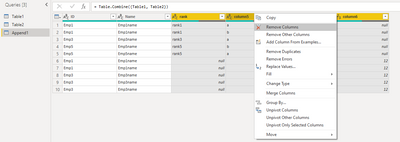
I create a sample, and you can take this for reference.
1. hit Append Queries as New
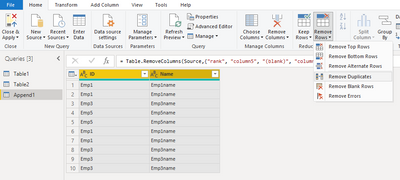
2.remove unused columns
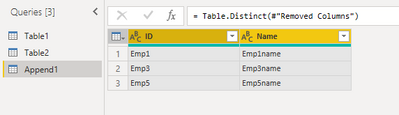
3.remove duplicates
Result:
Best Regards,
Community Support Team _ Tang
If this post helps, please consider Accept it as the solution to help the other members find it more quickly.
Hi @shefalinishad11 ,
You can create a measure like below
You can do this best in PQ.
Simply append both tables and then remove duplicates. See it all at work in the attached file.
let
Source = Table.Combine({Table1, Table2}),
#"Removed Duplicates" = Table.Distinct(Source)
in
#"Removed Duplicates"
|
|
Please accept the solution when done and consider giving a thumbs up if posts are helpful. Contact me privately for support with any larger-scale BI needs, tutoring, etc. |
If you love stickers, then you will definitely want to check out our Community Sticker Challenge!
Check out the January 2026 Power BI update to learn about new features.
| User | Count |
|---|---|
| 64 | |
| 63 | |
| 48 | |
| 21 | |
| 18 |
| User | Count |
|---|---|
| 118 | |
| 117 | |
| 38 | |
| 36 | |
| 27 |