Join us at FabCon Atlanta from March 16 - 20, 2026, for the ultimate Fabric, Power BI, AI and SQL community-led event. Save $200 with code FABCOMM.
Register now!Vote for your favorite vizzies from the Power BI Dataviz World Championship submissions. Vote now!
Trying to create a report from a CRM system to project coming revenue. Unfortunately the build in reporting is not made for subscription services. For each sales case we get one row with expected start date, number of months the project runs and monthly revenue;
| deal_name | expected_start_date | monthly_value | months |
| Client 1 | 2021-09-01 | 10 000 | 3 |
| Client 2 | 2021-11-01 | 13 000 | 4 |
We are only interested in the month the projects runs so we can assume expected start date is always the first day of the month
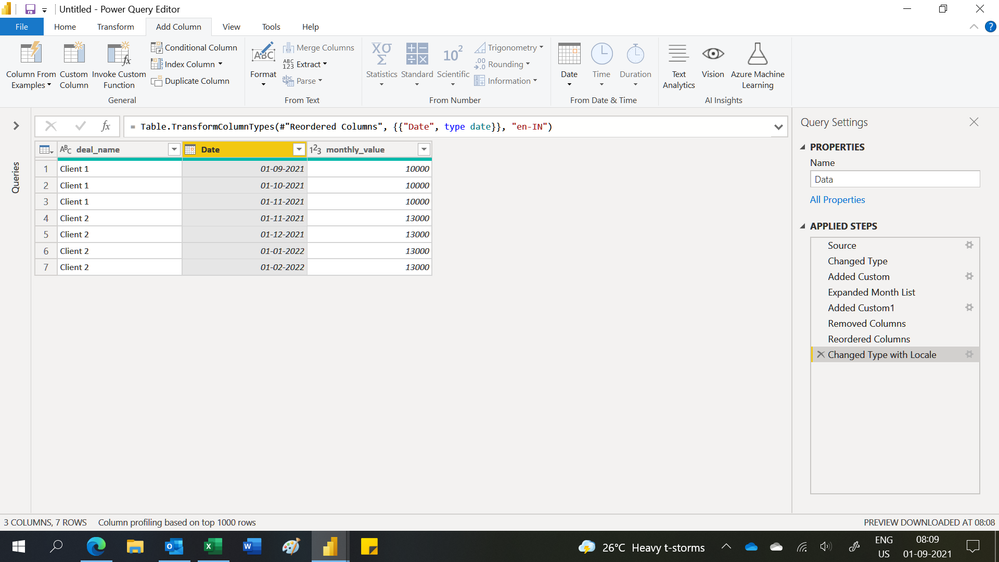
I would like to end up with a table like this:
| deal_name | date | monthly_value |
| Client 1 | 2021-09-01 | 10 000 |
| Client 1 | 2021-10-01 | 10 000 |
| Client 1 | 2021-11-01 | 10 000 |
| Client 2 | 2021-11-01 | 13 000 |
| Client 2 | 2021-12-01 | 13 000 |
| Client 2 | 2022-01-01 | 13 000 |
| Client 2 | 2022-02-01 | 13 000 |
I´m a bit of a newbie to PowerBi so apprechiate all the help I can get. Thanks!
Solved! Go to Solution.
Hi,
You may download my PBI file from here.
Hope this helps.
Hi,
You may download my PBI file from here.
Hope this helps.
Thank you so much Ashish! Worked perfect (just took me some time to adjust it to my full datamodel). Really apprechiate the help!
You are welcome.
you can create two columns
Column =
VAR _date=maxx(FILTER('Table','Table'[expected_start_date]<='Table (2)'[date]),'Table'[expected_start_date])
return maxx(FILTER('Table','Table'[expected_start_date]=_date),'Table'[deal_name])
Column2 =
VAR _date=maxx(FILTER('Table','Table'[expected_start_date]<='Table (2)'[date]),'Table'[expected_start_date])
return maxx(FILTER('Table','Table'[expected_start_date]=_date),'Table'[monthly_value])
pls see the attachment below.
I am curious why 11/1 is not client 2 and 13000?
Proud to be a Super User!
Thanks for the support! I found a solution that worked i bit better for me this time, but really apprechiate the support!
you are welcome
Proud to be a Super User!
Vote for your favorite vizzies from the Power BI World Championship submissions!
If you love stickers, then you will definitely want to check out our Community Sticker Challenge!
Check out the January 2026 Power BI update to learn about new features.
| User | Count |
|---|---|
| 64 | |
| 51 | |
| 46 | |
| 23 | |
| 19 |
| User | Count |
|---|---|
| 139 | |
| 112 | |
| 51 | |
| 33 | |
| 29 |