cancel
Showing results for 
Search instead for 
Did you mean: 

Get Fabric Certified for FREE during Fabric Data Days. Don't miss your chance! Request now

Reply
Nazeem81
Helper I
Helper I

Create groups

Hi,


If I have an invoice status column that contains data such as invoiced, not invoiced, on hold, paused: Is it possible to create one group with invoiced and not invoiced and a second group with invoiced, on hold and paused? Possible to have invoiced in both groups?


BR

Nazeem

1 ACCEPTED SOLUTION
v-yulgu-msft
Microsoft Employee
Microsoft Employee

Hi @Nazeem81,


In 'Input' table, add two calculated columns:

Group1 = IF(Input[Invoice status]="Invoiced"||Input[Invoice status]="Not invoiced","Group1")

Group2 = IF(Input[Invoice status]="Invoiced"||Input[Invoice status]="On hold"||Input[Invoice status]="Paused","Group2")
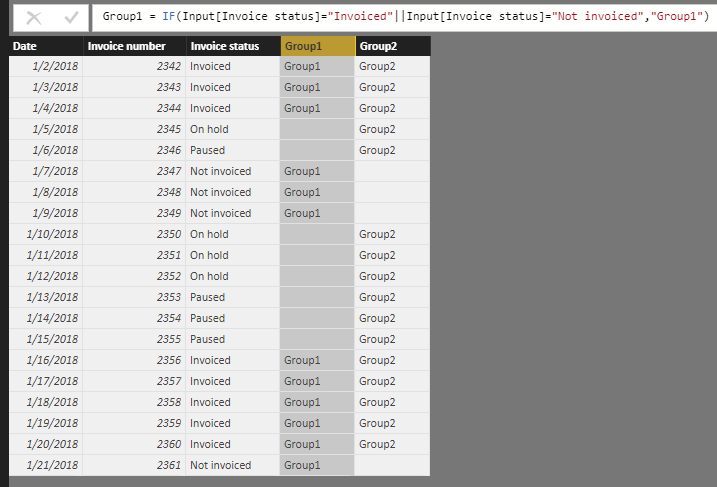
1.PNG


Then, new a calculated table as below:

Output_1 =
UNION (
    SELECTCOLUMNS (
        FILTER ( Input, Input[Group1] <> BLANK () ),
        "Date", Input[Date],
        "Invoice Number", Input[Invoice number],
        "Invoice Status", Input[Invoice status],
        "Group", Input[Group1]
    ),
    SELECTCOLUMNS (
        FILTER ( Input, Input[Group2] <> BLANK () ),
        "Date", Input[Date],
        "Invoice Number", Input[Invoice number],
        "Invoice Status", Input[Invoice status],
        "Group", Input[Group2]
    )
)

2.PNG


Use a Matrix to display data from 'Output_1'.
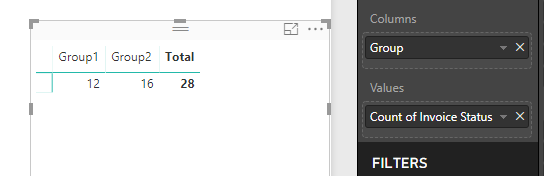
3.PNG


Best regards,

Yuliana Gu

Community Support Team _ Yuliana Gu
If this post helps, then please consider Accept it as the solution to help the other members find it more quickly.

View solution in original post

5 REPLIES 5
v-yulgu-msft
Microsoft Employee
Microsoft Employee

Hi @Nazeem81,


In 'Input' table, add two calculated columns:

Group1 = IF(Input[Invoice status]="Invoiced"||Input[Invoice status]="Not invoiced","Group1")

Group2 = IF(Input[Invoice status]="Invoiced"||Input[Invoice status]="On hold"||Input[Invoice status]="Paused","Group2")

1.PNG


Then, new a calculated table as below:

Output_1 =
UNION (
    SELECTCOLUMNS (
        FILTER ( Input, Input[Group1] <> BLANK () ),
        "Date", Input[Date],
        "Invoice Number", Input[Invoice number],
        "Invoice Status", Input[Invoice status],
        "Group", Input[Group1]
    ),
    SELECTCOLUMNS (
        FILTER ( Input, Input[Group2] <> BLANK () ),
        "Date", Input[Date],
        "Invoice Number", Input[Invoice number],
        "Invoice Status", Input[Invoice status],
        "Group", Input[Group2]
    )
)

2.PNG


Use a Matrix to display data from 'Output_1'.

3.PNG


Best regards,

Yuliana Gu

Community Support Team _ Yuliana Gu
If this post helps, then please consider Accept it as the solution to help the other members find it more quickly.
Greg_Deckler
Community Champion
Community Champion

Potentially, yes. But tough to say with the information provided:


Please see this post regarding How to Get Your Question Answered Quickly: https://community.powerbi.com/t5/Community-Blog/How-to-Get-Your-Question-Answered-Quickly/ba-p/38490


Follow on LinkedIn
@ me in replies or I'll lose your thread!!!
Instead of a Kudo, please vote for this idea
Become an expert!: Enterprise DNA
External Tools: MSHGQM
YouTube Channel!: Microsoft Hates Greg
Latest book!:
DAX For Humans

DAX is easy, CALCULATE makes DAX hard...

Hi,


Thanks for the reply. What more information do you need?


BR

Ammar

Sample/example input data and then example/sample of output is always helpful.


Follow on LinkedIn
@ me in replies or I'll lose your thread!!!
Instead of a Kudo, please vote for this idea
Become an expert!: Enterprise DNA
External Tools: MSHGQM
YouTube Channel!: Microsoft Hates Greg
Latest book!:
DAX For Humans

DAX is easy, CALCULATE makes DAX hard...

Hi,


See link below for sample in excel, thanks.


https://ufile.io/8pd86

Helpful resources

Announcements
November Power BI Update Carousel

Power BI Monthly Update - November 2025

Check out the November 2025 Power BI update to learn about new features.

Fabric Data Days Carousel

Fabric Data Days

Advance your Data & AI career with 50 days of live learning, contests, hands-on challenges, study groups & certifications and more!

FabCon Atlanta 2026 carousel

FabCon Atlanta 2026

Join us at FabCon Atlanta, March 16-20, for the ultimate Fabric, Power BI, AI and SQL community-led event. Save $200 with code FABCOMM.

Top Solution Authors
Top Kudoed Authors