Get certified for free when you join Fabric Data Days 2026 and dive into Fabric, Power BI, SQL, AI, and other essential data skills.
Join nowData Days is here! Join us now for 60+ days of learning, challenges, and connection. Learn more
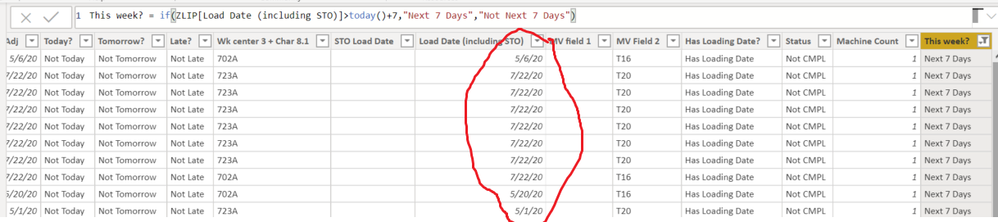
I have a date column I would like to evaluate and create another column that determines if the date is in today's week or not. How can I do this?
In the below example the column "Load Date (including STO)" I want to evaluate. Today is Tuesday 4/21/20 so the current week is Monday 4/20/20 - Sunday 4/27/20. Any days that are in the current week I want my new column to display, "Current Week" otherwise "Not Current Week"
Solved! Go to Solution.
Use this
Is This Week = WEEKNUM([Date],1) = WEEKNUM(TODAY(),1)
It will return true or false. The ,1 at the end determines how to define a week:
Return type: 1, week begins on Sunday. Weekdays are numbered 1 through 7.
Return type: 2, week begins on Monday. Weekdays are numbered 1 through 7.
DAX is for Analysis. Power Query is for Data Modeling
Proud to be a Super User!
MCSA: BI ReportingCurrent Week =
VAR IsYear = IF( YEAR( TODAY() ) = VALUE( 'Date'[Year] ), TRUE(), FALSE() )
VAR IsWeek = IF( WEEKNUM( TODAY() ) = 'Date'[Weekdaterange], TRUE(), FALSE() )
RETURN
IF( AND( IsYear, IsWeek ), TRUE(), FALSE() )
RETURN
IF( AND( IsYear, IsWeek ), TRUE(), FALSE() )
change true to ""Current Week" and false "Not Current Week"
should work i guess.
Maybe a bit late, but this solution won't work very well.
Weeknr are nog fully matched with years. So week 1 of 2020 can start on 30th dec of 2019.
So it is 2020 Week 1 but date is 30-12-2019. When viewing your report on 2nd of january, it will not show me the first 2 days of the current week, this can really give wrong information.... when working with dates and weeks, you should always use a separate yearcolumn to attacht to the weeks, to do this properly. I always have a year-month combination and a separate year-week combination.
Good luck!!
Use this
Is This Week = WEEKNUM([Date],1) = WEEKNUM(TODAY(),1)
It will return true or false. The ,1 at the end determines how to define a week:
Return type: 1, week begins on Sunday. Weekdays are numbered 1 through 7.
Return type: 2, week begins on Monday. Weekdays are numbered 1 through 7.
DAX is for Analysis. Power Query is for Data Modeling
Proud to be a Super User!
MCSA: BI ReportingDon't miss out on Data Days, June 15 through August 7. Learn Fabric, Power BI, SQL, AI and more.
Check out the May 2026 Power BI update to learn about new features.
| User | Count |
|---|---|
| 23 | |
| 23 | |
| 21 | |
| 17 | |
| 14 |
| User | Count |
|---|---|
| 58 | |
| 50 | |
| 37 | |
| 29 | |
| 24 |