Join us in Barcelona for FabCon and SQLCon, September 28 - October 1, 2026.
This is best Fabric, Power BI, SQL and AI community event. How do we know? The last event sold out! Save €200 with code FABCMTY200.
Register now- Power BI forums
- Get Help with Power BI
- Desktop
- Service
- Report Server
- Power Query
- Mobile Apps
- Developer
- DAX Commands and Tips
- Custom Visuals Development Discussion
- Health and Life Sciences
- Power BI Spanish forums
- Translated Spanish Desktop
- Training and Consulting
- Instructor Led Training
- Dashboard in a Day for Women, by Women
- Galleries
- Data Stories Gallery
- Themes Gallery
- Contests Gallery
- QuickViz Gallery
- Quick Measures Gallery
- Visual Calculations Gallery
- Fabric Apps Gallery
- Notebook Gallery
- Translytical Task Flow Gallery
- TMDL Gallery
- R Script Showcase
- Webinars and Video Gallery
- Ideas
- Custom Visuals Ideas (read-only)
- Issues
- Issues
- Events
- Upcoming Events
July 28 - August 9 | Final Round of the Power BI Dataviz World Championships. This is your chance. Learn more
- Power BI forums
- Forums
- Get Help with Power BI
- Desktop
- Re: Create column using different table's column
- Subscribe to RSS Feed
- Mark Topic as New
- Mark Topic as Read
- Float this Topic for Current User
- Bookmark
- Subscribe
- Printer Friendly Page


- Mark as New
- Bookmark
- Subscribe
- Mute
- Subscribe to RSS Feed
- Permalink
- Report Inappropriate Content
Create column using different table's column
Hi,
I need help with formula to add new column called 'multiplier' in table "client_purchase_order_item" where this column should get generated from other column 'unit_id' of the table itself.The dynamic value of 'multiplier' column should be from 'product_units' table 'multiplier' column.
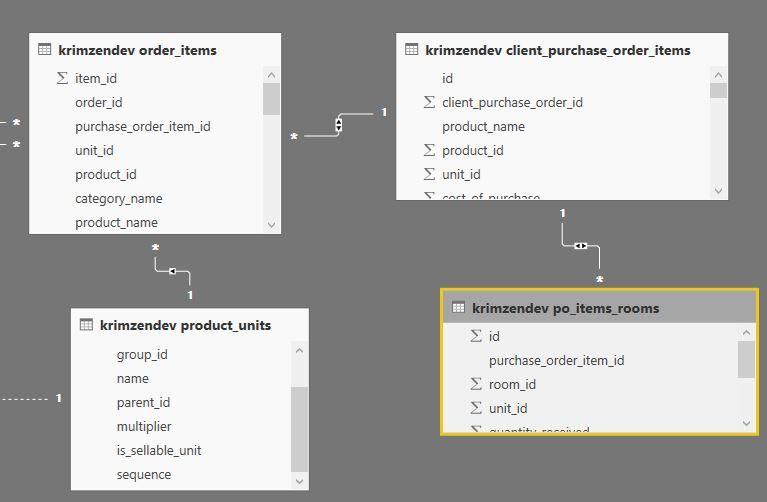
refer to image for a relationship.
example : if( [client_purchase_order_item][unit_id] = [product_units][unit_id],[product_units] [multiplier],1)
- product_units is related to order_items as one to many
- order_items is related to client_purchase_order_item as many to one
- client_purchase_order_item is related to po_items_rooms as one to many
I need samething in po_item rooms table as well with same conditions. Please help me with this issue .Thanks in advance for your help.
Pallavi
Solved! Go to Solution.


- Mark as New
- Bookmark
- Subscribe
- Mute
- Subscribe to RSS Feed
- Permalink
- Report Inappropriate Content
- Mark as New
- Bookmark
- Subscribe
- Mute
- Subscribe to RSS Feed
- Permalink
- Report Inappropriate Content
If interested do some performance testing with daxstudio and see which is faster with less resources. https://www.sqlbi.com/tools/dax-studio/
- Mark as New
- Bookmark
- Subscribe
- Mute
- Subscribe to RSS Feed
- Permalink
- Report Inappropriate Content
Add a calculated column to "client_purchase_order_item"
Multiplier = RELATED(product_units[multiplier])
- Mark as New
- Bookmark
- Subscribe
- Mute
- Subscribe to RSS Feed
- Permalink
- Report Inappropriate Content
Hi ,
when i do that on "client_purchase_order_item table", i get an error "The column 'product_units[multiplier]' either doesn't exist or doesn't have a relationship to any table available in the current context".

Since, Product_units table is not directly connected to "client_purchase_order_item" and "po_items_rooms".
Thank you
Pallavi
- Mark as New
- Bookmark
- Subscribe
- Mute
- Subscribe to RSS Feed
- Permalink
- Report Inappropriate Content
- Mark as New
- Bookmark
- Subscribe
- Mute
- Subscribe to RSS Feed
- Permalink
- Report Inappropriate Content
Thank you Seward. That was very helpful.
The solution i tried is
1) Multiplier = CALCULATE(
VALUES( 'krimzendev product_units'[multiplier]), FILTER('krimzendev product_units',
'krimzendev product_units'[id]='krimzendev client_purchase_order_items'[unit_id] ))
or
2) Multiplier = LOOKUPVALUE('krimzendev product_units'[multiplier],'krimzendev product_units'[id],'krimzendev client_purchase_order_items'[unit_id])
Both of the above worked fine. I don't see any difference in the new column values, when compared. Please let me know which is correct one, so that i can maintain the correct formulae across reports.
Thank You
Pallavi
- Mark as New
- Bookmark
- Subscribe
- Mute
- Subscribe to RSS Feed
- Permalink
- Report Inappropriate Content
If interested do some performance testing with daxstudio and see which is faster with less resources. https://www.sqlbi.com/tools/dax-studio/

Helpful resources

FabCon & SQLCon – Barcelona 2026
Join us in Barcelona for FabCon and SQLCon, the Fabric, Power BI, SQL, and AI community event. Save €200 with code FABCMTY200.

Power BI Monthly Update - July 2026
Check out the July 2026 Power BI update to learn about new features.

Power BI DataViz World Championships - June 2026
A new Power BI DataViz World Championship is coming this June! Don't miss out on submitting your entry.

| User | Count |
|---|---|
| 25 | |
| 23 | |
| 20 | |
| 18 | |
| 14 |


| User | Count |
|---|---|
| 22 | |
| 20 | |
| 20 | |
| 20 | |
| 20 |


