
cancel
Showing results for 
Search instead for 
Did you mean: 

Data Days is here! Join us now for 60+ days of learning, challenges, and connection. Learn more

Reply
PallaviKGVG
Helper I
Helper I

Create column using different table's column

Hi,

I need help with formula to add new column called 'multiplier' in table "client_purchase_order_item" where this column should get generated from other column 'unit_id' of the table itself.The dynamic value of 'multiplier' column should be from 'product_units' table 'multiplier' column. 


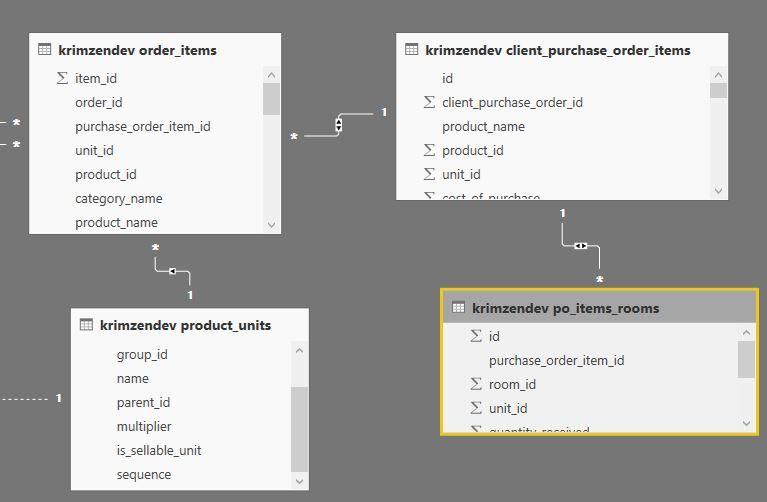
refer to image for a relationship.


queryjpg.JPG


example : if( [client_purchase_order_item][unit_id] = [product_units][unit_id],[product_units] [multiplier],1)


  • product_units is related to order_items as one to many  
  • order_items  is related to client_purchase_order_item as many to one
  • client_purchase_order_item is related to po_items_rooms as one to many


I need samething in po_item rooms table as well with same conditions. Please help me with this issue .Thanks in advance for your help.


Pallavi

2 ACCEPTED SOLUTIONS

Intuitively I like the 2nd but if they both work either is fine. For all I know the calculate with the filter is exactly what the model engine is doing under the covers but lookup is easier to understand when coming from a vlookul exel mindset.

If interested do some performance testing with daxstudio and see which is faster with less resources. https://www.sqlbi.com/tools/dax-studio/

View solution in original post

5 REPLIES 5
Seward12533
Solution Sage
Solution Sage

Add a calculated column to "client_purchase_order_item" 

Multiplier = RELATED(product_units[multiplier])

Hi , 

when i do that on "client_purchase_order_item table", i get an error "The column 'product_units[multiplier]' either doesn't exist or doesn't have a relationship to any table available in the current context".


query2.JPG


Since, Product_units table is not directly connected to "client_purchase_order_item" and "po_items_rooms".


Thank you 

Pallavi


Try LOOKUPVALUE

Thank you Seward. That was very helpful.


The solution i tried is 

1) Multiplier = CALCULATE(
VALUES( 'krimzendev product_units'[multiplier]), FILTER('krimzendev product_units',
'krimzendev product_units'[id]='krimzendev client_purchase_order_items'[unit_id] ))


or 


2) Multiplier = LOOKUPVALUE('krimzendev product_units'[multiplier],'krimzendev product_units'[id],'krimzendev client_purchase_order_items'[unit_id])  


Both of the above worked fine. I don't see any difference in the new column values, when compared. Please let me know which is correct one, so that i can maintain the correct formulae across reports. 


Thank You 

Pallavi


Intuitively I like the 2nd but if they both work either is fine. For all I know the calculate with the filter is exactly what the model engine is doing under the covers but lookup is easier to understand when coming from a vlookul exel mindset.

If interested do some performance testing with daxstudio and see which is faster with less resources. https://www.sqlbi.com/tools/dax-studio/

Helpful resources

Announcements
Fabric Data Days is here Carousel

Fabric Data Days 2026

Don't miss out on Data Days, June 15 through August 7. Learn Fabric, Power BI, SQL, AI and more.

May Power BI Update Carousel

Power BI Monthly Update - May 2026

Check out the May 2026 Power BI update to learn about new features.

Power BI DataViz World Championships carousel

Power BI DataViz World Championships - June 2026

A new Power BI DataViz World Championship is coming this June! Don't miss out on submitting your entry.