Join us at FabCon Atlanta from March 16 - 20, 2026, for the ultimate Fabric, Power BI, AI and SQL community-led event. Save $200 with code FABCOMM.
Register now!Learn from the best! Meet the four finalists headed to the FINALS of the Power BI Dataviz World Championships! Register now
You create a parameter named DataSourceExcel that holds the file name and location of a Microsoft Excel data source.
You need to update the query to reference the parameter instead of multiple hard-coded copies of the location within each query definition.
Solution: In the Power Query M code, you replace references to the Excel file with DataSourceExcel.
Does this meet the goal?
Solved! Go to Solution.
Let's imagine this scenario, If we have 5 queries, each of them pointing to the same Excel file. If we need to change Excel file location using M code, we need to go to advanced editor for each query and hard-code location of new Excel file. We need to repeat it each time we change the data source.
If we create just 1 parameter and use this parameter name instead of hard-code Excel location in each query, once we change parameter value (only on one place), it will update automatically all 5 queries. So we will have to change reference from hard-coded value to parameter on each query, but we do this only once, after that ew change only parameter value on 1 place.
Yes it does meet the goal. This is a simple example :
I imported an Excel file first without using a parameter and copied it twice, now I have 3 tables pointing to the same Excel file : (This is another way as I am supposing your question is related the to certification exam)
let
Source = let
Source = Excel.Workbook(File.Contents("XXXXXX\Sample Data 1.xlsx"), null, true),
Emp_Sheet = Source{[Item="Emp",Kind="Sheet"]}[Data],
#"Promoted Headers" = Table.PromoteHeaders(Emp_Sheet, [PromoteAllScalars=true]),
#"Changed Type" = Table.TransformColumnTypes(#"Promoted Headers",{{"EmpID", type text}, {"Name", type text}, {"Month", type date}})
in
#"Changed Type"
in
Source
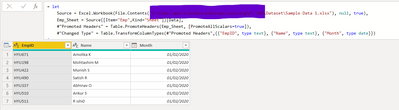
Then I created a parameter pointing to the location of that file :
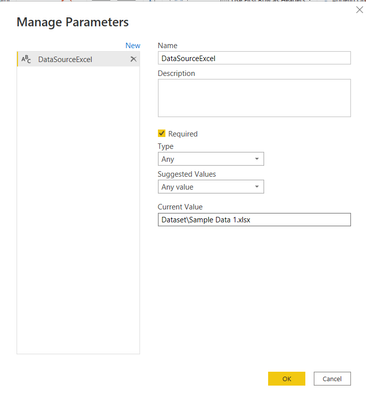
and I updated the code of each query like below : DataSourceExcel is the variable containing the path of the Excel file :
= let
Source = Excel.Workbook(File.Contents(DataSourceExcel), null, true),
Emp_Sheet = Source{[Item="Emp",Kind="Sheet"]}[Data],
#"Promoted Headers" = Table.PromoteHeaders(Emp_Sheet, [PromoteAllScalars=true]),
#"Changed Type" = Table.TransformColumnTypes(#"Promoted Headers",{{"EmpID", type text}, {"Name", type text}, {"Month", type date}})
in
#"Changed Type"
To conclude the answer is No.
Let's imagine this scenario, If we have 5 queries, each of them pointing to the same Excel file. If we need to change Excel file location using M code, we need to go to advanced editor for each query and hard-code location of new Excel file. We need to repeat it each time we change the data source.
If we create just 1 parameter and use this parameter name instead of hard-code Excel location in each query, once we change parameter value (only on one place), it will update automatically all 5 queries. So we will have to change reference from hard-coded value to parameter on each query, but we do this only once, after that ew change only parameter value on 1 place.
Yes it does meet the goal. This is a simple example :
I imported an Excel file first without using a parameter and copied it twice, now I have 3 tables pointing to the same Excel file : (This is another way as I am supposing your question is related the to certification exam)
let
Source = let
Source = Excel.Workbook(File.Contents("XXXXXX\Sample Data 1.xlsx"), null, true),
Emp_Sheet = Source{[Item="Emp",Kind="Sheet"]}[Data],
#"Promoted Headers" = Table.PromoteHeaders(Emp_Sheet, [PromoteAllScalars=true]),
#"Changed Type" = Table.TransformColumnTypes(#"Promoted Headers",{{"EmpID", type text}, {"Name", type text}, {"Month", type date}})
in
#"Changed Type"
in
Source
Then I created a parameter pointing to the location of that file :
and I updated the code of each query like below : DataSourceExcel is the variable containing the path of the Excel file :
= let
Source = Excel.Workbook(File.Contents(DataSourceExcel), null, true),
Emp_Sheet = Source{[Item="Emp",Kind="Sheet"]}[Data],
#"Promoted Headers" = Table.PromoteHeaders(Emp_Sheet, [PromoteAllScalars=true]),
#"Changed Type" = Table.TransformColumnTypes(#"Promoted Headers",{{"EmpID", type text}, {"Name", type text}, {"Month", type date}})
in
#"Changed Type"
To conclude the answer is No.
Share feedback directly with Fabric product managers, participate in targeted research studies and influence the Fabric roadmap.
Check out the February 2026 Power BI update to learn about new features.
| User | Count |
|---|---|
| 60 | |
| 53 | |
| 40 | |
| 15 | |
| 14 |
| User | Count |
|---|---|
| 97 | |
| 81 | |
| 35 | |
| 29 | |
| 25 |