Don't miss your chance to take the Fabric Data Engineer (DP-600) exam for FREE! Find out how by attending the DP-600 session on April 23rd (pacific time), live or on-demand.
Learn moreNext up in the FabCon + SQLCon recap series: The roadmap for Microsoft SQL and Maximizing Developer experiences in Fabric. All sessions are available on-demand after the live show. Register now
Hi,
I have a dataset that contains a unique identifier that is on multiple rows. Each row has 2 possible dates and ab indicator. I would liek to create a column that returns one date from those available.
| ID | Policy or Quote | Quote Date | Policy Date | New Date Column |
| 1 | Quote | 01/01/2019 | null | 01/01/2019 |
| 1 | Policy | null | 02/01/2019 | 01/01/2019 |
| 2 | Policy | null | 03/01/2019 | 03/01/2019 |
| 3 | Policy | null | 04/01/2019 | 04/01/2019 |
| 4 | Policy | null | 05/01/2019 | 04/01/2019 |
| 4 | Quote | 04/01/2019 | null | 04/01/2019 |
From the above table you can see the new column I'm trying to create. I want to show the quote date for an ID which will take the quote date if there is a quaote, but when there is no quote and only a policy, i will take the policy date as the quote date.
I hope this makes sense, and thanks in advance.
Solved! Go to Solution.
Hi @Anonymous
This checks for a quote date, and if there is not one it uses the policy date and if there is one, then it uses the quote for all rows that have that policy ID. Here is my PBIX POLICY DATE
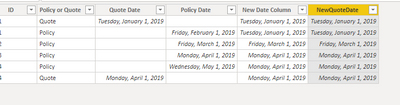
Matches your column.
Let me know if you have any questions.
If this solves your issues, please mark it as the solution, so that others can find it easily. Kudos are nice too.
Nathaniel
NewQuoteDate =
IF (
ISBLANK (
CALCULATE ( MIN ( PolDate[Quote Date] ), ALLEXCEPT ( PolDate, PolDate[ID] ) )
),
PolDate[Policy Date],
CALCULATE ( MIN ( PolDate[Quote Date] ), ALLEXCEPT ( PolDate, PolDate[ID] ) )
)
Proud to be a Super User!
Hi @Anonymous ,
In Power Query add a conditional column. Use If (table[Quote Date] <> "NULL", table[Quote Date], table[Policy Date])
Let me know if you have any questions.
If this solves your issues, please mark it as the solution, so that others can find it easily. Kudos are nice too.
Nathaniel
Proud to be a Super User!
Hi @Anonymous ,
So, looking at your table more closely, the logic is:
Use the quote date for both lines, else use the policy date.
Let me know if that is the case. I will be back on line in a couple of hours.
Nathaniel
Proud to be a Super User!
Hi @Anonymous
This checks for a quote date, and if there is not one it uses the policy date and if there is one, then it uses the quote for all rows that have that policy ID. Here is my PBIX POLICY DATE
Matches your column.
Let me know if you have any questions.
If this solves your issues, please mark it as the solution, so that others can find it easily. Kudos are nice too.
Nathaniel
NewQuoteDate =
IF (
ISBLANK (
CALCULATE ( MIN ( PolDate[Quote Date] ), ALLEXCEPT ( PolDate, PolDate[ID] ) )
),
PolDate[Policy Date],
CALCULATE ( MIN ( PolDate[Quote Date] ), ALLEXCEPT ( PolDate, PolDate[ID] ) )
)
Proud to be a Super User!
Thanks very much for the quick reply. Is it possibel to only use the policy date when there is no associated quote? Like the instances of ID's 2 & 3?
If you have recently started exploring Fabric, we'd love to hear how it's going. Your feedback can help with product improvements.
A new Power BI DataViz World Championship is coming this June! Don't miss out on submitting your entry.
Experience the highlights from FabCon & SQLCon, available live and on-demand starting April 14th.
| User | Count |
|---|---|
| 47 | |
| 44 | |
| 40 | |
| 20 | |
| 15 |
| User | Count |
|---|---|
| 70 | |
| 67 | |
| 32 | |
| 27 | |
| 25 |