Learn from the best! Meet the four finalists headed to the FINALS of the Power BI Dataviz World Championships! Register now
Is there way to create a timeline visual from the data below?
| Program | Date 1 | Date 2 | Date3 | Date4 | Date5 | Date6 | Date7 | Date8 | Date9 | Date10 | Date11 | Date12 | Date13 | Date14 | Date15 |
| Test 1 | 10/26/2020 | 1/1/2021 | 3/9/2021 | 5/15/2021 | 7/21/2021 | 9/26/2021 | 12/2/2021 | 2/7/2022 | 4/15/2022 | 6/21/2022 | 8/27/2022 | 11/2/2022 | 1/8/2023 | 3/16/2023 | 5/22/2023 |
| Test 2 | 9/9/2020 | 10/9/2020 | 11/9/2020 | 12/9/2020 | 1/9/2021 | 2/9/2021 | 3/9/2021 | 4/9/2021 | 5/9/2021 | 6/9/2021 | 7/9/2021 | 8/9/2021 | 9/9/2021 | 10/9/2021 | 11/9/2021 |
| Test 3 | 10/26/2020 | 3/1/2021 | 7/5/2021 | 11/8/2021 | 3/14/2022 | 7/18/2022 | 11/21/2022 | 3/27/2023 | 7/31/2023 | 12/4/2023 | 4/8/2024 | 8/12/2024 | 12/16/2024 | 4/21/2025 | 8/25/2025 |
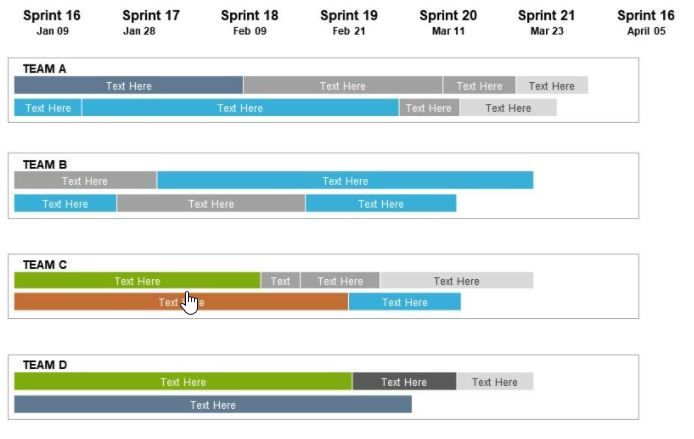
Would be nice to have something like this? or anything visual other than table would be good?
@lotus22 , You have Gantt Chart visual. But this data format need some chnages
https://appsource.microsoft.com/en/product/power-bi-visuals/WA104380765?tab=Overview
https://www.mpug.com/articles/how-to-create-an-amazing-gantt-chart-in-power-bi/
another way is color matrix background.
A new Power BI DataViz World Championship is coming this June! Don't miss out on submitting your entry.
Share feedback directly with Fabric product managers, participate in targeted research studies and influence the Fabric roadmap.
| User | Count |
|---|---|
| 45 | |
| 34 | |
| 27 | |
| 15 | |
| 15 |
| User | Count |
|---|---|
| 58 | |
| 56 | |
| 38 | |
| 22 | |
| 20 |