Get certified for free when you join Fabric Data Days 2026 and dive into Fabric, Power BI, SQL, AI, and other essential data skills.
Join nowTry your skills in the Power BI Dataviz World Championship! Round one ends June 26. Join now
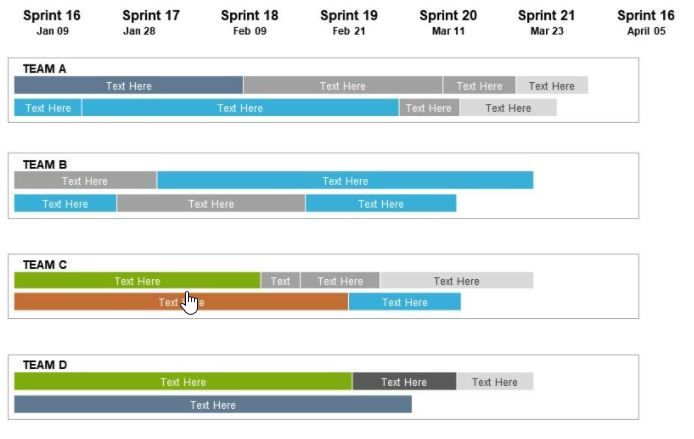
Is there way to create a timeline visual from the data below?
| Program | Date 1 | Date 2 | Date3 | Date4 | Date5 | Date6 | Date7 | Date8 | Date9 | Date10 | Date11 | Date12 | Date13 | Date14 | Date15 |
| Test 1 | 10/26/2020 | 1/1/2021 | 3/9/2021 | 5/15/2021 | 7/21/2021 | 9/26/2021 | 12/2/2021 | 2/7/2022 | 4/15/2022 | 6/21/2022 | 8/27/2022 | 11/2/2022 | 1/8/2023 | 3/16/2023 | 5/22/2023 |
| Test 2 | 9/9/2020 | 10/9/2020 | 11/9/2020 | 12/9/2020 | 1/9/2021 | 2/9/2021 | 3/9/2021 | 4/9/2021 | 5/9/2021 | 6/9/2021 | 7/9/2021 | 8/9/2021 | 9/9/2021 | 10/9/2021 | 11/9/2021 |
| Test 3 | 10/26/2020 | 3/1/2021 | 7/5/2021 | 11/8/2021 | 3/14/2022 | 7/18/2022 | 11/21/2022 | 3/27/2023 | 7/31/2023 | 12/4/2023 | 4/8/2024 | 8/12/2024 | 12/16/2024 | 4/21/2025 | 8/25/2025 |
Would be nice to have something like this? or anything visual other than table would be good?
@lotus22 , You have Gantt Chart visual. But this data format need some chnages
https://appsource.microsoft.com/en/product/power-bi-visuals/WA104380765?tab=Overview
https://www.mpug.com/articles/how-to-create-an-amazing-gantt-chart-in-power-bi/
another way is color matrix background.
Don't miss out on Data Days, June 15 through August 7. Learn Fabric, Power BI, SQL, AI and more.
Check out the May 2026 Power BI update to learn about new features.
| User | Count |
|---|---|
| 21 | |
| 21 | |
| 21 | |
| 19 | |
| 11 |
| User | Count |
|---|---|
| 59 | |
| 53 | |
| 40 | |
| 31 | |
| 26 |