Join us at FabCon Atlanta from March 16 - 20, 2026, for the ultimate Fabric, Power BI, AI and SQL community-led event. Save $200 with code FABCOMM.
Register now!The Power BI Data Visualization World Championships is back! Get ahead of the game and start preparing now! Learn more
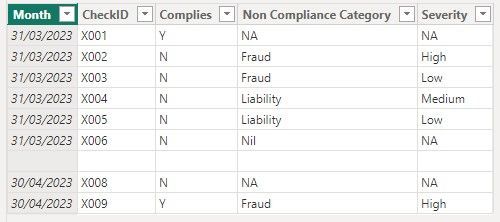
How can I create a DAX measure to display the most frequent non-compliance outcome for a given month on a card? The measure should exclude rows with "Y" in the compliance column and "NA" or 'Nil' in the non-compliance category column. In case of ties, the measure should use severity as the tiebreaker (Low, Medium, High - assume 1,2 3 if helps?).
Initially assumed it would be straightforward, I have spent hours experimenting with various approaches involving filters, calculated tables, addcolumns, summarize, and rankx functions. Now i'm just more confused and going in circles.
Table: Compliance
The desired outcome for March 2023, the card would display "Fraud".
Any assistance or guidance would be greatly appreciated. Thank you in advance.
Solved! Go to Solution.
Hi,
I am not sure how your datamodel looks like, but I tried to create a sample pbix file like below.
Please check the below picture and the attached pbix file.
Expected outcome measure: =
VAR _t =
ADDCOLUMNS (
FILTER (
Compliance,
Compliance[Compliance] <> "Y"
&& NOT ( Compliance[Non Compliance] IN { "NA", "Nil" } )
),
"@tiebreaker",
SWITCH (
TRUE (),
Compliance[Severity] = "High", 3,
Compliance[Severity] = "Medium", 2,
Compliance[Severity] = "Low", 1
)
)
VAR _grouptable =
GROUPBY (
_t,
Compliance[Date],
Compliance[Non Compliance],
"@count", SUMX ( CURRENTGROUP (), 1 ),
"@tiebreak", SUMX ( CURRENTGROUP (), [@tiebreaker] )
)
VAR _highest =
MAXX (
ADDCOLUMNS ( _grouptable, "@value", [@count] * 10 + [@tiebreak] ),
[@value]
)
RETURN
IF (
HASONEVALUE ( Compliance[Date] ),
CONCATENATEX (
FILTER (
ADDCOLUMNS ( _grouptable, "@value", [@count] * 10 + [@tiebreak] ),
[@value] = _highest
),
Compliance[Non Compliance],
", "
)
)
This solution is perfect, thank you so much 🙂
Hi,
I am not sure how your datamodel looks like, but I tried to create a sample pbix file like below.
Please check the below picture and the attached pbix file.
Expected outcome measure: =
VAR _t =
ADDCOLUMNS (
FILTER (
Compliance,
Compliance[Compliance] <> "Y"
&& NOT ( Compliance[Non Compliance] IN { "NA", "Nil" } )
),
"@tiebreaker",
SWITCH (
TRUE (),
Compliance[Severity] = "High", 3,
Compliance[Severity] = "Medium", 2,
Compliance[Severity] = "Low", 1
)
)
VAR _grouptable =
GROUPBY (
_t,
Compliance[Date],
Compliance[Non Compliance],
"@count", SUMX ( CURRENTGROUP (), 1 ),
"@tiebreak", SUMX ( CURRENTGROUP (), [@tiebreaker] )
)
VAR _highest =
MAXX (
ADDCOLUMNS ( _grouptable, "@value", [@count] * 10 + [@tiebreak] ),
[@value]
)
RETURN
IF (
HASONEVALUE ( Compliance[Date] ),
CONCATENATEX (
FILTER (
ADDCOLUMNS ( _grouptable, "@value", [@count] * 10 + [@tiebreak] ),
[@value] = _highest
),
Compliance[Non Compliance],
", "
)
)
The Power BI Data Visualization World Championships is back! Get ahead of the game and start preparing now!
| User | Count |
|---|---|
| 38 | |
| 38 | |
| 36 | |
| 28 | |
| 28 |
| User | Count |
|---|---|
| 124 | |
| 88 | |
| 74 | |
| 66 | |
| 65 |