Get certified for free when you join Fabric Data Days 2026 and dive into Fabric, Power BI, SQL, AI, and other essential data skills.
Join nowJuly 7 - July 17 | Round 2 of the Power BI Dataviz World Championships. Don't miss your chance! Learn more
I'm having a bit of a struggle with this.
I have one data set that contains productID and product unit price and another data set that contains productID and unit cost. I have them related so that I can see the product ID, unit price and unit cost in the report, but I want to create another (measured?) column for unit profit. this is what I'm trying:
Measure = SUM(ALLdata[Unit Price]-('display-cost-feb2016'[Cost]))
But it tells me the SUM function only accepts a column reference as an argument. Unit Price and Cost are both column names, just on 2 different data sets. What am I doing wrong?
thanks!
Solved! Go to Solution.
Your syntax has to be changed to
Measure = sum(Table1[column1]) - sum(Table2[column2])
Can you try this and let me know if it is ok?
Your syntax has to be changed to
Measure = sum(Table1[column1]) - sum(Table2[column2])
Can you try this and let me know if it is ok?
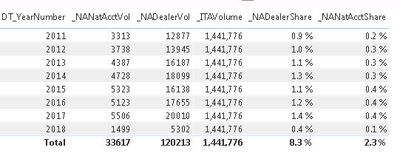
I'm trying to do something similar to this but I'm calculating a share percentage so I'm dividing the two numbers (ex. sum(Table1[column1]) / sum(Table2[column2]). The problem I'm having is that the value from table 2 seems to have lost any reference it had to the year because my numbers are way off because it is using the grand total of the column 2 value for the division instead of just using the portion that belongs to a single year (see below).
The _ITAVolume number for 2011 should be around 158,000.
Any assistance with this would be greatly appreciated.
Join us in Barcelona for FabCon and SQLCon, the Fabric, Power BI, SQL, and AI community event. Save €200 with code FABCMTY200.
Join Data Days 2026: 60 days of free live/on-demand sessions, challenges, study groups, and certification opportunities.
| User | Count |
|---|---|
| 29 | |
| 27 | |
| 26 | |
| 24 | |
| 16 |
| User | Count |
|---|---|
| 53 | |
| 47 | |
| 38 | |
| 30 | |
| 21 |