Get certified for free when you join Fabric Data Days 2026 and dive into Fabric, Power BI, SQL, AI, and other essential data skills.
Join nowData Days is here! Join us now for 60+ days of learning, challenges, and connection. Learn more
I'm having a bit of a struggle with this.
I have one data set that contains productID and product unit price and another data set that contains productID and unit cost. I have them related so that I can see the product ID, unit price and unit cost in the report, but I want to create another (measured?) column for unit profit. this is what I'm trying:
Measure = SUM(ALLdata[Unit Price]-('display-cost-feb2016'[Cost]))
But it tells me the SUM function only accepts a column reference as an argument. Unit Price and Cost are both column names, just on 2 different data sets. What am I doing wrong?
thanks!
Solved! Go to Solution.
Your syntax has to be changed to
Measure = sum(Table1[column1]) - sum(Table2[column2])
Can you try this and let me know if it is ok?
Your syntax has to be changed to
Measure = sum(Table1[column1]) - sum(Table2[column2])
Can you try this and let me know if it is ok?
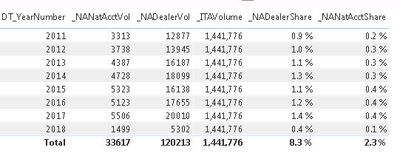
I'm trying to do something similar to this but I'm calculating a share percentage so I'm dividing the two numbers (ex. sum(Table1[column1]) / sum(Table2[column2]). The problem I'm having is that the value from table 2 seems to have lost any reference it had to the year because my numbers are way off because it is using the grand total of the column 2 value for the division instead of just using the portion that belongs to a single year (see below).
The _ITAVolume number for 2011 should be around 158,000.
Any assistance with this would be greatly appreciated.
Don't miss out on Data Days, June 15 through August 7. Learn Fabric, Power BI, SQL, AI and more.
Check out the May 2026 Power BI update to learn about new features.
| User | Count |
|---|---|
| 23 | |
| 23 | |
| 21 | |
| 17 | |
| 13 |
| User | Count |
|---|---|
| 58 | |
| 50 | |
| 38 | |
| 29 | |
| 24 |