Don't miss your chance to take the Fabric Data Engineer (DP-600) exam for FREE! Find out how by watching the DP-600 session on-demand now through April 28th.
Learn moreJoin the FabCon + SQLCon recap series. Up next: Power BI, Real-Time Intelligence, IQ and AI, and Data Factory take center stage. All sessions are available on-demand after the live show. Register now
I have a simple job table with 3 columns, job_ID(pk), date_updated, updated_by(user)
A job can be updated several times by both a user and the system so its common to see multiple entries for one job_ID(pk).
I need to create a summary table that breaks this down to give me the max date and user where the updated_by(user) <> SYSTEM.
However, IF this is BLANK (i.e. there are only SYSTEM updates for the job), then give me the MAX date and user where updated_by(user) == SYSTEM.
Some of the max dates have entries from both a user and the system (on the same day).
Any help would be appreciated.
Solved! Go to Solution.
Hi @Anonymous
Please try the following:
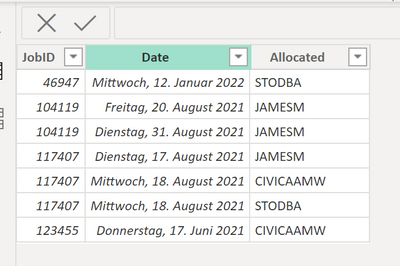
my example (TableName = SampleJob)
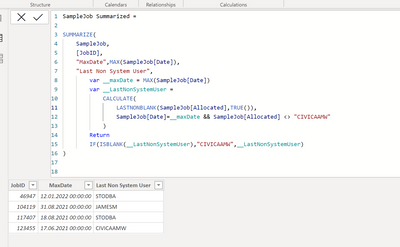
Formula:
SampleJob Summarized =
SUMMARIZE(
SampleJob,
[JobID],
"MaxDate",MAX(SampleJob[Date]),
"Last Non System User",
var __maxDate = MAX(SampleJob[Date])
var __LastNonSystemUser =
CALCULATE(
LASTNONBLANK(SampleJob[Allocated],TRUE()),
SampleJob[Date]=__maxDate && SampleJob[Allocated] <> "CIVICAAMW"
)
Return
IF(ISBLANK(__LastNonSystemUser),"CIVICAAMW",__LastNonSystemUser)
)
Result:
I think the only question is how to handle if you have two updates ion same date. BUt this is hard to specify.
Best regards
Michael
-----------------------------------------------------
If this post helps, then please consider Accept it as the solution to help the other members find it more quickly.
Appreciate your thumbs up!
@ me in replies or I'll lose your thread.
@Anonymous Can you share sample data and sample output in table format? Or a sample pbix after removing sensitive data.
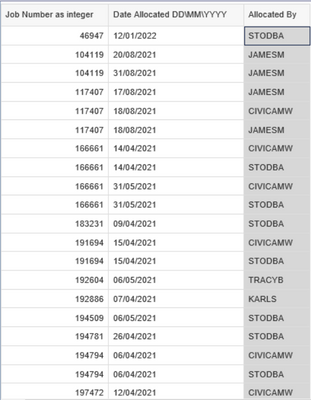
This is the source data that I will load into PowerBI. User: CIVICAAMW is the System. There are instances where CIVICAAMW is the only update on a job. Cheers.
Hi @Anonymous
Please try the following:
my example (TableName = SampleJob)
Formula:
SampleJob Summarized =
SUMMARIZE(
SampleJob,
[JobID],
"MaxDate",MAX(SampleJob[Date]),
"Last Non System User",
var __maxDate = MAX(SampleJob[Date])
var __LastNonSystemUser =
CALCULATE(
LASTNONBLANK(SampleJob[Allocated],TRUE()),
SampleJob[Date]=__maxDate && SampleJob[Allocated] <> "CIVICAAMW"
)
Return
IF(ISBLANK(__LastNonSystemUser),"CIVICAAMW",__LastNonSystemUser)
)
Result:
I think the only question is how to handle if you have two updates ion same date. BUt this is hard to specify.
Best regards
Michael
-----------------------------------------------------
If this post helps, then please consider Accept it as the solution to help the other members find it more quickly.
Appreciate your thumbs up!
@ me in replies or I'll lose your thread.
Hey mate,
Firstly, I really appreciate the reply and the attention to detail in the answer, amazing.
I have implemented the table and it works great. The only issue left is that where there is a SYSTEM entry with a greater max(date) than a USER entry, its pulling back the system entry. (NOTE Sorry I put the system user as CIVICAAMW when it is actually CIVICAMW. But I changed your code to reflect this).
JOBID Date Allocated
285586 27/05/2021 STODBA
285586 23/06/2021 CIVICAMW
In this example I would need it to pull back 27/05/2021 STODBA, ignoring the real max as Allocated <> "CIVICAMW".
Of course ther are entries with only system entries so in that case I just need the max.
Cheers,
JP
Check out the April 2026 Power BI update to learn about new features.
If you have recently started exploring Fabric, we'd love to hear how it's going. Your feedback can help with product improvements.
A new Power BI DataViz World Championship is coming this June! Don't miss out on submitting your entry.
| User | Count |
|---|---|
| 48 | |
| 40 | |
| 38 | |
| 20 | |
| 17 |
| User | Count |
|---|---|
| 68 | |
| 65 | |
| 30 | |
| 26 | |
| 25 |