cancel
Showing results for 
Search instead for 
Did you mean: 

July 7 - July 17 | Round 2 of the Power BI Dataviz World Championships. Don't miss your chance! Learn more

Reply
Anonymous
Not applicable

Create Table based on IF statement

I have a simple job table with 3 columns, job_ID(pk), date_updated, updated_by(user)


A job can be updated several times by both a user and the system so its common to see multiple entries for one job_ID(pk).


I need to create a summary table that breaks this down to give me the max date and user where the updated_by(user) <> SYSTEM.  

However,  IF this is BLANK (i.e. there are only SYSTEM updates for the job), then give me the MAX date and user where updated_by(user) == SYSTEM.


Some of the max dates have entries from both a user and the system (on the same day).


Any help would be appreciated.


1 ACCEPTED SOLUTION

Hi @Anonymous 


Please try the following:


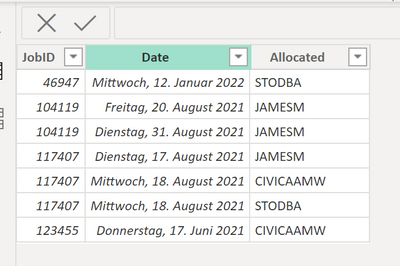
my example (TableName = SampleJob)

Mikelytics_0-1673964154782.png


Formula:

SampleJob Summarized = 

SUMMARIZE(
    SampleJob,
    [JobID],
    "MaxDate",MAX(SampleJob[Date]),
    "Last Non System User",
        var __maxDate = MAX(SampleJob[Date])
        var __LastNonSystemUser =
            CALCULATE(
                LASTNONBLANK(SampleJob[Allocated],TRUE()),
                SampleJob[Date]=__maxDate && SampleJob[Allocated] <> "CIVICAAMW"
            )
        Return
        IF(ISBLANK(__LastNonSystemUser),"CIVICAAMW",__LastNonSystemUser)
)


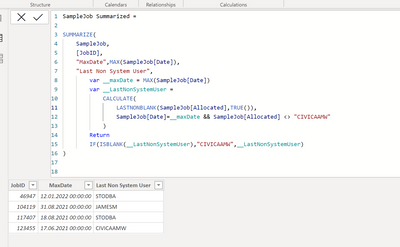
Result:

Mikelytics_1-1673964231740.png


I think the only question is how to handle if you have two updates ion same date. BUt this is hard to specify.


Best regards
Michael
-----------------------------------------------------
If this post helps, then please consider Accept it as the solution to help the other members find it more quickly.
Appreciate your thumbs up!
@ me in replies or I'll lose your thread.


------------------------------------------------------------------
Visit my blog datenhungrig which I recently started with content about business intelligence and Power BI in German and English or follow me on LinkedIn!

View solution in original post

4 REPLIES 4
Mahesh0016
Super User
Super User

@Anonymous Can you share sample data and sample output in table format? Or a sample pbix after removing sensitive data.

Anonymous
Not applicable

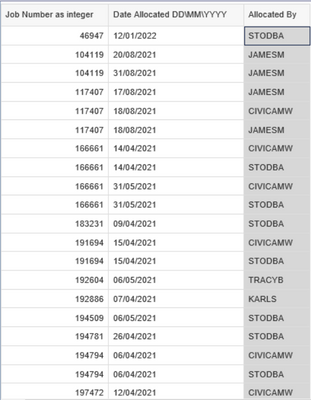
This is the source data that I will load into PowerBI.  User: CIVICAAMW is the System.  There are instances where CIVICAAMW is the only update on a job.  Cheers.


jp_wheatley_0-1673958108118.png


Hi @Anonymous 


Please try the following:


my example (TableName = SampleJob)

Mikelytics_0-1673964154782.png


Formula:

SampleJob Summarized = 

SUMMARIZE(
    SampleJob,
    [JobID],
    "MaxDate",MAX(SampleJob[Date]),
    "Last Non System User",
        var __maxDate = MAX(SampleJob[Date])
        var __LastNonSystemUser =
            CALCULATE(
                LASTNONBLANK(SampleJob[Allocated],TRUE()),
                SampleJob[Date]=__maxDate && SampleJob[Allocated] <> "CIVICAAMW"
            )
        Return
        IF(ISBLANK(__LastNonSystemUser),"CIVICAAMW",__LastNonSystemUser)
)


Result:

Mikelytics_1-1673964231740.png


I think the only question is how to handle if you have two updates ion same date. BUt this is hard to specify.


Best regards
Michael
-----------------------------------------------------
If this post helps, then please consider Accept it as the solution to help the other members find it more quickly.
Appreciate your thumbs up!
@ me in replies or I'll lose your thread.


------------------------------------------------------------------
Visit my blog datenhungrig which I recently started with content about business intelligence and Power BI in German and English or follow me on LinkedIn!
Anonymous
Not applicable

Hey mate,


Firstly, I really appreciate the reply and the attention to detail in the answer, amazing.


I have implemented the table and it works great.  The only issue left is that where there is a SYSTEM entry with a greater max(date) than a USER entry, its pulling back the system entry. (NOTE Sorry I put the system user as CIVICAAMW when it is actually CIVICAMW.  But I changed your code to reflect this).   


JOBID                   Date                         Allocated

285586                27/05/2021               STODBA

285586                23/06/2021               CIVICAMW


In this example I would need it to pull back 27/05/2021  STODBA, ignoring the real max as Allocated <> "CIVICAMW".


Of course ther are entries with only system entries so in that case I just need the max.


Cheers,

JP

Helpful resources

Announcements
FabCon and SQLCon Barcelona 2026

FabCon & SQLCon – Barcelona 2026

Join us in Barcelona for FabCon and SQLCon, the Fabric, Power BI, SQL, and AI community event. Save €200 with code FABCMTY200.

60 days of Data Days Carousel

Data Days 2026

Join Fabric Data Days 2026: 60 days of free live/on-demand sessions, challenges, study groups, and certification opportunities.

Power BI DataViz World Championships carousel

Power BI DataViz World Championships - June 2026

A new Power BI DataViz World Championship is coming this June! Don't miss out on submitting your entry.