Don't miss your chance to take the Fabric Data Engineer (DP-700) exam on us!
Learn moreWe've captured the moments from FabCon & SQLCon that everyone is talking about, and we are bringing them to the community, live and on-demand. Starts on April 14th. Register now
Hi all,
My company has recently adopted Power BI as the progress reporting tool of choice and I'm in process of learning how to use it.
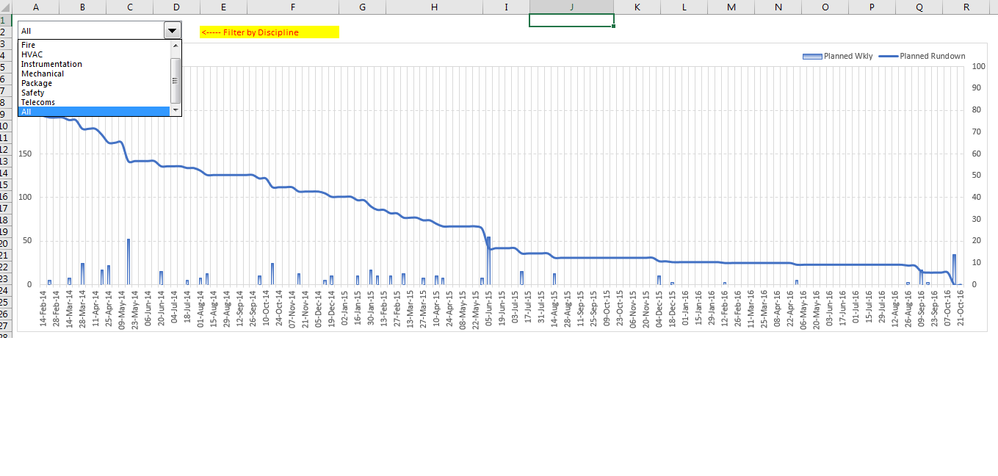
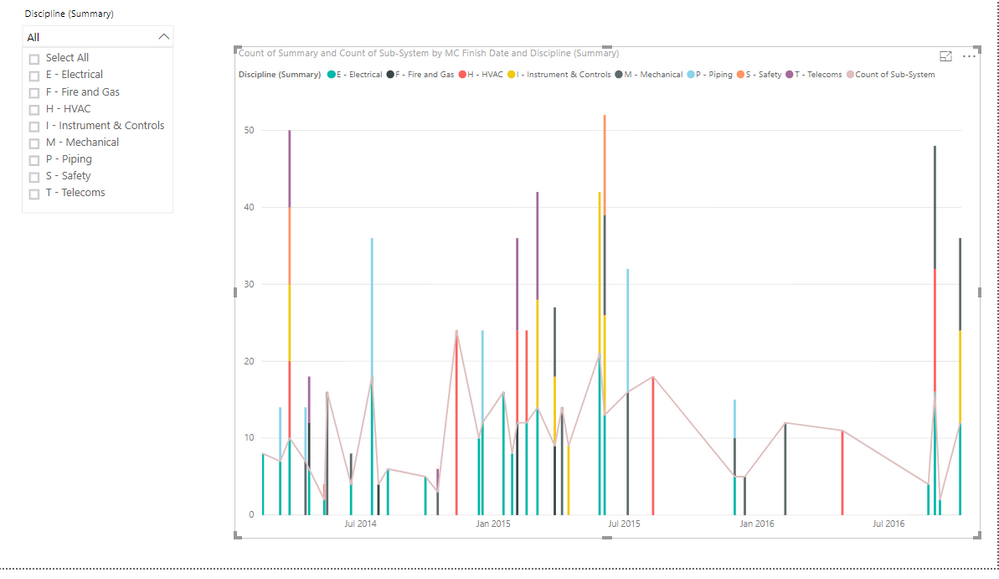
The below screen shot shows a rundown/burndown curve I've developed in Excel. I need to re-create something similar in Power BI. The 'Progress Dashboard' link has a power BI file that I've uploaded the same two spreadsheets required to make the rundown curve as seen in the screenshot.
The common column between the two tables is titled "sub-system".
The "MC Finish Date" table only has two column of importance (Sub-system and MC Finish Date).
The "Checksheets" table also only has two columns of importance (Sub-System and Discipline (Summary)).
I only started reviewing Power BI turorials a few days ago so would appreciate any assistance people can offer.
Thanks in advance.
Solved! Go to Solution.
Thanks for replying Jimmy.
In order for me to make it work in Excel I had to lookup the MC Finish Date for each sub-system from the MC Finish Date table and count how many dates fell in a particular week. Once calculated, I'd tabulate the totals and generate the rundown curve accordingly. The below link shows how I do it in excel:
https://1drv.ms/f/s!Ap_6-ICMV1K6ed9-ueXp0nMNL-0
This is the sequence of activities required to generate in excel:
1. Import MC finish date to checksheet tab (column AN)
2. Count total weekly completed sub-systems (CalcSheet tab - columns K3:EU3)
3. Generate rundown figures for chart (CalcSheet tab - columns K4:EU4)
4. Create chart with above figures (Dashboard tab charts)
Hope this helps shine a bit more light on what I need to develop.
Thanks for replying Jimmy.
In order for me to make it work in Excel I had to lookup the MC Finish Date for each sub-system from the MC Finish Date table and count how many dates fell in a particular week. Once calculated, I'd tabulate the totals and generate the rundown curve accordingly. The below link shows how I do it in excel:
https://1drv.ms/f/s!Ap_6-ICMV1K6ed9-ueXp0nMNL-0
This is the sequence of activities required to generate in excel:
1. Import MC finish date to checksheet tab (column AN)
2. Count total weekly completed sub-systems (CalcSheet tab - columns K3:EU3)
3. Generate rundown figures for chart (CalcSheet tab - columns K4:EU4)
4. Create chart with above figures (Dashboard tab charts)
Hope this helps shine a bit more light on what I need to develop.
Above link now contains solution.
If you have recently started exploring Fabric, we'd love to hear how it's going. Your feedback can help with product improvements.
A new Power BI DataViz World Championship is coming this June! Don't miss out on submitting your entry.
Share feedback directly with Fabric product managers, participate in targeted research studies and influence the Fabric roadmap.
| User | Count |
|---|---|
| 52 | |
| 38 | |
| 37 | |
| 19 | |
| 17 |
| User | Count |
|---|---|
| 69 | |
| 64 | |
| 37 | |
| 32 | |
| 21 |