cancel
Showing results for 
Search instead for 
Did you mean: 

Get Fabric Certified for FREE during Fabric Data Days. Don't miss your chance! Request now

Reply
Anonymous
Not applicable

Create Report Table With Multiple Slicers

Hi,


I am new to PowerBI and am trying to build a report table with columns that are different based on selections with different slicers. In otherwords, the selections from slicer A populate data in column A and selections from slicer B populate data in column B. I have one large table of data that I am working with. I have attempted using calculated tables (that just duplicate the main table), but this would only work if I could create relationships with 2 primary keys in each table, but that does not seem to be an option. Here is some sample data to clarify what I am trying to do:


Main Data File

Revision ID    |   Property ID   |   Item Name    | Item Premium

451-554-112      01223               Coverage A       200000

451-554-112     01223               Coverage B        20000

451-554-112      01223               Coverage C       10000


Slicer A

Coverage A

Coverage B

Coverage C


Slicer B

Coverage A

Coverage B

Coverage C


Slicer C

Coverage A

Coverage B

Coverage C


Final Report Table Needed

Property ID    |  Coverage A Premium | Coverage B Premium | Coverage C Premium

01223                   200000                        20000                         10000


*Note: Each slicer would have at least 50 options that could be selected. If I create calculated tables that duplicate the main data they MUST join on revision ID and property ID because multiple properties can fall under the same revision. 


1 ACCEPTED SOLUTION
v-juanli-msft
Community Support
Community Support

Hi @Anonymous 

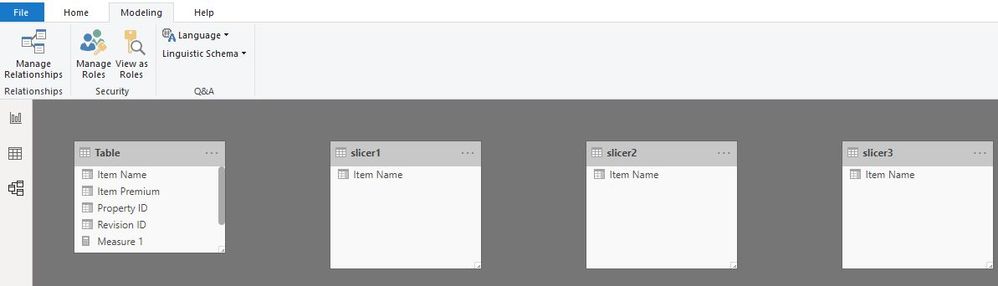
Create three tables

slicer1 = VALUES('Table'[Item Name])

slicer2 = VALUES('Table'[Item Name])

slicer3 = VALUES('Table'[Item Name])

Capture16.JPG

Create three measures

Measure 1 =
CALCULATE (
    SUM ( 'Table'[Item Premium] ),
    FILTER (
        ALLEXCEPT ( 'Table', 'Table'[Revision ID], 'Table'[Property ID] ),
        'Table'[Item Name] = SELECTEDVALUE ( slicer1[Item Name] )
    )
)

Measure 2 =
CALCULATE (
    SUM ( 'Table'[Item Premium] ),
    FILTER (
        ALLEXCEPT ( 'Table', 'Table'[Revision ID], 'Table'[Property ID] ),
        'Table'[Item Name] = SELECTEDVALUE ( slicer2[Item Name] )
    )
)

Measure 3 =
CALCULATE (
    SUM ( 'Table'[Item Premium] ),
    FILTER (
        ALLEXCEPT ( 'Table', 'Table'[Revision ID], 'Table'[Property ID] ),
        'Table'[Item Name] = SELECTEDVALUE ( slicer3[Item Name] )
    )
)

Capture15.JPG

Best Regards
Maggie
Community Support Team _ Maggie Li
If this post helps, then please consider Accept it as the solution to help the other members find it more quickly.

View solution in original post

2 REPLIES 2
v-juanli-msft
Community Support
Community Support

Hi @Anonymous 

Create three tables

slicer1 = VALUES('Table'[Item Name])

slicer2 = VALUES('Table'[Item Name])

slicer3 = VALUES('Table'[Item Name])

Capture16.JPG

Create three measures

Measure 1 =
CALCULATE (
    SUM ( 'Table'[Item Premium] ),
    FILTER (
        ALLEXCEPT ( 'Table', 'Table'[Revision ID], 'Table'[Property ID] ),
        'Table'[Item Name] = SELECTEDVALUE ( slicer1[Item Name] )
    )
)

Measure 2 =
CALCULATE (
    SUM ( 'Table'[Item Premium] ),
    FILTER (
        ALLEXCEPT ( 'Table', 'Table'[Revision ID], 'Table'[Property ID] ),
        'Table'[Item Name] = SELECTEDVALUE ( slicer2[Item Name] )
    )
)

Measure 3 =
CALCULATE (
    SUM ( 'Table'[Item Premium] ),
    FILTER (
        ALLEXCEPT ( 'Table', 'Table'[Revision ID], 'Table'[Property ID] ),
        'Table'[Item Name] = SELECTEDVALUE ( slicer3[Item Name] )
    )
)

Capture15.JPG

Best Regards
Maggie
Community Support Team _ Maggie Li
If this post helps, then please consider Accept it as the solution to help the other members find it more quickly.
Anonymous
Not applicable

@v-juanli-msft 


Thank you so much!! I was able to use your code to complete this report. There were two things I did not mention in my original post. First, I needed to list the premiums by "Policy Number" and "Property Name" (two other columns). Secondly, users needed to be able to select multiple options in the slicers such as "Coverage A - Dwelling" and "Coverage A - Residence". To accomplish this I modified your code accordingly:

premiumCovA = 
CALCULATE (
    SUM ( working_file[itemInforceLimit] ),
    FILTER (
        ALLEXCEPT ( 'working_file', 'working_file'[revisionId], working_file[propertyId],working_file[propertyName],working_file[policyNumber] ),
        working_file[itemName] IN VALUES (limitCovA[lineItemName])
    )
)

Thank you again!

Helpful resources

Announcements
November Power BI Update Carousel

Power BI Monthly Update - November 2025

Check out the November 2025 Power BI update to learn about new features.

Fabric Data Days Carousel

Fabric Data Days

Advance your Data & AI career with 50 days of live learning, contests, hands-on challenges, study groups & certifications and more!

FabCon Atlanta 2026 carousel

FabCon Atlanta 2026

Join us at FabCon Atlanta, March 16-20, for the ultimate Fabric, Power BI, AI and SQL community-led event. Save $200 with code FABCOMM.

Top Solution Authors
Top Kudoed Authors