Join us at FabCon Atlanta from March 16 - 20, 2026, for the ultimate Fabric, Power BI, AI and SQL community-led event. Save $200 with code FABCOMM.
Register now!The Power BI Data Visualization World Championships is back! Get ahead of the game and start preparing now! Learn more
I am currently creating a CustomColumn in a existing model where I need to use data from previous rows to calucate the column value. This is already existing in Excel which I am currently migrating it to PowerBI.
In the screenshot shared below, "FinalResult" is a calculated column which uses a formula to calculate the result.
D5= IF(SUM(C3:C5)>=2,B5,"")
Since, it uses 2 previous rows to determine the value, the first 2 cells are empty and the formula starts only from D4 till end. Kindly let me know how do I create a similar column in PowerBI.
Note: I already have the other 3 columns in model and only need to create "FinalResult"
Solved! Go to Solution.
Hi,
This calculated column formula seems to work
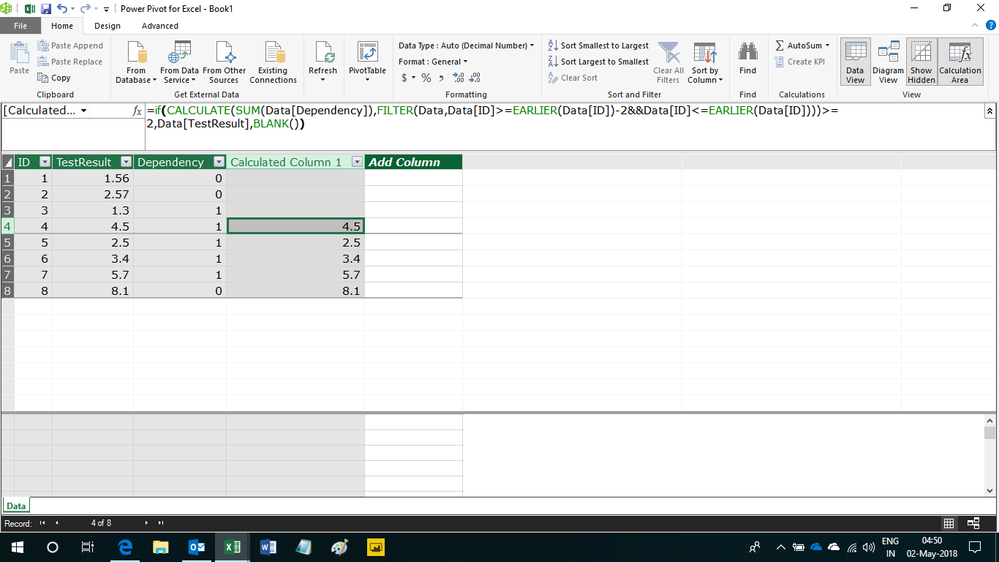
=if(CALCULATE(SUM(Data[Dependency]),FILTER(Data,Data[ID]>=EARLIER(Data[ID])-2&&Data[ID]<=EARLIER(Data[ID])))>=2,Data[TestResult],BLANK())
Hope this helps.
Hi,
You have to go to Modelling > Add column and paste the query there.
Hi,
This calculated column formula seems to work
=if(CALCULATE(SUM(Data[Dependency]),FILTER(Data,Data[ID]>=EARLIER(Data[ID])-2&&Data[ID]<=EARLIER(Data[ID])))>=2,Data[TestResult],BLANK())
Hope this helps.
I am creating this model in PowerBI Desktop and can you help to write the same query accepted by PowerBI Desktop. I have trouble executing the query
Hi,
You have to go to Modelling > Add column and paste the query there.
The Power BI Data Visualization World Championships is back! Get ahead of the game and start preparing now!
| User | Count |
|---|---|
| 65 | |
| 43 | |
| 40 | |
| 29 | |
| 19 |
| User | Count |
|---|---|
| 200 | |
| 126 | |
| 103 | |
| 70 | |
| 54 |