Get certified for free when you join Fabric Data Days 2026 and dive into Fabric, Power BI, SQL, AI, and other essential data skills.
Join nowData Days is here! Join us now for 60+ days of learning, challenges, and connection. Learn more
I am currently creating a CustomColumn in a existing model where I need to use data from previous rows to calucate the column value. This is already existing in Excel which I am currently migrating it to PowerBI.
In the screenshot shared below, "FinalResult" is a calculated column which uses a formula to calculate the result.
D5= IF(SUM(C3:C5)>=2,B5,"")
Since, it uses 2 previous rows to determine the value, the first 2 cells are empty and the formula starts only from D4 till end. Kindly let me know how do I create a similar column in PowerBI.
Note: I already have the other 3 columns in model and only need to create "FinalResult"
Solved! Go to Solution.
Hi,
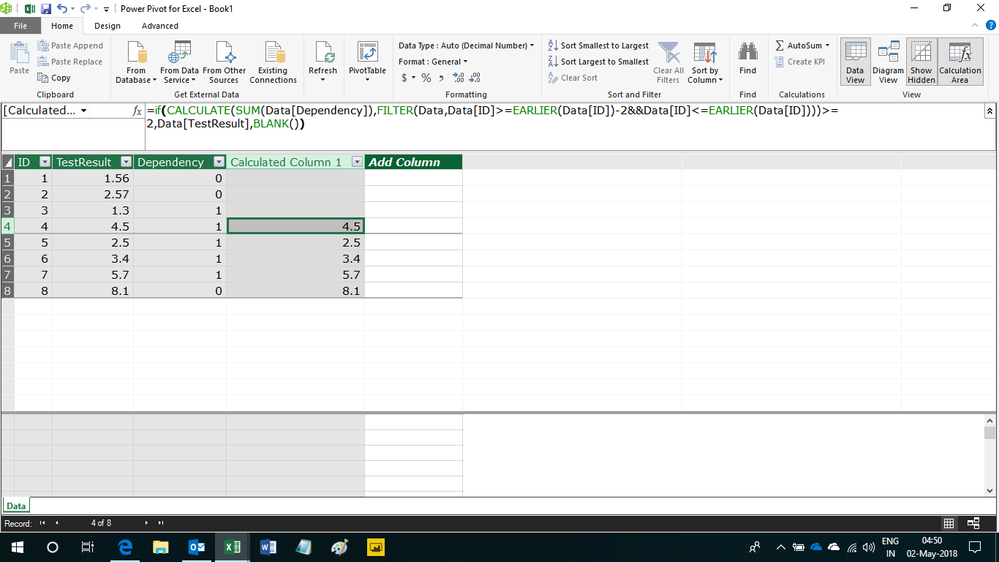
This calculated column formula seems to work
=if(CALCULATE(SUM(Data[Dependency]),FILTER(Data,Data[ID]>=EARLIER(Data[ID])-2&&Data[ID]<=EARLIER(Data[ID])))>=2,Data[TestResult],BLANK())
Hope this helps.
Hi,
You have to go to Modelling > Add column and paste the query there.
Hi,
This calculated column formula seems to work
=if(CALCULATE(SUM(Data[Dependency]),FILTER(Data,Data[ID]>=EARLIER(Data[ID])-2&&Data[ID]<=EARLIER(Data[ID])))>=2,Data[TestResult],BLANK())
Hope this helps.
I am creating this model in PowerBI Desktop and can you help to write the same query accepted by PowerBI Desktop. I have trouble executing the query
Hi,
You have to go to Modelling > Add column and paste the query there.
Don't miss out on Data Days, June 15 through August 7. Learn Fabric, Power BI, SQL, AI and more.
Check out the May 2026 Power BI update to learn about new features.
| User | Count |
|---|---|
| 23 | |
| 21 | |
| 20 | |
| 18 | |
| 13 |
| User | Count |
|---|---|
| 58 | |
| 50 | |
| 38 | |
| 31 | |
| 27 |