This time we’re going bigger than ever. Fabric, Power BI, SQL, AI and more. We're covering it all. You won't want to miss it.
Learn moreLevel up your Power BI skills this month - build one visual each week and tell better stories with data! Get started
Good afternoon All,
Thank you for your help. I've have been trying to replicate my company's accuracy measure in Power BI for a single column dataset. We measure accuracy against our forecast from several lags (Prior Month, Two Months ago, Three Months ago, etc.)
I have succeeded in recreating it however it required that I build the measure up through a series of 5 Calculated Measures. Is there any way to reduce this number as when I need to add different accuracy measures, multiplying each one by 5 will get very messy.
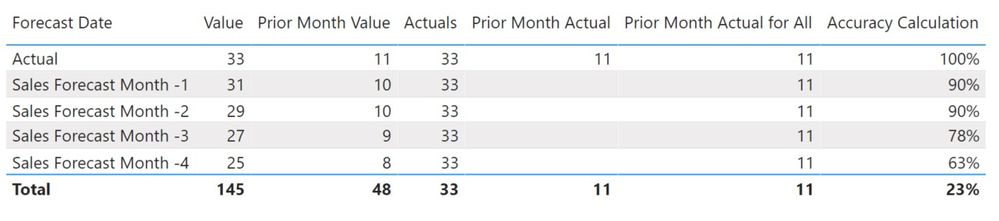
Step 1
Filter Forecast Date for Actuals:
Step 5
Create accuracy measure:
Link to Power BI Example:
Link to Fruit Accuracy Demo File
Regards,
Gareth.
Solved! Go to Solution.
Hi @jazking123 ,
We can use this measure to meet your requirement:
New Accuracy Calculation =
VAR current_month =
MONTH ( TODAY () )
VAR prior_month_value =
CALCULATE (
SUM ( 'Sheet1'[Value] ),
FILTER ( Sheet1, MONTH ( 'Sheet1'[Date] ) = current_month - 1 )
)
VAR prior_month_Actual =
CALCULATE (
SUM ( 'Sheet1'[Value] ),
FILTER ( Sheet1, Sheet1[Forecast Date] IN { "Actual" } ),
ALL ( Sheet1 ),
MONTH ( Sheet1[Date] ) = current_month - 1
)
VAR prior_Actual_for_All =
CALCULATE (
CALCULATE (
SUM ( 'Sheet1'[Value] ),
FILTER ( Sheet1, Sheet1[Forecast Date] IN { "Actual" } ),
ALL ( Sheet1 ),
MONTH ( Sheet1[Date] ) = current_month - 1
),
Sheet1[Forecast Date] IN { "Actual" }
)
RETURN
1
- (
ABS ( prior_month_value - prior_Actual_for_All ) / prior_Actual_for_All
)
If it doesn’t meet your requirement, could you please show the exact expected result based on the table that you have shared?
Best regards,
Hi @jazking123 ,
We can use this measure to meet your requirement:
New Accuracy Calculation =
VAR current_month =
MONTH ( TODAY () )
VAR prior_month_value =
CALCULATE (
SUM ( 'Sheet1'[Value] ),
FILTER ( Sheet1, MONTH ( 'Sheet1'[Date] ) = current_month - 1 )
)
VAR prior_month_Actual =
CALCULATE (
SUM ( 'Sheet1'[Value] ),
FILTER ( Sheet1, Sheet1[Forecast Date] IN { "Actual" } ),
ALL ( Sheet1 ),
MONTH ( Sheet1[Date] ) = current_month - 1
)
VAR prior_Actual_for_All =
CALCULATE (
CALCULATE (
SUM ( 'Sheet1'[Value] ),
FILTER ( Sheet1, Sheet1[Forecast Date] IN { "Actual" } ),
ALL ( Sheet1 ),
MONTH ( Sheet1[Date] ) = current_month - 1
),
Sheet1[Forecast Date] IN { "Actual" }
)
RETURN
1
- (
ABS ( prior_month_value - prior_Actual_for_All ) / prior_Actual_for_All
)
If it doesn’t meet your requirement, could you please show the exact expected result based on the table that you have shared?
Best regards,
Thank you @v-lid-msft!!!
This works perfectly. I have a few modifications to make, but just using multple vars was the key.
Gareth.
Check out the April 2026 Power BI update to learn about new features.
Sign up to receive a private message when registration opens and key events begin.
If you have recently started exploring Fabric, we'd love to hear how it's going. Your feedback can help with product improvements.
| User | Count |
|---|---|
| 36 | |
| 29 | |
| 29 | |
| 21 | |
| 18 |
| User | Count |
|---|---|
| 71 | |
| 43 | |
| 33 | |
| 24 | |
| 23 |
