Good afternoon All,
Thank you for your help. I've have been trying to replicate my company's accuracy measure in Power BI for a single column dataset. We measure accuracy against our forecast from several lags (Prior Month, Two Months ago, Three Months ago, etc.)
I have succeeded in recreating it however it required that I build the measure up through a series of 5 Calculated Measures. Is there any way to reduce this number as when I need to add different accuracy measures, multiplying each one by 5 will get very messy.
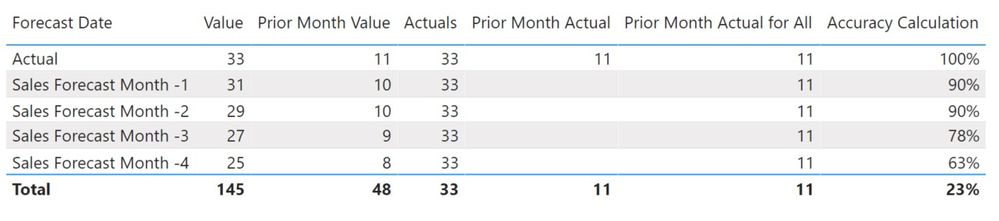
Step 1
Filter Forecast Date for Actuals:
Actuals = Calculate(SUM('Sheet1'[Value]),
'Sheet1'[Forecast Date] IN { "ACTUAL" })
Step 2
Filter the actuals to just the prior month (Otherwise it sums all the actuals):
Prior Month Actual = var current_month= MONTH(TODAY()) return Calculate(SUM('Sheet1'[Value]),FILTER(Sheet1,Sheet1[Forecast Date] IN { "Actual" }),ALL(Sheet1),MONTH(Sheet1[Date])=current_month -1)
Step 3
Get the Actuals to show against the other forecast periods:
Prior Month Actual for All = Calculate('Sheet1'[Prior Month Actual],
'Sheet1'[Forecast Date] IN { "Actual" })
Step 4
Get the prior month values for the other forecasts:
Prior Month Value = var current_month= MONTH(TODAY()) return CALCULATE(SUM('Sheet1'[Value]),FILTER(Sheet1,MONTH('Sheet1'[Date])=current_month -1))
Step 5
Create accuracy measure:
Accuracy Calculation = (1-(ABS([Prior Month Value]-[Prior Month Actual for All])/[Prior Month Value]))
Any help to even reduce even one of these steps would be really appreciated.
Link to Power BI Example:
Link to Fruit Accuracy Demo File
Regards,
Gareth.





