cancel
Showing results for 
Search instead for 
Did you mean: 

The Power BI Data Visualization World Championships is back! Get ahead of the game and start preparing now! Learn more

Reply
jazking123
Frequent Visitor

Create Accuracy Measure based on Single Column Data

Good afternoon All, 


Thank you for your help. I've have been trying to replicate my company's accuracy measure in Power BI for a single column dataset. We measure accuracy against our forecast from several lags (Prior Month, Two Months ago, Three Months ago, etc.)


I have succeeded in recreating it however it required that I build the measure up through a series of 5 Calculated Measures. Is there any way to reduce this number as when I need to add different accuracy measures, multiplying each one by 5 will get very messy.
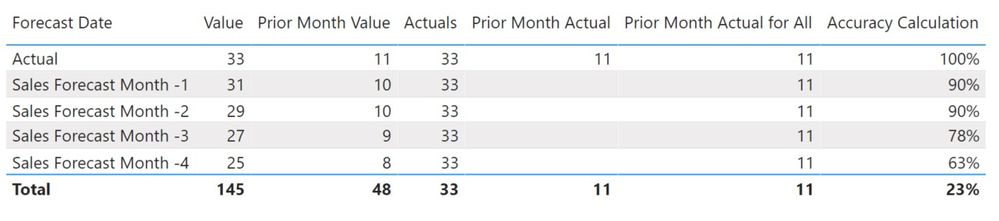
 

Accuracy.jpg

Step 1

Filter Forecast Date for Actuals:

Actuals = Calculate(SUM('Sheet1'[Value]),
    'Sheet1'[Forecast Date] IN { "ACTUAL" })
 
Step 2
Filter the actuals to just the prior month (Otherwise it sums all the actuals):
Prior Month Actual = var current_month= MONTH(TODAY()) return  Calculate(SUM('Sheet1'[Value]),FILTER(Sheet1,Sheet1[Forecast Date] IN { "Actual" }),ALL(Sheet1),MONTH(Sheet1[Date])=current_month -1)
 
Step 3
Get the Actuals to show against the other forecast periods:
Prior Month Actual for All = Calculate('Sheet1'[Prior Month Actual],
    'Sheet1'[Forecast Date] IN { "Actual" })
 
Step 4
Get the prior month values for the other forecasts:
Prior Month Value = var current_month= MONTH(TODAY()) return  CALCULATE(SUM('Sheet1'[Value]),FILTER(Sheet1,MONTH('Sheet1'[Date])=current_month -1))


Step 5 

Create accuracy measure:

Accuracy Calculation = (1-(ABS([Prior Month Value]-[Prior Month Actual for All])/[Prior Month Value]))
 
Any help to even reduce even one of these steps would be really appreciated.
 

Link to Power BI Example:

Link to Fruit Accuracy Demo File 


Regards,


Gareth.


1 ACCEPTED SOLUTION
v-lid-msft
Community Support
Community Support

Hi @jazking123 ,


We can use this measure to meet your requirement:


New Accuracy Calculation = 
VAR current_month =
    MONTH ( TODAY () )
VAR prior_month_value =
    CALCULATE (
        SUM ( 'Sheet1'[Value] ),
        FILTER ( Sheet1, MONTH ( 'Sheet1'[Date] ) = current_month - 1 )
    )
VAR prior_month_Actual =
    CALCULATE (
        SUM ( 'Sheet1'[Value] ),
        FILTER ( Sheet1, Sheet1[Forecast Date] IN { "Actual" } ),
        ALL ( Sheet1 ),
        MONTH ( Sheet1[Date] ) = current_month - 1
    )
VAR prior_Actual_for_All =
    CALCULATE (
        CALCULATE (
            SUM ( 'Sheet1'[Value] ),
            FILTER ( Sheet1, Sheet1[Forecast Date] IN { "Actual" } ),
            ALL ( Sheet1 ),
            MONTH ( Sheet1[Date] ) = current_month - 1
        ),
        Sheet1[Forecast Date] IN { "Actual" }
    )
RETURN
    1
        - (
            ABS ( prior_month_value - prior_Actual_for_All ) / prior_Actual_for_All
        )


If it doesn’t meet your requirement, could you please show the exact expected result based on the table that you have shared?


2.png


Best regards,


Community Support Team _ Dong Li
If this post helps, then please consider Accept it as the solution to help the other members find it more quickly.

View solution in original post

2 REPLIES 2
v-lid-msft
Community Support
Community Support

Hi @jazking123 ,


We can use this measure to meet your requirement:


New Accuracy Calculation = 
VAR current_month =
    MONTH ( TODAY () )
VAR prior_month_value =
    CALCULATE (
        SUM ( 'Sheet1'[Value] ),
        FILTER ( Sheet1, MONTH ( 'Sheet1'[Date] ) = current_month - 1 )
    )
VAR prior_month_Actual =
    CALCULATE (
        SUM ( 'Sheet1'[Value] ),
        FILTER ( Sheet1, Sheet1[Forecast Date] IN { "Actual" } ),
        ALL ( Sheet1 ),
        MONTH ( Sheet1[Date] ) = current_month - 1
    )
VAR prior_Actual_for_All =
    CALCULATE (
        CALCULATE (
            SUM ( 'Sheet1'[Value] ),
            FILTER ( Sheet1, Sheet1[Forecast Date] IN { "Actual" } ),
            ALL ( Sheet1 ),
            MONTH ( Sheet1[Date] ) = current_month - 1
        ),
        Sheet1[Forecast Date] IN { "Actual" }
    )
RETURN
    1
        - (
            ABS ( prior_month_value - prior_Actual_for_All ) / prior_Actual_for_All
        )


If it doesn’t meet your requirement, could you please show the exact expected result based on the table that you have shared?


2.png


Best regards,


Community Support Team _ Dong Li
If this post helps, then please consider Accept it as the solution to help the other members find it more quickly.

Thank you @v-lid-msft!!!
This works perfectly. I have a few modifications to make, but just using multple vars was the key.


Gareth. 

Helpful resources

Announcements
Power BI DataViz World Championships

Power BI Dataviz World Championships

The Power BI Data Visualization World Championships is back! Get ahead of the game and start preparing now!

December 2025 Power BI Update Carousel

Power BI Monthly Update - December 2025

Check out the December 2025 Power BI Holiday Recap!

FabCon Atlanta 2026 carousel

FabCon Atlanta 2026

Join us at FabCon Atlanta, March 16-20, for the ultimate Fabric, Power BI, AI and SQL community-led event. Save $200 with code FABCOMM.
