This time we’re going bigger than ever. Fabric, Power BI, SQL, AI and more. We're covering it all. You won't want to miss it.
Learn moreLevel up your Power BI skills this month - build one visual each week and tell better stories with data! Get started
Hello
Here's one Im stuck with. I have 2 stores, each service people with different Citizen codes. I want to be able to COUNT the number of times that citizen code appears in a list, but without hard coding EACH of the citizen codes. (the list is extensive, snapshot below)
At present I have a measure for each citizen code // AUS = CALCULATE ( COUNTROWS (Sheet1),Sheet1[Citizen]="AUS") // but this means I need to create a measure for each citizen code individually, and the lists can grow regularly so its hard to keep up.
Is there a way that I can the system to recoginze the unique citizen code values in the list, then count those unique values, but without having to create individual measure for each citizen code?
| Shop | Date | Citizen |
| PX1 | 4/5/2016 | AUS |
| PX2 | 4/5/2016 | AUS |
| PX1 | 4/6/2016 | AUS |
| PX2 | 4/6/2016 | AUS |
| PX2 | 4/6/2016 | AUS |
| PX1 | 4/6/2016 | AUS |
| PX1 | 4/6/2016 | AUS |
| PX2 | 4/9/2016 | AUT |
| PX1 | 4/9/2016 | AUT |
| PX2 | 4/9/2016 | DEU |
| PX2 | 4/9/2016 | DEU |
| PX1 | 4/9/2016 | DEU |
| PX1 | 4/9/2016 | DEU |
| PX2 | 4/9/2016 | DEU |
| PX1 | 4/9/2016 | DEU |
| PX2 | 4/10/2016 | DEU |
| PX2 | 4/10/2016 | DEU |
| PX1 | 4/10/2016 | DEU |
| PX1 | 4/11/2016 | NOR |
| PX2 | 4/11/2016 | NOR |
| PX1 | 4/11/2016 | NOK |
| PX2 | 4/11/2016 | NOK |
| PX2 | 4/11/2016 | DEU |
| PX1 | 4/11/2016 | CHL |
| PX1 | 4/11/2016 | DEU |
| PX1 | 4/12/2016 | DEU |
| PX1 | 4/12/2016 | GBR |
Solved! Go to Solution.
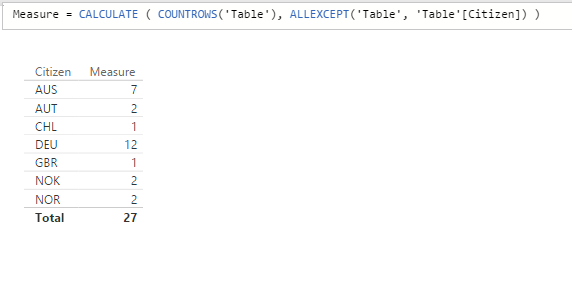
Measure = CALCULATE ( COUNTROWS('Table'), ALLEXCEPT('Table', 'Table'[Citizen]) )Yes the above will give OVERALL Total at the Citizen level no matter what - useful for calculating % at the Citizen level (NOT Grand Total)
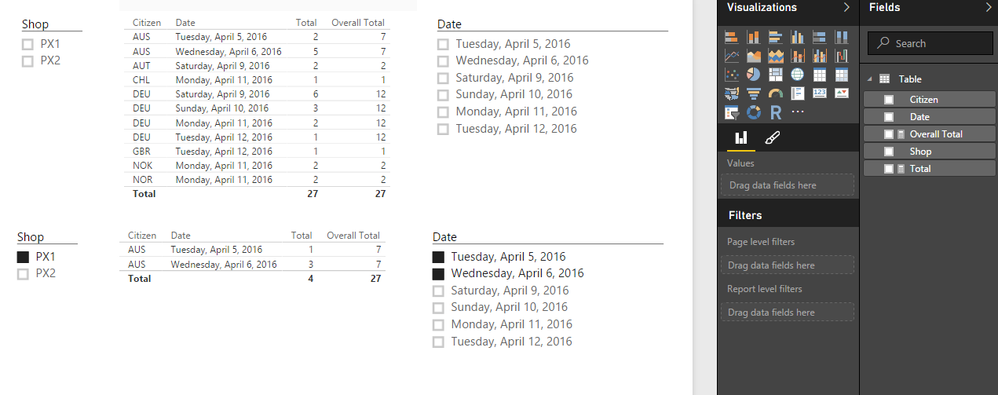
Yes if you'll use Slicers just use Total = COUNTROWS(Table) with no filters!
Hope this helps and makes sense! ![]()
Measure = CALCULATE ( COUNTROWS('Table'), ALLEXCEPT('Table', 'Table'[Citizen]) )Yes the above will give OVERALL Total at the Citizen level no matter what - useful for calculating % at the Citizen level (NOT Grand Total)
Yes if you'll use Slicers just use Total = COUNTROWS(Table) with no filters!
Hope this helps and makes sense! ![]()
Check out the April 2026 Power BI update to learn about new features.
Sign up to receive a private message when registration opens and key events begin.
If you have recently started exploring Fabric, we'd love to hear how it's going. Your feedback can help with product improvements.
| User | Count |
|---|---|
| 37 | |
| 29 | |
| 29 | |
| 21 | |
| 18 |
| User | Count |
|---|---|
| 69 | |
| 39 | |
| 33 | |
| 24 | |
| 23 |