This time we’re going bigger than ever. Fabric, Power BI, SQL, AI and more. We're covering it all. You won't want to miss it.
Learn moreDid you hear? There's a new SQL AI Developer certification (DP-800). Start preparing now and be one of the first to get certified. Register now
Hello
Here's one Im stuck with. I have 2 stores, each service people with different Citizen codes. I want to be able to COUNT the number of times that citizen code appears in a list, but without hard coding EACH of the citizen codes. (the list is extensive, snapshot below)
At present I have a measure for each citizen code // AUS = CALCULATE ( COUNTROWS (Sheet1),Sheet1[Citizen]="AUS") // but this means I need to create a measure for each citizen code individually, and the lists can grow regularly so its hard to keep up.
Is there a way that I can the system to recoginze the unique citizen code values in the list, then count those unique values, but without having to create individual measure for each citizen code?
| Shop | Date | Citizen |
| PX1 | 4/5/2016 | AUS |
| PX2 | 4/5/2016 | AUS |
| PX1 | 4/6/2016 | AUS |
| PX2 | 4/6/2016 | AUS |
| PX2 | 4/6/2016 | AUS |
| PX1 | 4/6/2016 | AUS |
| PX1 | 4/6/2016 | AUS |
| PX2 | 4/9/2016 | AUT |
| PX1 | 4/9/2016 | AUT |
| PX2 | 4/9/2016 | DEU |
| PX2 | 4/9/2016 | DEU |
| PX1 | 4/9/2016 | DEU |
| PX1 | 4/9/2016 | DEU |
| PX2 | 4/9/2016 | DEU |
| PX1 | 4/9/2016 | DEU |
| PX2 | 4/10/2016 | DEU |
| PX2 | 4/10/2016 | DEU |
| PX1 | 4/10/2016 | DEU |
| PX1 | 4/11/2016 | NOR |
| PX2 | 4/11/2016 | NOR |
| PX1 | 4/11/2016 | NOK |
| PX2 | 4/11/2016 | NOK |
| PX2 | 4/11/2016 | DEU |
| PX1 | 4/11/2016 | CHL |
| PX1 | 4/11/2016 | DEU |
| PX1 | 4/12/2016 | DEU |
| PX1 | 4/12/2016 | GBR |
Solved! Go to Solution.
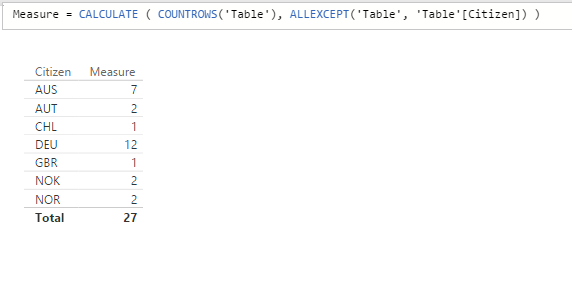
Measure = CALCULATE ( COUNTROWS('Table'), ALLEXCEPT('Table', 'Table'[Citizen]) )Yes the above will give OVERALL Total at the Citizen level no matter what - useful for calculating % at the Citizen level (NOT Grand Total)
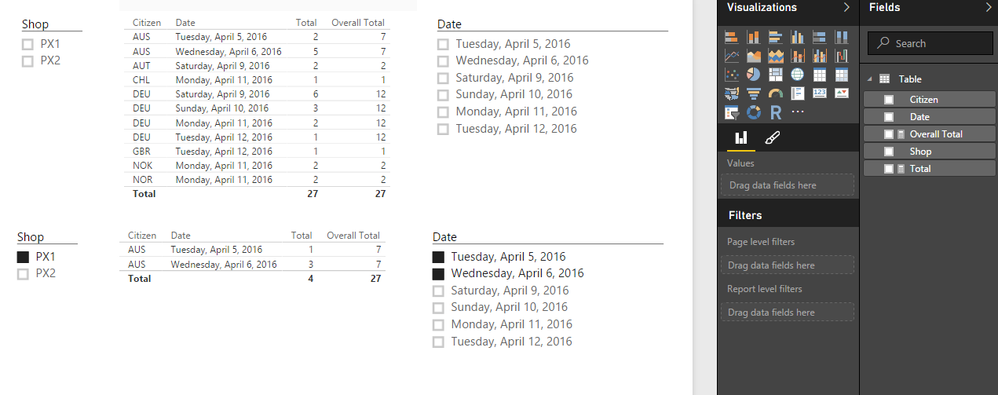
Yes if you'll use Slicers just use Total = COUNTROWS(Table) with no filters!
Hope this helps and makes sense! ![]()
Measure = CALCULATE ( COUNTROWS('Table'), ALLEXCEPT('Table', 'Table'[Citizen]) )Yes the above will give OVERALL Total at the Citizen level no matter what - useful for calculating % at the Citizen level (NOT Grand Total)
Yes if you'll use Slicers just use Total = COUNTROWS(Table) with no filters!
Hope this helps and makes sense! ![]()
Check out the April 2026 Power BI update to learn about new features.
Sign up to receive a private message when registration opens and key events begin.
If you have recently started exploring Fabric, we'd love to hear how it's going. Your feedback can help with product improvements.
| User | Count |
|---|---|
| 34 | |
| 31 | |
| 30 | |
| 21 | |
| 16 |
| User | Count |
|---|---|
| 61 | |
| 50 | |
| 30 | |
| 23 | |
| 23 |