cancel
Showing results for 
Search instead for 
Did you mean: 

The Power BI Data Visualization World Championships is back! Get ahead of the game and start preparing now! Learn more

Reply
Anonymous
Not applicable

Counting variable data within a list

Hello


Here's one Im stuck with.  I have 2 stores, each service people with different Citizen codes.  I want to be able to COUNT the number of times that citizen code appears in a list, but without hard coding EACH of the citizen codes. (the list is extensive, snapshot below)


At present I have a measure for each citizen code  // AUS = CALCULATE ( COUNTROWS (Sheet1),Sheet1[Citizen]="AUS") // but this means I need to create a measure for each citizen code individually, and the lists can grow regularly so its hard to keep up.


Is there a way that I can the system to recoginze the unique citizen code values in the list, then count those unique values, but without having to create individual measure for each citizen code?


ShopDateCitizen
PX14/5/2016AUS
PX24/5/2016AUS
PX14/6/2016AUS
PX24/6/2016AUS
PX24/6/2016AUS
PX14/6/2016AUS
PX14/6/2016AUS
PX24/9/2016AUT
PX14/9/2016AUT
PX24/9/2016DEU
PX24/9/2016DEU
PX14/9/2016DEU
PX14/9/2016DEU
PX24/9/2016DEU
PX14/9/2016DEU
PX24/10/2016DEU
PX24/10/2016DEU
PX14/10/2016DEU
PX14/11/2016NOR
PX24/11/2016NOR
PX14/11/2016NOK
PX24/11/2016NOK
PX24/11/2016DEU
PX14/11/2016CHL
PX14/11/2016DEU
PX14/12/2016DEU
PX14/12/2016GBR
2 ACCEPTED SOLUTIONS
Sean
Community Champion
Community Champion

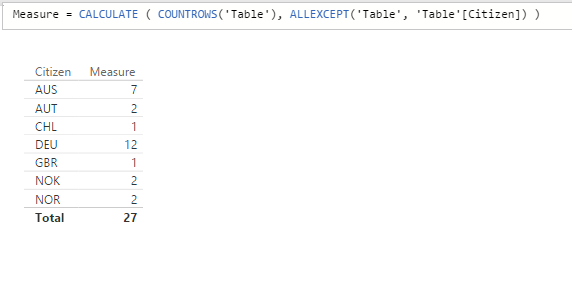
Measure = CALCULATE ( COUNTROWS('Table'), ALLEXCEPT('Table', 'Table'[Citizen]) )

Count.png

View solution in original post

Sean
Community Champion
Community Champion

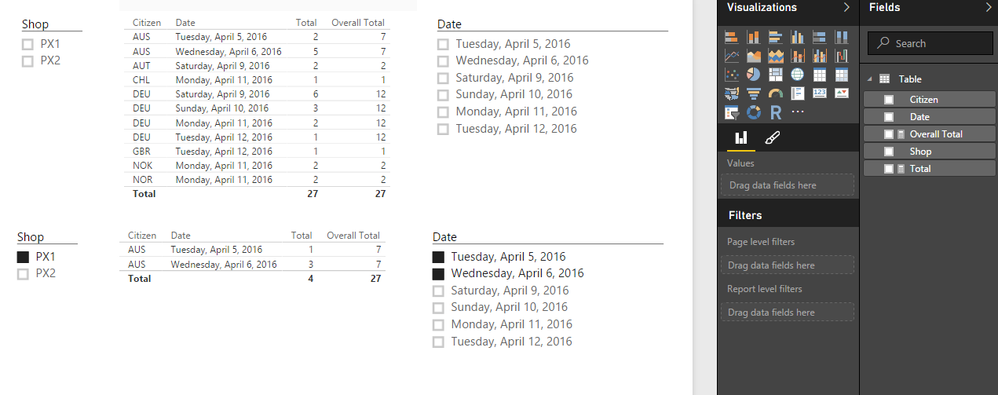
Yes the above will give OVERALL Total at the Citizen level no matter what - useful for calculating % at the Citizen level (NOT Grand Total)


Yes if you'll use Slicers just use Total = COUNTROWS(Table) with no filters!


Count2.png


Hope this helps and makes sense! Smiley Happy

View solution in original post

3 REPLIES 3
Sean
Community Champion
Community Champion

Measure = CALCULATE ( COUNTROWS('Table'), ALLEXCEPT('Table', 'Table'[Citizen]) )

Count.png

Anonymous
Not applicable

Thanks @Sean, this is great.


Sean
Community Champion
Community Champion

Yes the above will give OVERALL Total at the Citizen level no matter what - useful for calculating % at the Citizen level (NOT Grand Total)


Yes if you'll use Slicers just use Total = COUNTROWS(Table) with no filters!


Count2.png


Hope this helps and makes sense! Smiley Happy

Helpful resources

Announcements
Power BI DataViz World Championships

Power BI Dataviz World Championships

The Power BI Data Visualization World Championships is back! Get ahead of the game and start preparing now!

December 2025 Power BI Update Carousel

Power BI Monthly Update - December 2025

Check out the December 2025 Power BI Holiday Recap!

FabCon Atlanta 2026 carousel

FabCon Atlanta 2026

Join us at FabCon Atlanta, March 16-20, for the ultimate Fabric, Power BI, AI and SQL community-led event. Save $200 with code FABCOMM.