Join us at FabCon Atlanta from March 16 - 20, 2026, for the ultimate Fabric, Power BI, AI and SQL community-led event. Save $200 with code FABCOMM.
Register now!The Power BI Data Visualization World Championships is back! Get ahead of the game and start preparing now! Learn more
I have a column, 'Date', which gives a range of dates across 2018.
I have a second column, 'Type', which gives the type of event associated with that date. The values are either 'Open' or 'Closed'.
I want to create a measure that calculates how many 'Open' events occured in the past month, from today.
I have tried to create this measure but have had no luck. Does anyone have any ideas?
Thanks
Solved! Go to Solution.
Perhaps something along the lines of:
Measure =
COUNTX(FILTER('Table',MONTH([Date]) = MONTH(TODAY())-1 && [Type]="Open"),[Type])
Perhaps something along the lines of:
Measure =
COUNTX(FILTER('Table',MONTH([Date]) = MONTH(TODAY())-1 && [Type]="Open"),[Type])
Thanks Greg! That worked perfectly.
One more thing - I need a similar DAX formula that does the exact same thing, but apart from the timeframe being last 30 days, it is since a fixed date: ie, 01/01/2018. Is that possible?
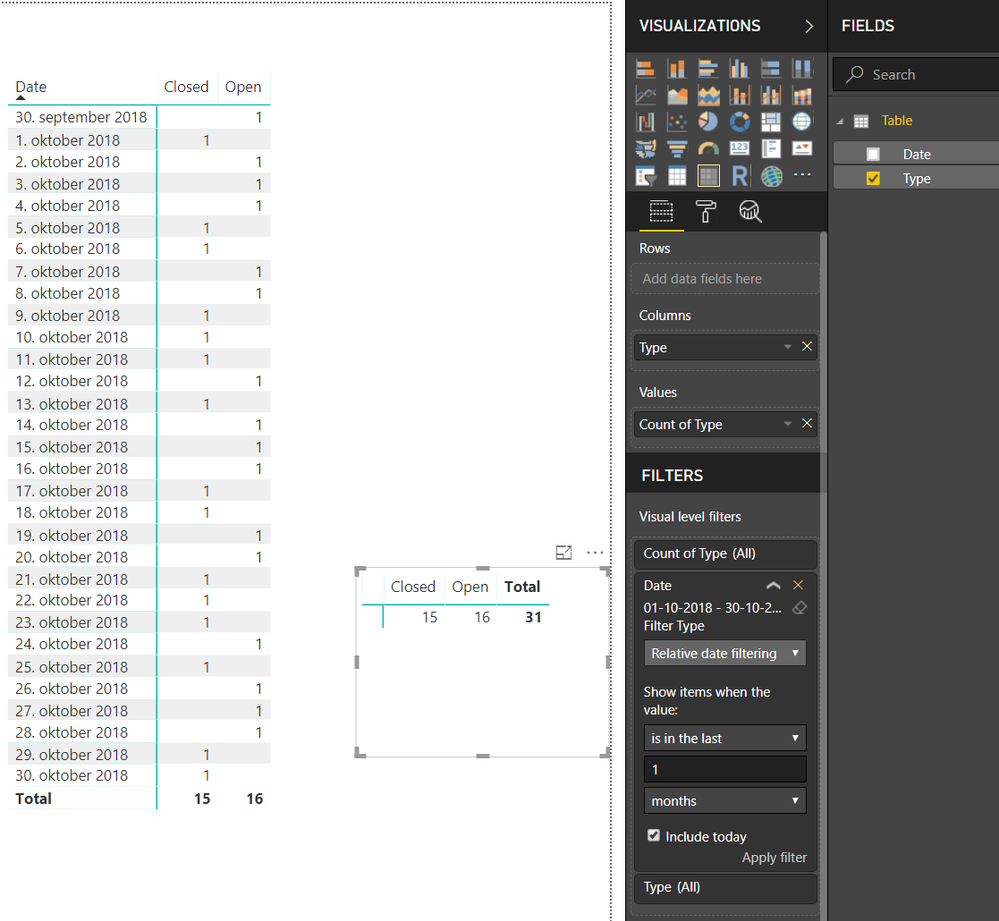
Instead of calculating, you could make PowerBi count the types.
And then just filter on the date.
Here is a visual with the date, and without the date appearing.
Just to be sure.
Today is the 30th October 2018.
Does that mean you want to see the numbers of open and closed for the period 1st of september til today or from the1st October to today?
The Power BI Data Visualization World Championships is back! Get ahead of the game and start preparing now!
| User | Count |
|---|---|
| 40 | |
| 36 | |
| 33 | |
| 29 | |
| 26 |
| User | Count |
|---|---|
| 135 | |
| 103 | |
| 65 | |
| 61 | |
| 55 |