cancel
Showing results for 
Search instead for 
Did you mean: 

The Power BI Data Visualization World Championships is back! Get ahead of the game and start preparing now! Learn more

Reply
shaunguyver
Helper III
Helper III

Count values occurring between two dates

I have a column, 'Date', which gives a range of dates across 2018.


I have a second column, 'Type', which gives the type of event associated with that date. The values are either 'Open' or 'Closed'.


I want to create a measure that calculates how many 'Open' events occured in the past month, from today.


I have tried to create this measure but have had no luck. Does anyone have any ideas?


Thanks

1 ACCEPTED SOLUTION
Greg_Deckler
Community Champion
Community Champion

Perhaps something along the lines of:


Measure = 
COUNTX(FILTER('Table',MONTH([Date]) = MONTH(TODAY())-1 && [Type]="Open"),[Type])


Follow on LinkedIn
@ me in replies or I'll lose your thread!!!
Instead of a Kudo, please vote for this idea
Become an expert!: Enterprise DNA
External Tools: MSHGQM
YouTube Channel!: Microsoft Hates Greg
Latest book!:
DAX For Humans

DAX is easy, CALCULATE makes DAX hard...

View solution in original post

4 REPLIES 4
Greg_Deckler
Community Champion
Community Champion

Perhaps something along the lines of:


Measure = 
COUNTX(FILTER('Table',MONTH([Date]) = MONTH(TODAY())-1 && [Type]="Open"),[Type])


Follow on LinkedIn
@ me in replies or I'll lose your thread!!!
Instead of a Kudo, please vote for this idea
Become an expert!: Enterprise DNA
External Tools: MSHGQM
YouTube Channel!: Microsoft Hates Greg
Latest book!:
DAX For Humans

DAX is easy, CALCULATE makes DAX hard...

Thanks Greg! That worked perfectly.


One more thing - I need a similar DAX formula that does the exact same thing, but apart from the timeframe being last 30 days, it is since a fixed date: ie, 01/01/2018. Is that possible?

Thim
Resolver V
Resolver V

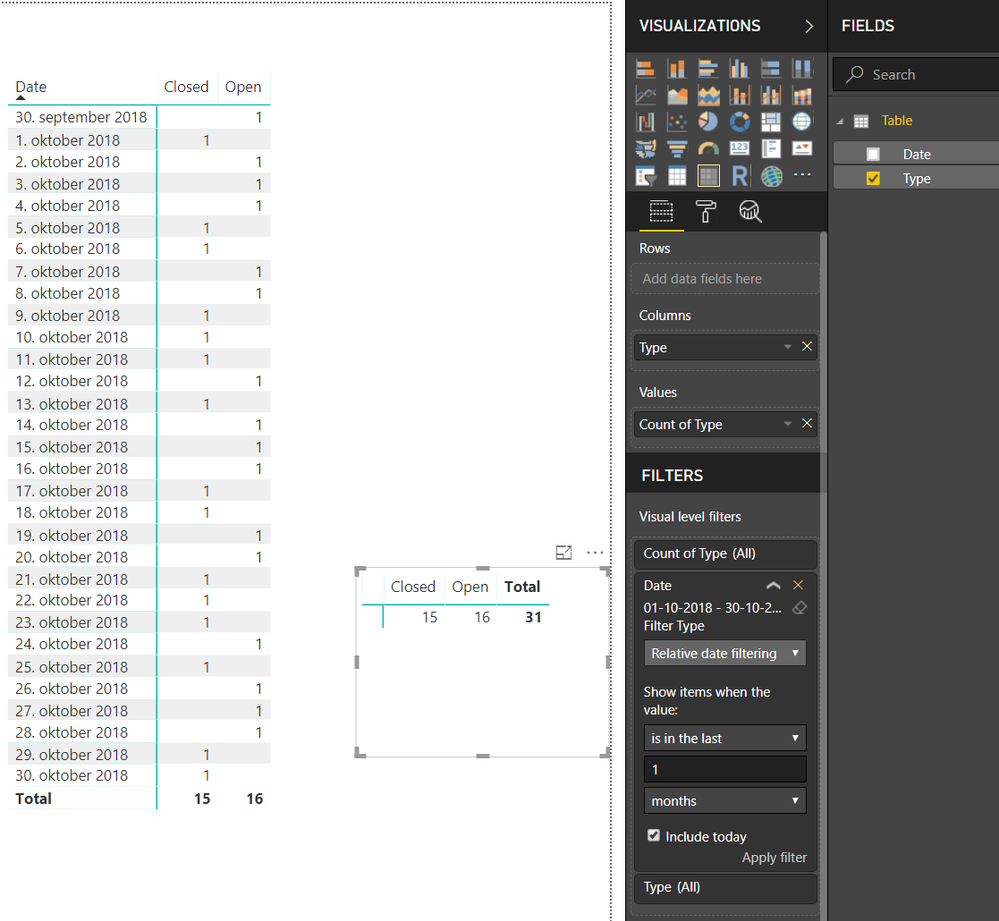
Instead of calculating, you could make PowerBi count the types.

And then just filter on the date.

Here is a visual with the date, and without the date appearing.


calc.PNG

Thim
Resolver V
Resolver V

Just to be sure.


Today is the 30th October 2018.


Does that mean you want to see the numbers of open and closed for the period 1st of september til today or from the1st October to today?

Helpful resources

Announcements
Power BI DataViz World Championships

Power BI Dataviz World Championships

The Power BI Data Visualization World Championships is back! Get ahead of the game and start preparing now!

December 2025 Power BI Update Carousel

Power BI Monthly Update - December 2025

Check out the December 2025 Power BI Holiday Recap!

FabCon Atlanta 2026 carousel

FabCon Atlanta 2026

Join us at FabCon Atlanta, March 16-20, for the ultimate Fabric, Power BI, AI and SQL community-led event. Save $200 with code FABCOMM.