cancel
Showing results for 
Search instead for 
Did you mean: 

Try your skills in the Power BI Dataviz World Championship! Round one ends June 26. Join now

Reply
Anonymous
Not applicable

Count column using filter

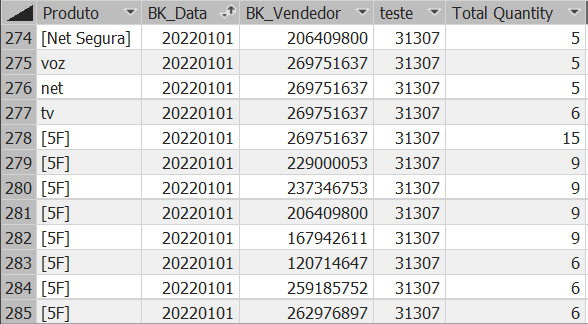
I am trying to count nº of rows from a column in Dim_Chamadas table (using a filter) grouping by the columns in the "Summarize" formula. The problem is that it isn't grouping by those columns, it is counting all the rows from the Dim_Chamadas where [1nive] = 'Sale" (Column "teste"). The "Total Quantity" column is  indeed grouping however. Can someone help me?


=ADDCOLUMNS ( SUMMARIZE (Fact_Tipificacao,[Produto],Dim_Data[BK_Data],Dim_Vendedor[BK_Vendedor]),"Total Quantity",Calculate(SUM ( Fact_Tipification[Quantity] )),"teste", COUNTROWS( Filter( Dim_Chamadas,Dim_Chamadas[1Nivel] = "Sale")))


RESULT:

jjhh.PNG 


Solution:


Ok apparently i had to change the filter in diagram between Dim_Chamadas and Fact_Tipification to Both ways. It was "one way". it is now working.

1 ACCEPTED SOLUTION
Anonymous
Not applicable

Hi @Anonymous ,


According to your statement, I think Dim_Chamadas table should have directly relationship with Fact_Tipificacao. This issue should be caused by relationship, like many to many. Here I suggest you to add some filter in "teste" part.

Code should look like as below. You need to replace the Dim_Chamadas[ColumnName]  and Fact_Tipificacao[ColumnName] by related column name in both tables.

table =
ADDCOLUMNS (
    SUMMARIZE (
        Fact_Tipificacao,
        [Produto],
        Dim_Data[BK_Data],
        Dim_Vendedor[BK_Vendedor]
    ),
    "Total Quantity", CALCULATE ( SUM ( Fact_Tipification[Quantity] ) ),
    "teste",
        COUNTROWS (
            FILTER (
                Dim_Chamadas,
                Dim_Chamadas[ColumnName] = EARLIER ( Fact_Tipificacao[ColumnName] )
                    && Dim_Chamadas[1Nivel] = "Sale"
            )
        )
)


Best Regards,
Rico Zhou


If this post helps, then please consider Accept it as the solution to help the other members find it more quickly.


View solution in original post

2 REPLIES 2
Anonymous
Not applicable

Hi @Anonymous ,


According to your statement, I think Dim_Chamadas table should have directly relationship with Fact_Tipificacao. This issue should be caused by relationship, like many to many. Here I suggest you to add some filter in "teste" part.

Code should look like as below. You need to replace the Dim_Chamadas[ColumnName]  and Fact_Tipificacao[ColumnName] by related column name in both tables.

table =
ADDCOLUMNS (
    SUMMARIZE (
        Fact_Tipificacao,
        [Produto],
        Dim_Data[BK_Data],
        Dim_Vendedor[BK_Vendedor]
    ),
    "Total Quantity", CALCULATE ( SUM ( Fact_Tipification[Quantity] ) ),
    "teste",
        COUNTROWS (
            FILTER (
                Dim_Chamadas,
                Dim_Chamadas[ColumnName] = EARLIER ( Fact_Tipificacao[ColumnName] )
                    && Dim_Chamadas[1Nivel] = "Sale"
            )
        )
)


Best Regards,
Rico Zhou


If this post helps, then please consider Accept it as the solution to help the other members find it more quickly.


ryan_mayu
Super User
Super User

could you pls provide the sample data and the expected result based on the sample data?


Did I answer your question? Mark my post as a solution!

Proud to be a Super User!


Helpful resources

Announcements
Fabric Data Days is here Carousel

Data Days 2026

Don't miss out on Data Days, June 15 through August 7. Learn Fabric, Power BI, SQL, AI and more.

Power BI DataViz World Championships carousel

Power BI DataViz World Championships - June 2026

A new Power BI DataViz World Championship is coming this June! Don't miss out on submitting your entry.