cancel
Showing results for 
Search instead for 
Did you mean: 

July 7 - July 17 | Round 2 of the Power BI Dataviz World Championships. Don't miss your chance! Learn more

Reply
elemesey
Frequent Visitor

Count Value Lookup

Good day everyone,

I'm a beginner to DAX and need assistance. I have a list of customers that have made sales, and I'd like to know the total number of customers who have not made sales during the specified time frame. 

elemesey_0-1694762257179.png


I'm also open to suggestions for the proper name for this subject 😅 When you view this post, I appreciate all of your help 😊

Thank you.

Test File - https://drive.google.com/file/d/1kbQsdWT47QYGqnHOemsU040vrYcETNM1/view?usp=drive_link 

1 ACCEPTED SOLUTION
Anonymous
Not applicable

Hi @elemesey ,


I suggest you to try code as below.

Count of Customer no sales =
VAR _COUNTBYREGION =
    SUMMARIZE (
        Sales,
        Sales[Region],
        "COUNTBYREGION",
            CALCULATE (
                DISTINCTCOUNT ( Allcustomer[Customer] ),
                ALLEXCEPT ( Allcustomer, Sales[Region] )
            )
    )
RETURN
    SUMX ( _COUNTBYREGION, [COUNTBYREGION] )
        - CALCULATE ( DISTINCTCOUNT ( Allcustomer[Customer] ) )

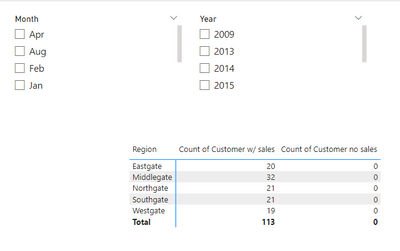
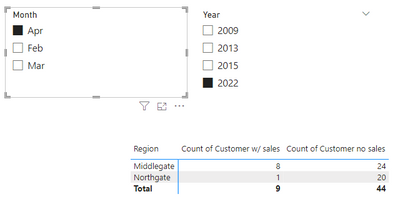
Result is as below.

vrzhoumsft_0-1695007646740.pngvrzhoumsft_1-1695007663537.png


Best Regards,

Rico Zhou


If this post helps, then please consider Accept it as the solution to help the other members find it more quickly.

View solution in original post

3 REPLIES 3
Ahmedx
Super User
Super User

write what result you want to see

Anonymous
Not applicable

Hi @elemesey ,


I suggest you to try code as below.

Count of Customer no sales =
VAR _COUNTBYREGION =
    SUMMARIZE (
        Sales,
        Sales[Region],
        "COUNTBYREGION",
            CALCULATE (
                DISTINCTCOUNT ( Allcustomer[Customer] ),
                ALLEXCEPT ( Allcustomer, Sales[Region] )
            )
    )
RETURN
    SUMX ( _COUNTBYREGION, [COUNTBYREGION] )
        - CALCULATE ( DISTINCTCOUNT ( Allcustomer[Customer] ) )

Result is as below.

vrzhoumsft_0-1695007646740.pngvrzhoumsft_1-1695007663537.png


Best Regards,

Rico Zhou


If this post helps, then please consider Accept it as the solution to help the other members find it more quickly.

Hi @Anonymous,

It works fantastic, thank you very much! 😊

Helpful resources

Announcements
FabCon and SQLCon Barcelona 2026

FabCon & SQLCon – Barcelona 2026

Join us in Barcelona for FabCon and SQLCon, the Fabric, Power BI, SQL, and AI community event. Save €200 with code FABCMTY200.

60 days of Data Days Carousel

Data Days 2026

Join Fabric Data Days 2026: 60 days of free live/on-demand sessions, challenges, study groups, and certification opportunities.

Power BI DataViz World Championships carousel

Power BI DataViz World Championships - June 2026

A new Power BI DataViz World Championship is coming this June! Don't miss out on submitting your entry.