cancel
Showing results for 
Search instead for 
Did you mean: 

Try your skills in the Power BI Dataviz World Championship! Round one ends June 26. Join now

Reply
elemesey
Frequent Visitor

Count Value Lookup

Good day everyone,

I'm a beginner to DAX and need assistance. I have a list of customers that have made sales, and I'd like to know the total number of customers who have not made sales during the specified time frame. 

elemesey_0-1694762257179.png


I'm also open to suggestions for the proper name for this subject 😅 When you view this post, I appreciate all of your help 😊

Thank you.

Test File - https://drive.google.com/file/d/1kbQsdWT47QYGqnHOemsU040vrYcETNM1/view?usp=drive_link 

1 ACCEPTED SOLUTION
Anonymous
Not applicable

Hi @elemesey ,


I suggest you to try code as below.

Count of Customer no sales =
VAR _COUNTBYREGION =
    SUMMARIZE (
        Sales,
        Sales[Region],
        "COUNTBYREGION",
            CALCULATE (
                DISTINCTCOUNT ( Allcustomer[Customer] ),
                ALLEXCEPT ( Allcustomer, Sales[Region] )
            )
    )
RETURN
    SUMX ( _COUNTBYREGION, [COUNTBYREGION] )
        - CALCULATE ( DISTINCTCOUNT ( Allcustomer[Customer] ) )

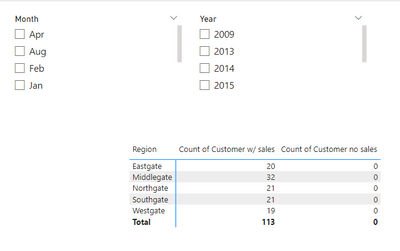
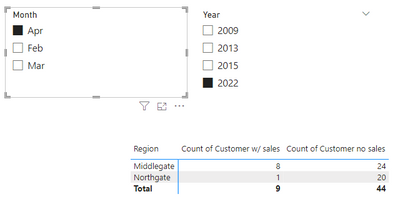
Result is as below.

vrzhoumsft_0-1695007646740.pngvrzhoumsft_1-1695007663537.png


Best Regards,

Rico Zhou


If this post helps, then please consider Accept it as the solution to help the other members find it more quickly.

View solution in original post

3 REPLIES 3
Ahmedx
Super User
Super User

write what result you want to see

Anonymous
Not applicable

Hi @elemesey ,


I suggest you to try code as below.

Count of Customer no sales =
VAR _COUNTBYREGION =
    SUMMARIZE (
        Sales,
        Sales[Region],
        "COUNTBYREGION",
            CALCULATE (
                DISTINCTCOUNT ( Allcustomer[Customer] ),
                ALLEXCEPT ( Allcustomer, Sales[Region] )
            )
    )
RETURN
    SUMX ( _COUNTBYREGION, [COUNTBYREGION] )
        - CALCULATE ( DISTINCTCOUNT ( Allcustomer[Customer] ) )

Result is as below.

vrzhoumsft_0-1695007646740.pngvrzhoumsft_1-1695007663537.png


Best Regards,

Rico Zhou


If this post helps, then please consider Accept it as the solution to help the other members find it more quickly.

Hi @Anonymous,

It works fantastic, thank you very much! 😊

Helpful resources

Announcements
Fabric Data Days is here Carousel

Data Days 2026

Don't miss out on Data Days, June 15 through August 7. Learn Fabric, Power BI, SQL, AI and more.

May Power BI Update Carousel

Power BI Monthly Update - May 2026

Check out the May 2026 Power BI update to learn about new features.

Power BI DataViz World Championships carousel

Power BI DataViz World Championships - June 2026

A new Power BI DataViz World Championship is coming this June! Don't miss out on submitting your entry.