Join us at FabCon Atlanta from March 16 - 20, 2026, for the ultimate Fabric, Power BI, AI and SQL community-led event. Save $200 with code FABCOMM.
Register now!Learn from the best! Meet the four finalists headed to the FINALS of the Power BI Dataviz World Championships! Register now
Hi,
I was wondering if someone can help
I have a model set up using direct query.
I have two column each have duplicates I want to be able to create a measure that would count only unique rows from BOTH columns
For Example:
Column A Column B
1 A
2 B
3 C
4 D
1 A
4 E
3 C
I was be expecting a total of 5 unique rows (what I want the measure to show).
As I have 2 rows that are Column A: 1 and Column B: A (should only count one row)
I also have two rows that are Column A: 3 and Column B: C (should only count one row)
I also have two other rows:
Is there any way to achieve this?
Thanks in advance,
Boycie92
Solved! Go to Solution.
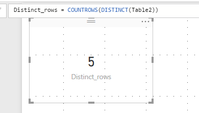
MEASURE = COUNTROWS ( DISTINCT ( Table_Name ) )
Hi @Boycie92,
After test, the measure formula @Zubair_Muhammad posted is right. You can create a card visual to show the result.
Please mark the right reply as answer, so more people will find workaround easily and clearly.
Best Regards,
Angelia
You could combine 2 columns into a new column:
Combine = COMBINEVALUES("_", Table[ColumnA], Table[ColumnB])
And then do a distinct count on the new column:
Unique rows = DISTINCTCOUNT(Table[Combine])
MEASURE = COUNTROWS ( DISTINCT ( Table_Name ) )
Share feedback directly with Fabric product managers, participate in targeted research studies and influence the Fabric roadmap.
Check out the February 2026 Power BI update to learn about new features.
| User | Count |
|---|---|
| 61 | |
| 54 | |
| 41 | |
| 17 | |
| 13 |
| User | Count |
|---|---|
| 106 | |
| 99 | |
| 38 | |
| 29 | |
| 28 |