Share feedback directly with Fabric product managers, participate in targeted research studies and influence the Fabric roadmap.
Sign up nowGet Fabric certified for FREE! Don't miss your chance! Learn more
Hi,
I was wondering if someone can help
I have a model set up using direct query.
I have two column each have duplicates I want to be able to create a measure that would count only unique rows from BOTH columns
For Example:
Column A Column B
1 A
2 B
3 C
4 D
1 A
4 E
3 C
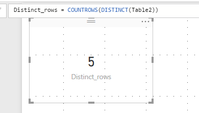
I was be expecting a total of 5 unique rows (what I want the measure to show).
As I have 2 rows that are Column A: 1 and Column B: A (should only count one row)
I also have two rows that are Column A: 3 and Column B: C (should only count one row)
I also have two other rows:
Is there any way to achieve this?
Thanks in advance,
Boycie92
Solved! Go to Solution.
MEASURE = COUNTROWS ( DISTINCT ( Table_Name ) )
Hi @Boycie92,
After test, the measure formula @Zubair_Muhammad posted is right. You can create a card visual to show the result.
Please mark the right reply as answer, so more people will find workaround easily and clearly.
Best Regards,
Angelia
You could combine 2 columns into a new column:
Combine = COMBINEVALUES("_", Table[ColumnA], Table[ColumnB])
And then do a distinct count on the new column:
Unique rows = DISTINCTCOUNT(Table[Combine])
MEASURE = COUNTROWS ( DISTINCT ( Table_Name ) )
Share feedback directly with Fabric product managers, participate in targeted research studies and influence the Fabric roadmap.
| User | Count |
|---|---|
| 63 | |
| 62 | |
| 42 | |
| 19 | |
| 16 |
| User | Count |
|---|---|
| 113 | |
| 105 | |
| 36 | |
| 28 | |
| 28 |