This time we’re going bigger than ever. Fabric, Power BI, SQL, AI and more. We're covering it all. You won't want to miss it.
Learn moreDid you hear? There's a new SQL AI Developer certification (DP-800). Start preparing now and be one of the first to get certified. Register now
Hi,
Week 1 of power bi novice here!
I am struggling to get a measure to count what i need it to count.
I have 2 coloumns that i need to count based the values that are in there. Subcategory and quintile. Subcategory is the name of a product category and quintile is a letter given the a product within that category to highlight its importance. The letters are ABCDE
I want to count the number of A lines within a category and so on with b,c,d,e as sepereate mesures. However the challenge is. That the data set is at Product level so the subcategory field has duplicates within it. I can get it to count the total number of A lines but i need the measure to take into account the duplication of values that appear in the subcategory coloumn. The formula that im using to get it to this stage is below.
Solved! Go to Solution.
Hi AlexCorbin,
We can use the following DAX query:
Blines = CALCULATE(COUNTROWS(CKBKCRTABLE),FILTER(ALLEXCEPT(CKBKCRTABLE,CKBKCRTABLE[Subcategory]),CKBKCRTABLE[Quintile] = "B"))
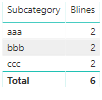
The result will like below:
Best Regards,
Teige
Hi,
Please share some data and show the expected result.
Hi AlexCorbin,
We can use the following DAX query:
Blines = CALCULATE(COUNTROWS(CKBKCRTABLE),FILTER(ALLEXCEPT(CKBKCRTABLE,CKBKCRTABLE[Subcategory]),CKBKCRTABLE[Quintile] = "B"))
The result will like below:
Best Regards,
Teige
Check out the April 2026 Power BI update to learn about new features.
Sign up to receive a private message when registration opens and key events begin.
If you have recently started exploring Fabric, we'd love to hear how it's going. Your feedback can help with product improvements.
| User | Count |
|---|---|
| 34 | |
| 32 | |
| 25 | |
| 21 | |
| 16 |
| User | Count |
|---|---|
| 61 | |
| 49 | |
| 28 | |
| 23 | |
| 23 |