cancel
Showing results for 
Search instead for 
Did you mean: 

Join the FabCon + SQLCon recap series. Up next: Power BI, Real-Time Intelligence, IQ and AI, and Data Factory take center stage. All sessions are available on-demand after the live show. Register now

Reply
Anonymous
Not applicable

Count Help!

Hi,

Week 1 of power bi novice here!


I am struggling to get a measure to count what i need it to count. 


I have 2 coloumns that i need to count based the values that are in there.  Subcategory and quintile. Subcategory is the name of a product category and quintile is a letter given the a product within that category to highlight its importance. The letters are ABCDE


I want to count the number of A lines within a category and so on with b,c,d,e as sepereate mesures. However the challenge is. That the data set is at Product level so the subcategory field has duplicates within it. I can get it to count the total number of A lines but i need the measure to take into account the duplication of values that appear in the subcategory coloumn. The formula that im using to get it to this stage is below. 


BLines=CALCULATE(COUNTA(CKBKCRTABLE[Quintile]),FILTER(CKBKCRTABLE,CKBKCRTABLE[Quintile]="B"),ALL(CKBKCRTABLE[Subcategory]))
1 ACCEPTED SOLUTION
TeigeGao
Solution Sage
Solution Sage

Hi AlexCorbin,

We can use the following DAX query:

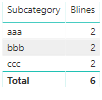
Blines = CALCULATE(COUNTROWS(CKBKCRTABLE),FILTER(ALLEXCEPT(CKBKCRTABLE,CKBKCRTABLE[Subcategory]),CKBKCRTABLE[Quintile] = "B"))

The result will like below:

111111.png

Best Regards,

Teige

View solution in original post

2 REPLIES 2
Ashish_Mathur
Super User
Super User

Hi,

Please share some data and show the expected result.


Regards,
Ashish Mathur
http://www.ashishmathur.com
https://www.linkedin.com/in/excelenthusiasts/
TeigeGao
Solution Sage
Solution Sage

Hi AlexCorbin,

We can use the following DAX query:

Blines = CALCULATE(COUNTROWS(CKBKCRTABLE),FILTER(ALLEXCEPT(CKBKCRTABLE,CKBKCRTABLE[Subcategory]),CKBKCRTABLE[Quintile] = "B"))

The result will like below:

111111.png

Best Regards,

Teige

Helpful resources

Announcements
April Power BI Update Carousel

Power BI Monthly Update - April 2026

Check out the April 2026 Power BI update to learn about new features.

New to Fabric survey Carousel

New to Fabric Survey

If you have recently started exploring Fabric, we'd love to hear how it's going. Your feedback can help with product improvements.

Power BI DataViz World Championships carousel

Power BI DataViz World Championships - June 2026

A new Power BI DataViz World Championship is coming this June! Don't miss out on submitting your entry.

FabCon and SQLCon Highlights Carousel

FabCon &SQLCon Highlights

Experience the highlights from FabCon & SQLCon, available live and on-demand starting April 14th.