Join us in Barcelona for FabCon and SQLCon, September 28 - October 1, 2026.
This is best Fabric, Power BI, SQL and AI community event. How do we know? The last event sold out! Save €200 with code FABCMTY200.
Register now- Power BI forums
- Get Help with Power BI
- Desktop
- Service
- Report Server
- Power Query
- Mobile Apps
- Developer
- DAX Commands and Tips
- Custom Visuals Development Discussion
- Health and Life Sciences
- Power BI Spanish forums
- Translated Spanish Desktop
- Training and Consulting
- Instructor Led Training
- Dashboard in a Day for Women, by Women
- Galleries
- Data Stories Gallery
- Themes Gallery
- Contests Gallery
- QuickViz Gallery
- Quick Measures Gallery
- Visual Calculations Gallery
- Fabric Apps Gallery
- Notebook Gallery
- Translytical Task Flow Gallery
- TMDL Gallery
- R Script Showcase
- Webinars and Video Gallery
- Ideas
- Custom Visuals Ideas (read-only)
- Issues
- Issues
- Events
- Upcoming Events
The Fabric community is upgrading! Read all of the details including the timeline and what you can expect. Learn more
- Power BI forums
- Forums
- Get Help with Power BI
- Desktop
- Re: Count/CountA counting wrong category
- Subscribe to RSS Feed
- Mark Topic as New
- Mark Topic as Read
- Float this Topic for Current User
- Bookmark
- Subscribe
- Printer Friendly Page

- Mark as New
- Bookmark
- Subscribe
- Mute
- Subscribe to RSS Feed
- Permalink
- Report Inappropriate Content
Count/CountA counting wrong category
This is such a simple problem that I have spent HOURS trying to solve with no avail.
I have a table with plenty of categories, say A, B, C, D, etc. I have a measure that Counts values in column A, and filters them by name into a table. I have another identical measure for column B, but for some reason, it just returns identical values as the column A measure. It makes no sense and I'm ripping my hair out over here.
My table looks like this:
Name | Count of A | Count of B
Name1 3 3
Name2 7 7
Name3 4 4
and so on when A and B in reality have very different values. I don't understand what's happening. Please help me <3.
Solved! Go to Solution.


- Mark as New
- Bookmark
- Subscribe
- Mute
- Subscribe to RSS Feed
- Permalink
- Report Inappropriate Content
Hi, @Anonymous
Based on your description, I assume that you want to filter by player and get win% for each player. I created data to reproduce your scenario. The pbix file is attached in the end.
Table:
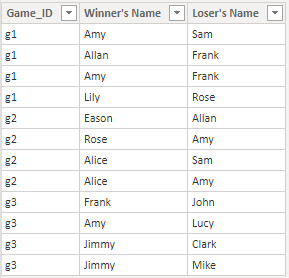
Names(a calculated table):
Names =
DISTINCT(
    UNION(
        DISTINCT('Table'[Winner's Name]),
        DISTINCT('Table'[Loser's Name])
    )
)
You may create a measure as below.
Win % =
var result =
DIVIDE(
    COUNTROWS(
        FILTER(
            ALL('Table'),
            [Winner's Name]=SELECTEDVALUE(Names[Name])
        )
    ),
    COUNTROWS(
        FILTER(
            ALL('Table'),
            OR(
                [Winner's Name]=SELECTEDVALUE(Names[Name]),
                [Loser's Name]=SELECTEDVALUE(Names[Name])
            )
        )
    )
)
return
IF(
    ISBLANK(result),
    0,
    result
)
Result:
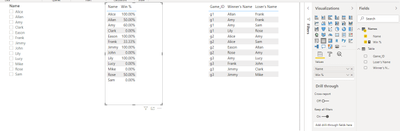
Best Regards
Allan
If this post helps, then please consider Accept it as the solution to help the other members find it more quickly.
- Mark as New
- Bookmark
- Subscribe
- Mute
- Subscribe to RSS Feed
- Permalink
- Report Inappropriate Content
Hi, @Anonymous
Based on your description, I assume that you want to filter by player and get win% for each player. I created data to reproduce your scenario. The pbix file is attached in the end.
Table:
Names(a calculated table):
Names =
DISTINCT(
    UNION(
        DISTINCT('Table'[Winner's Name]),
        DISTINCT('Table'[Loser's Name])
    )
)
You may create a measure as below.
Win % =
var result =
DIVIDE(
    COUNTROWS(
        FILTER(
            ALL('Table'),
            [Winner's Name]=SELECTEDVALUE(Names[Name])
        )
    ),
    COUNTROWS(
        FILTER(
            ALL('Table'),
            OR(
                [Winner's Name]=SELECTEDVALUE(Names[Name]),
                [Loser's Name]=SELECTEDVALUE(Names[Name])
            )
        )
    )
)
return
IF(
    ISBLANK(result),
    0,
    result
)
Result:
Best Regards
Allan
If this post helps, then please consider Accept it as the solution to help the other members find it more quickly.


- Mark as New
- Bookmark
- Subscribe
- Mute
- Subscribe to RSS Feed
- Permalink
- Report Inappropriate Content
Hello @Anonymous ,
Try ignoring any filters applied on the column, on which you are calculating Measure 'B'. You can achieve this in your DAX, by using ALL( ) function in your filter context of DAX.
Or you can share your masked DAX, so that I can get more clarity on your issue.
- Mark as New
- Bookmark
- Subscribe
- Mute
- Subscribe to RSS Feed
- Permalink
- Report Inappropriate Content
Pls see above explanation ❤️


- Mark as New
- Bookmark
- Subscribe
- Mute
- Subscribe to RSS Feed
- Permalink
- Report Inappropriate Content
Please post a sample data and your formulas.
Dane Belarmino | Microsoft MVP | Proud to be a Super User!
Did I answer your question? Mark my post as a solution!
"Tell me and I’ll forget; show me and I may remember; involve me and I’ll understand."
Need Power BI consultation, get in touch with me on LinkedIn or hire me on UpWork.
Learn with me on YouTube @DAXJutsu or follow my page on Facebook @DAXJutsuPBI.
- Mark as New
- Bookmark
- Subscribe
- Mute
- Subscribe to RSS Feed
- Permalink
- Report Inappropriate Content
I can't provide data because it's sensitive. However, I have isolated the problem.
My dataset is essentially [game_id] [winner's name] [loser's name] .
The reason I am having issues is that when I put [Count of Wins] and [Count of Losses] into a table, I don't have a common "name" column to filter them both into.

- Mark as New
- Bookmark
- Subscribe
- Mute
- Subscribe to RSS Feed
- Permalink
- Report Inappropriate Content
- Mark as New
- Bookmark
- Subscribe
- Mute
- Subscribe to RSS Feed
- Permalink
- Report Inappropriate Content
I do not. I just want a way to filter by player and get someone's win%, etc
- Mark as New
- Bookmark
- Subscribe
- Mute
- Subscribe to RSS Feed
- Permalink
- Report Inappropriate Content
Hello @Anonymous ,
Is your data in this format ?
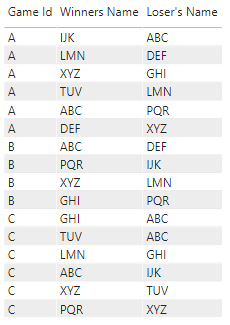
Please give some sample masked data, so that we get better idea. You can also give the sample output which you expect.
Helpful resources

FabCon & SQLCon – Barcelona 2026
Join us in Barcelona for FabCon and SQLCon, the Fabric, Power BI, SQL, and AI community event. Save €200 with code FABCMTY200.

Power BI DataViz World Championships - June 2026
A new Power BI DataViz World Championship is coming this June! Don't miss out on submitting your entry.

| User | Count |
|---|---|
| 27 | |
| 22 | |
| 20 | |
| 18 | |
| 14 |


| User | Count |
|---|---|
| 25 | |
| 20 | |
| 20 | |
| 20 | |
| 20 |


