Get Fabric or SQL Certified for Free.
Get certified for free when you join Fabric Data Days 2026 and dive into Fabric, Power BI, SQL, AI, and other essential data skills.
Join now- Power BI forums
- Get Help with Power BI
- Desktop
- Service
- Report Server
- Power Query
- Mobile Apps
- Developer
- DAX Commands and Tips
- Custom Visuals Development Discussion
- Health and Life Sciences
- Power BI Spanish forums
- Translated Spanish Desktop
- Training and Consulting
- Instructor Led Training
- Dashboard in a Day for Women, by Women
- Galleries
- Data Stories Gallery
- Themes Gallery
- Contests Gallery
- QuickViz Gallery
- Quick Measures Gallery
- Visual Calculations Gallery
- Fabric Apps Gallery
- Notebook Gallery
- Translytical Task Flow Gallery
- TMDL Gallery
- R Script Showcase
- Webinars and Video Gallery
- Ideas
- Custom Visuals Ideas (read-only)
- Issues
- Issues
- Events
- Upcoming Events
July 7 - July 17 | Round 2 of the Power BI Dataviz World Championships. Don't miss your chance! Learn more
- Power BI forums
- Forums
- Get Help with Power BI
- Desktop
- Re: Count/CountA counting wrong category
- Subscribe to RSS Feed
- Mark Topic as New
- Mark Topic as Read
- Float this Topic for Current User
- Bookmark
- Subscribe
- Printer Friendly Page

- Mark as New
- Bookmark
- Subscribe
- Mute
- Subscribe to RSS Feed
- Permalink
- Report Inappropriate Content
Count/CountA counting wrong category
This is such a simple problem that I have spent HOURS trying to solve with no avail.
I have a table with plenty of categories, say A, B, C, D, etc. I have a measure that Counts values in column A, and filters them by name into a table. I have another identical measure for column B, but for some reason, it just returns identical values as the column A measure. It makes no sense and I'm ripping my hair out over here.
My table looks like this:
Name | Count of A | Count of B
Name1 3 3
Name2 7 7
Name3 4 4
and so on when A and B in reality have very different values. I don't understand what's happening. Please help me <3.
Solved! Go to Solution.


- Mark as New
- Bookmark
- Subscribe
- Mute
- Subscribe to RSS Feed
- Permalink
- Report Inappropriate Content
Hi, @Anonymous
Based on your description, I assume that you want to filter by player and get win% for each player. I created data to reproduce your scenario. The pbix file is attached in the end.
Table:
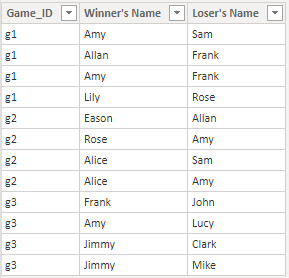
Names(a calculated table):
Names =
DISTINCT(
    UNION(
        DISTINCT('Table'[Winner's Name]),
        DISTINCT('Table'[Loser's Name])
    )
)
You may create a measure as below.
Win % =
var result =
DIVIDE(
    COUNTROWS(
        FILTER(
            ALL('Table'),
            [Winner's Name]=SELECTEDVALUE(Names[Name])
        )
    ),
    COUNTROWS(
        FILTER(
            ALL('Table'),
            OR(
                [Winner's Name]=SELECTEDVALUE(Names[Name]),
                [Loser's Name]=SELECTEDVALUE(Names[Name])
            )
        )
    )
)
return
IF(
    ISBLANK(result),
    0,
    result
)
Result:
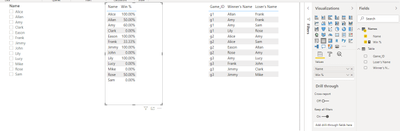
Best Regards
Allan
If this post helps, then please consider Accept it as the solution to help the other members find it more quickly.
- Mark as New
- Bookmark
- Subscribe
- Mute
- Subscribe to RSS Feed
- Permalink
- Report Inappropriate Content
Hi, @Anonymous
Based on your description, I assume that you want to filter by player and get win% for each player. I created data to reproduce your scenario. The pbix file is attached in the end.
Table:
Names(a calculated table):
Names =
DISTINCT(
    UNION(
        DISTINCT('Table'[Winner's Name]),
        DISTINCT('Table'[Loser's Name])
    )
)
You may create a measure as below.
Win % =
var result =
DIVIDE(
    COUNTROWS(
        FILTER(
            ALL('Table'),
            [Winner's Name]=SELECTEDVALUE(Names[Name])
        )
    ),
    COUNTROWS(
        FILTER(
            ALL('Table'),
            OR(
                [Winner's Name]=SELECTEDVALUE(Names[Name]),
                [Loser's Name]=SELECTEDVALUE(Names[Name])
            )
        )
    )
)
return
IF(
    ISBLANK(result),
    0,
    result
)
Result:
Best Regards
Allan
If this post helps, then please consider Accept it as the solution to help the other members find it more quickly.


- Mark as New
- Bookmark
- Subscribe
- Mute
- Subscribe to RSS Feed
- Permalink
- Report Inappropriate Content
Hello @Anonymous ,
Try ignoring any filters applied on the column, on which you are calculating Measure 'B'. You can achieve this in your DAX, by using ALL( ) function in your filter context of DAX.
Or you can share your masked DAX, so that I can get more clarity on your issue.
- Mark as New
- Bookmark
- Subscribe
- Mute
- Subscribe to RSS Feed
- Permalink
- Report Inappropriate Content
Pls see above explanation ❤️


- Mark as New
- Bookmark
- Subscribe
- Mute
- Subscribe to RSS Feed
- Permalink
- Report Inappropriate Content
Please post a sample data and your formulas.
Dane Belarmino | Microsoft MVP | Proud to be a Super User!
Did I answer your question? Mark my post as a solution!
"Tell me and I’ll forget; show me and I may remember; involve me and I’ll understand."
Need Power BI consultation, get in touch with me on LinkedIn or hire me on UpWork.
Learn with me on YouTube @DAXJutsu or follow my page on Facebook @DAXJutsuPBI.
- Mark as New
- Bookmark
- Subscribe
- Mute
- Subscribe to RSS Feed
- Permalink
- Report Inappropriate Content
I can't provide data because it's sensitive. However, I have isolated the problem.
My dataset is essentially [game_id] [winner's name] [loser's name] .
The reason I am having issues is that when I put [Count of Wins] and [Count of Losses] into a table, I don't have a common "name" column to filter them both into.

- Mark as New
- Bookmark
- Subscribe
- Mute
- Subscribe to RSS Feed
- Permalink
- Report Inappropriate Content
- Mark as New
- Bookmark
- Subscribe
- Mute
- Subscribe to RSS Feed
- Permalink
- Report Inappropriate Content
I do not. I just want a way to filter by player and get someone's win%, etc
- Mark as New
- Bookmark
- Subscribe
- Mute
- Subscribe to RSS Feed
- Permalink
- Report Inappropriate Content
Hello @Anonymous ,
Is your data in this format ?
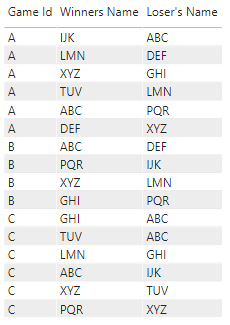
Please give some sample masked data, so that we get better idea. You can also give the sample output which you expect.
Helpful resources

FabCon & SQLCon – Barcelona 2026
Join us in Barcelona for FabCon and SQLCon, the Fabric, Power BI, SQL, and AI community event. Save €200 with code FABCMTY200.

Fabric Community Sticker Challenge - Barcelona 2026
If you love stickers, then you will definitely want to check out our community sticker challenge, Barcelona edition!

Power BI Monthly Update - July 2026
Check out the July 2026 Power BI update to learn about new features.

Power BI DataViz World Championships - June 2026
A new Power BI DataViz World Championship is coming this June! Don't miss out on submitting your entry.

| User | Count |
|---|---|
| 30 | |
| 26 | |
| 23 | |
| 23 | |
| 14 |


| User | Count |
|---|---|
| 47 | |
| 33 | |
| 20 | |
| 18 | |
| 16 |


