cancel
Showing results for 
Search instead for 
Did you mean: 

The Power BI Data Visualization World Championships is back! Get ahead of the game and start preparing now! Learn more

Reply
Anonymous
Not applicable

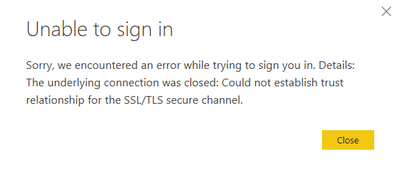
Could not establish trust relationship for the ssl/tls power bi

Hi there ! 


Hope you're doing well. I'm currently facing an issue with Power BI desktop. When I try to connect to my account it show the following message : 


othmanbelmouzo_0-1605537784236.png

Can anyone help me ?

1 ACCEPTED SOLUTION
BenRosing
Frequent Visitor

I had the same problem, and this worked for me from this solution:


Clear the Secure Sockets Layer (SSL) state. To do this, follow these steps:

  1. In Internet Explorer, click Tools, and then click Internet Options.
  2. Click the Content tab, and then click Clear SSL state.

View solution in original post

6 REPLIES 6
BenRosing
Frequent Visitor

I had the same problem, and this worked for me from this solution:


Clear the Secure Sockets Layer (SSL) state. To do this, follow these steps:

  1. In Internet Explorer, click Tools, and then click Internet Options.
  2. Click the Content tab, and then click Clear SSL state.

  1. Open the Start menu.
  2. Search for and open Internet Options.
  3. In the dialog box that appears, select the Content tab.
  4. Click Clear SSL State.

    Use the above steps if you are using edge or chrome. 
    @BenRosing - your solution worked for me. 
Anonymous
Not applicable

Hi BenRosing,


Thanks for the solution. We can also solve the problem by uncheking "Enable certificate revocation check" under Certificate revocation check in Security. (File -> Options and Setings -> -> Options -> Security -> Cetificate revocation check.)

Thank you for the solution I appreciate your help.


Best regards,


Othman


othmanbelmouzo_0-1605715933215.png


Help_VACC
New Member

I am also having this issue since updating to the latest version (November 2020) of Power BI Desktop. I used it as recently as last week without issues, but now unable to Publish Dashboards to my workspaces.

vanessafvg
Super User
Super User

are you logging in via a network?   could be a firewall issue.    Have you ever logged in before?  have you tried loggin out of office 365 if thats what you logged in with and try again.


If I took the time to answer your question and I came up with a solution, please mark my post as a solution and /or give kudos freely for the effort 🙂 Thank you!

Proud to be a Super User!


Anonymous
Not applicable

Hi vanessafvg,


Yes, I'm connecting ia a network. It's not the first time, I had been logging in several times in the last 4 months. I tried to log out from Office 365 nut still don't work.

Helpful resources

Announcements
Power BI DataViz World Championships

Power BI Dataviz World Championships

The Power BI Data Visualization World Championships is back! Get ahead of the game and start preparing now!

December 2025 Power BI Update Carousel

Power BI Monthly Update - December 2025

Check out the December 2025 Power BI Holiday Recap!

FabCon Atlanta 2026 carousel

FabCon Atlanta 2026

Join us at FabCon Atlanta, March 16-20, for the ultimate Fabric, Power BI, AI and SQL community-led event. Save $200 with code FABCOMM.