This is best Fabric, Power BI, SQL and AI community event. How do we know? The last event sold out! Save €200 with code FABCMTY200.
Register nowJuly 28 - August 9 | Final Round of the Power BI Dataviz World Championships. This is your chance. Learn more
Hi all,
I have a table calendar with data in each hour.
I created a slicer for date between.
I want to create a dropdown list which calculate today, last 7 days,... and when I choose one value, slicer date between date will reflect. (Or filter all data)
I know it has a slicer call Relative can support this but can I set up this.
Solved! Go to Solution.
Hi @Anonymous
A workaround below:
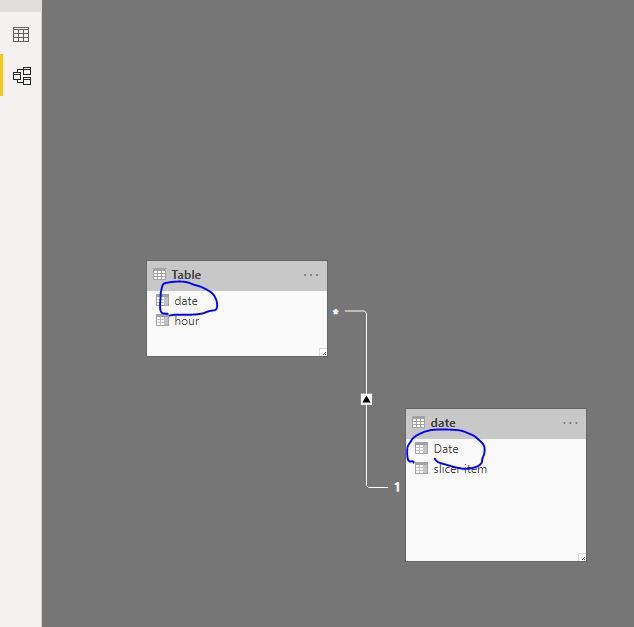
Create a date table
date = CALENDAR(MIN('Table'[date]),TODAY())
add a column
slicer item =
SWITCH (
TRUE (),
[Date]
= TODAY (), "today",
DATEDIFF (
[Date],
TODAY (),
DAY
) <= 7
&& [Date]
< TODAY (), "last 7 days",
DATEDIFF (
[Date],
TODAY (),
DAY
) <= 30
&& [Date]
< TODAY (), "last 30 days"
)
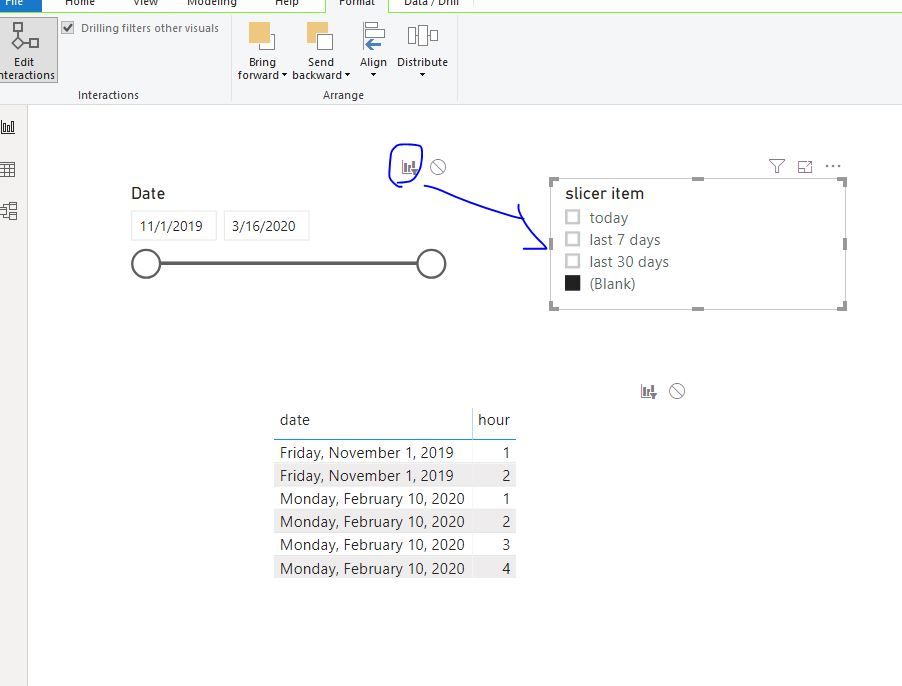
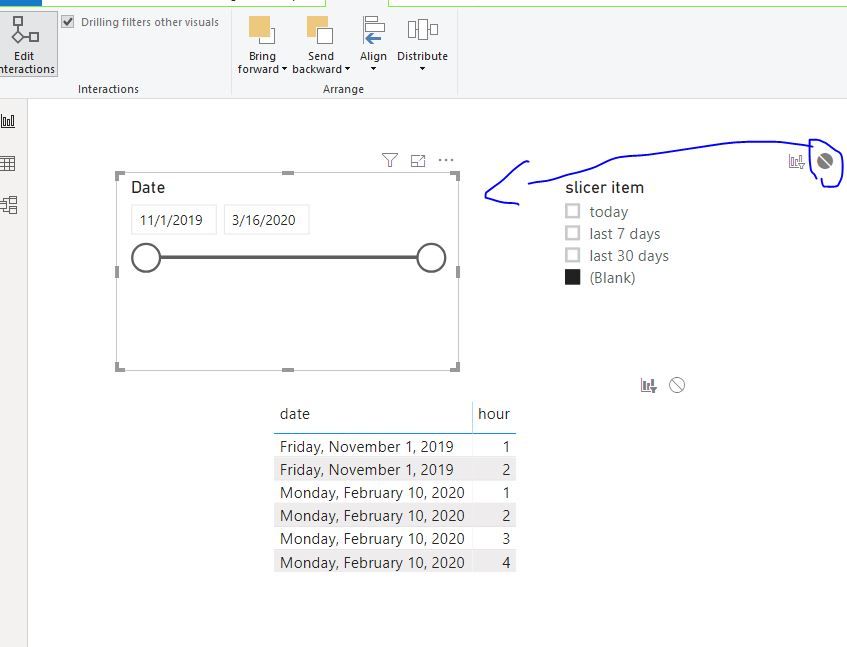
Then edit interactions as below
Best Regards
Maggie
Community Support Team _ Maggie Li
If this post helps, then please consider Accept it as the solution to help the other members find it more quickly.
Hello,
i have tried your solution, but I came across an issue. When you use this formula, you will have something like this:
10/11/2021 = today
10/10/2021 = yesterday
10/09/2021 = last 7 days
10/08/2021 = last 7 days
10/07/2021 = last 7 days
10/06/2021 = last 7 days
10/05/2021 = last 7 days
10/04/2021 = last 30 days
....
and then, when you filter last 7 days, you only get data for 10/09-10/4 instead of 10/11-10/4. Same for last 30 days. Do you get my point?
I even tried to build different columns like "last week", "last month", "last year", but then I have problem with hierarchies. Anyone has solution for that?
Thank you.
Best Jan
Hi @Anonymous
A workaround below:
Create a date table
date = CALENDAR(MIN('Table'[date]),TODAY())
add a column
slicer item =
SWITCH (
TRUE (),
[Date]
= TODAY (), "today",
DATEDIFF (
[Date],
TODAY (),
DAY
) <= 7
&& [Date]
< TODAY (), "last 7 days",
DATEDIFF (
[Date],
TODAY (),
DAY
) <= 30
&& [Date]
< TODAY (), "last 30 days"
)
Then edit interactions as below
Best Regards
Maggie
Community Support Team _ Maggie Li
If this post helps, then please consider Accept it as the solution to help the other members find it more quickly.
Thank you.
Hi @v-juanli-msft ,
Thank you so much, That is what I need, I have a concern that Can we remove the blank selection?
It's a little weird for end user when use this.
Once again, I'm very appreciated your support.
You can create a slicer like : https://community.powerbi.com/t5/Desktop/Slicer-MTD-QTD-YTD-to-filter-dates-using-the-slicer/td-p/50...
Join us in Barcelona for FabCon and SQLCon, the Fabric, Power BI, SQL, and AI community event. Save €200 with code FABCMTY200.
If you love stickers, then you will definitely want to check out our community sticker challenge, Barcelona edition!
Check out the July 2026 Power BI update to learn about new features.
| User | Count |
|---|---|
| 25 | |
| 23 | |
| 19 | |
| 17 | |
| 14 |
| User | Count |
|---|---|
| 25 | |
| 23 | |
| 20 | |
| 20 | |
| 19 |