Join us at FabCon Atlanta from March 16 - 20, 2026, for the ultimate Fabric, Power BI, AI and SQL community-led event. Save $200 with code FABCOMM.
Register now!The Power BI Data Visualization World Championships is back! Get ahead of the game and start preparing now! Learn more
Hi all,
I have a table calendar with data in each hour.
I created a slicer for date between.
I want to create a dropdown list which calculate today, last 7 days,... and when I choose one value, slicer date between date will reflect. (Or filter all data)
I know it has a slicer call Relative can support this but can I set up this.
Solved! Go to Solution.
Hi @Anonymous
A workaround below:
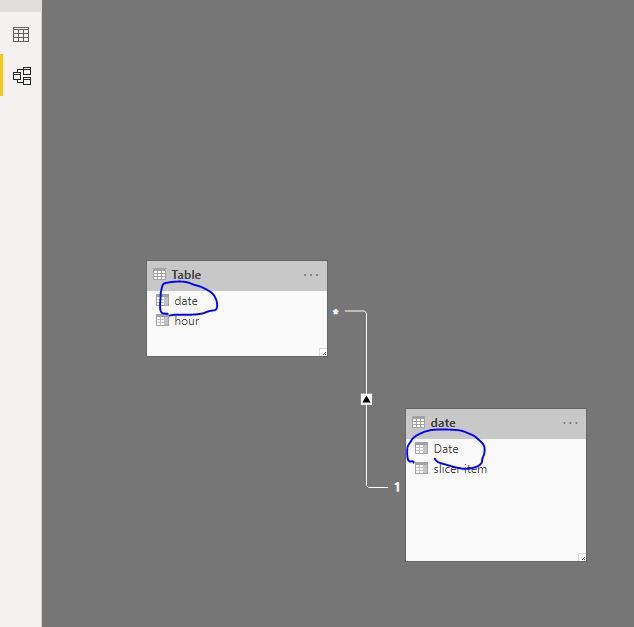
Create a date table
date = CALENDAR(MIN('Table'[date]),TODAY())
add a column
slicer item =
SWITCH (
TRUE (),
[Date]
= TODAY (), "today",
DATEDIFF (
[Date],
TODAY (),
DAY
) <= 7
&& [Date]
< TODAY (), "last 7 days",
DATEDIFF (
[Date],
TODAY (),
DAY
) <= 30
&& [Date]
< TODAY (), "last 30 days"
)
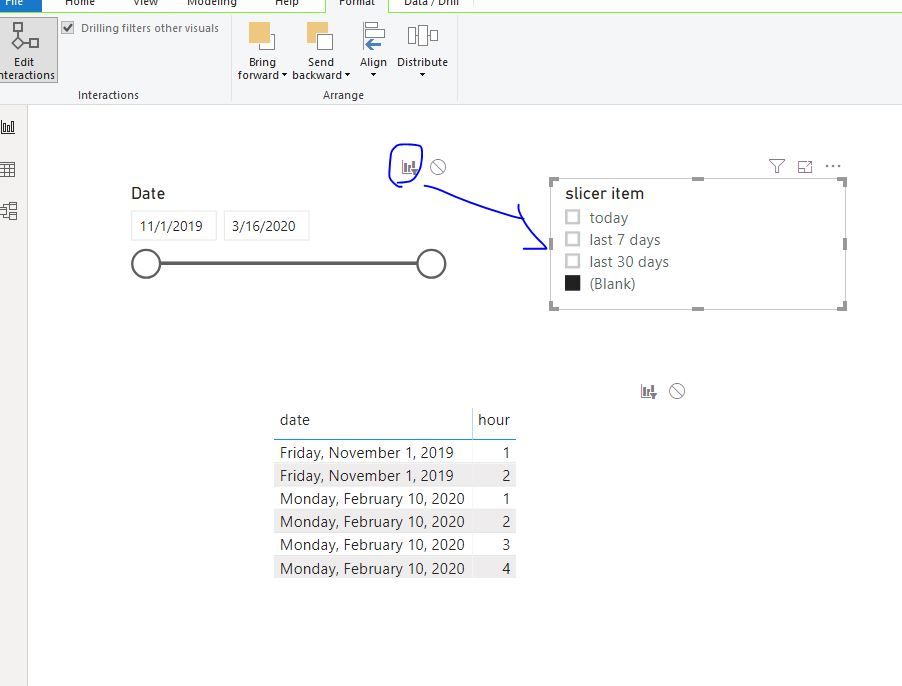
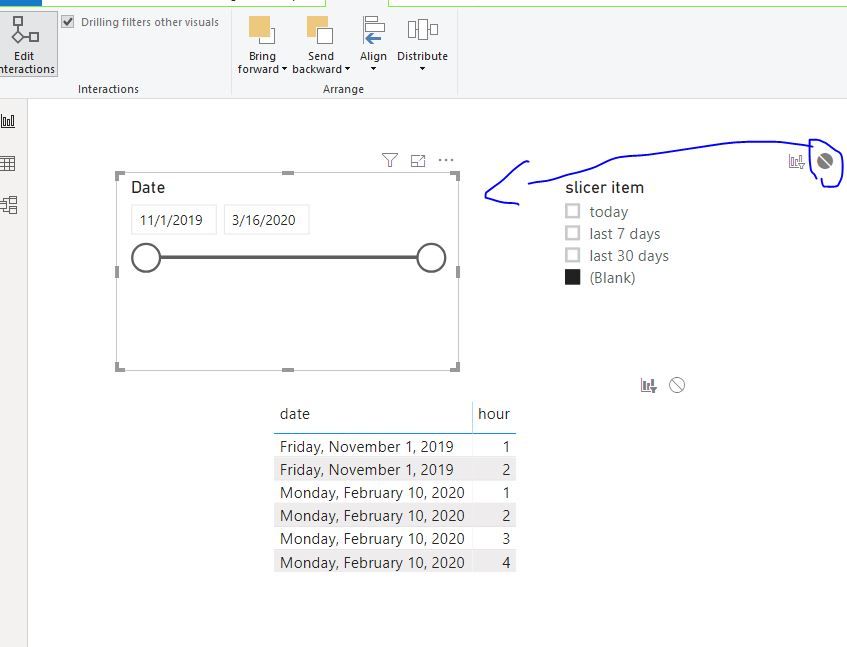
Then edit interactions as below
Best Regards
Maggie
Community Support Team _ Maggie Li
If this post helps, then please consider Accept it as the solution to help the other members find it more quickly.
Hello,
i have tried your solution, but I came across an issue. When you use this formula, you will have something like this:
10/11/2021 = today
10/10/2021 = yesterday
10/09/2021 = last 7 days
10/08/2021 = last 7 days
10/07/2021 = last 7 days
10/06/2021 = last 7 days
10/05/2021 = last 7 days
10/04/2021 = last 30 days
....
and then, when you filter last 7 days, you only get data for 10/09-10/4 instead of 10/11-10/4. Same for last 30 days. Do you get my point?
I even tried to build different columns like "last week", "last month", "last year", but then I have problem with hierarchies. Anyone has solution for that?
Thank you.
Best Jan
Hi @Anonymous
A workaround below:
Create a date table
date = CALENDAR(MIN('Table'[date]),TODAY())
add a column
slicer item =
SWITCH (
TRUE (),
[Date]
= TODAY (), "today",
DATEDIFF (
[Date],
TODAY (),
DAY
) <= 7
&& [Date]
< TODAY (), "last 7 days",
DATEDIFF (
[Date],
TODAY (),
DAY
) <= 30
&& [Date]
< TODAY (), "last 30 days"
)
Then edit interactions as below
Best Regards
Maggie
Community Support Team _ Maggie Li
If this post helps, then please consider Accept it as the solution to help the other members find it more quickly.
Thank you.
Hi @v-juanli-msft ,
Thank you so much, That is what I need, I have a concern that Can we remove the blank selection?
It's a little weird for end user when use this.
Once again, I'm very appreciated your support.
You can create a slicer like : https://community.powerbi.com/t5/Desktop/Slicer-MTD-QTD-YTD-to-filter-dates-using-the-slicer/td-p/50...
The Power BI Data Visualization World Championships is back! Get ahead of the game and start preparing now!
| User | Count |
|---|---|
| 40 | |
| 37 | |
| 33 | |
| 29 | |
| 27 |
| User | Count |
|---|---|
| 134 | |
| 104 | |
| 63 | |
| 60 | |
| 55 |