Don't miss your chance to take the Fabric Data Engineer (DP-600) exam for FREE! Find out how by watching the DP-600 session on-demand now through April 28th.
Learn moreJoin the FabCon + SQLCon recap series. Up next: Power BI, Real-Time Intelligence, IQ and AI, and Data Factory take center stage. All sessions are available on-demand after the live show. Register now
New here and trying to learn, appreciate the patience.
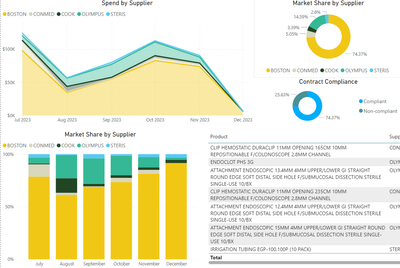
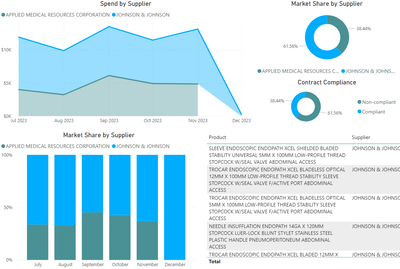
Built my first template and am replicating it for multiple categories. The theme is consistent, but each page has different colors. I do not need a common color for each supplier across all pages, but would like all visualization to have the same colors. Ideally every page would match the color palette of the first example.
Thanks in advance.
@Hospital_BI , While it will not possible to do it on all the visuals. You can create a measure that returns color based on supplier and you can use that in Conditional formatting "Field Value" option
Color = Switch( Max(Table[Supplier]) ,
"Supplier 1", "Red",
"Supplier 2", "Blue",
// Add others
"Green"//Default
)
How to do conditional formatting by measure and apply it on pie?
https://www.youtube.com/watch?v=RqBb5eBf_I4&list=PLPaNVDMhUXGYo50Ajmr4SgSV9HIQLxc8L
https://community.powerbi.com/t5/Community-Blog/Power-BI-Conditional-formatting-the-Pie-Visual/ba-p/...
https://amitchandak.medium.com/power-bi-where-is-the-conditional-formatting-option-in-new-format-pan...
Check out the April 2026 Power BI update to learn about new features.
If you have recently started exploring Fabric, we'd love to hear how it's going. Your feedback can help with product improvements.
A new Power BI DataViz World Championship is coming this June! Don't miss out on submitting your entry.
| User | Count |
|---|---|
| 41 | |
| 37 | |
| 34 | |
| 21 | |
| 16 |
| User | Count |
|---|---|
| 64 | |
| 58 | |
| 31 | |
| 25 | |
| 25 |