Don't miss your chance to take the Fabric Data Engineer (DP-600) exam for FREE! Find out how by attending the DP-600 session on April 23rd (pacific time), live or on-demand.
Learn moreJoin the FabCon + SQLCon recap series. Up next: Power BI, Real-Time Intelligence, IQ and AI, and Data Factory take center stage. All sessions are available on-demand after the live show. Register now
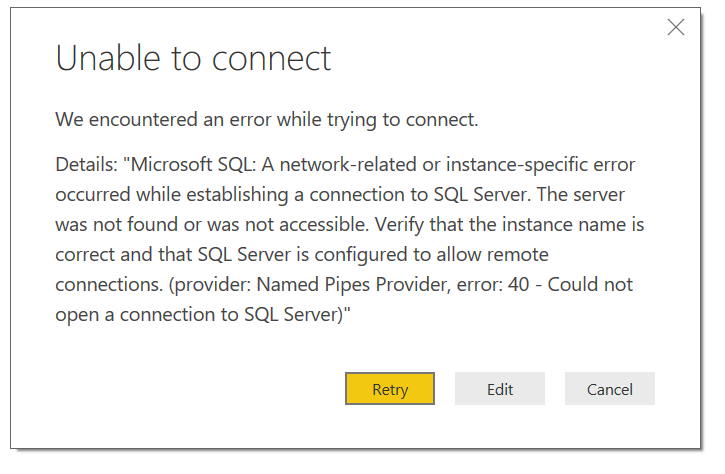
I'm unable to connect to Azure SQL database with below error message, any1 know what's that means?
@Anonymous
Make sure your input correct server name. You can also try to connect SQL Azure via SSMS. If it also fails, please check the Azure firewall configuration as @Greg_Deckler suggested.
Regards,
I have a similar / identical issue:
Details: "Microsoft SQL: A network-related or instance-specific error occurred while establishing a connection to SQL Server. The server was not found or was not accessible. Verify that the instance name is correct and that SQL Server is configured to allow remote connections. (provider: TCP Provider, error: 0 - No such host is known.)"
Details: "An error happened while reading data from the provider: 'System.IO.FileLoadException"
I am able to connect to my Azure SQL Database from SSMS, so the firewall ports are configured as expected. Exhausted my options - Please help.
I would guess firewall rule for Azure SQL DB needs configured:
https://community.powerbi.com/t5/Desktop/Can-t-connect-to-Azure-Database/td-p/7761
Check out the April 2026 Power BI update to learn about new features.
If you have recently started exploring Fabric, we'd love to hear how it's going. Your feedback can help with product improvements.
A new Power BI DataViz World Championship is coming this June! Don't miss out on submitting your entry.
| User | Count |
|---|---|
| 48 | |
| 46 | |
| 41 | |
| 20 | |
| 17 |
| User | Count |
|---|---|
| 69 | |
| 67 | |
| 32 | |
| 27 | |
| 26 |