This is best Fabric, Power BI, SQL and AI community event. How do we know? The last event sold out! Save €200 with code FABCMTY200.
Register nowA new Data Days event is coming soon! This time we’re going bigger than ever. Fabric, Power BI, SQL, AI and more. Don't miss out.
Hello,
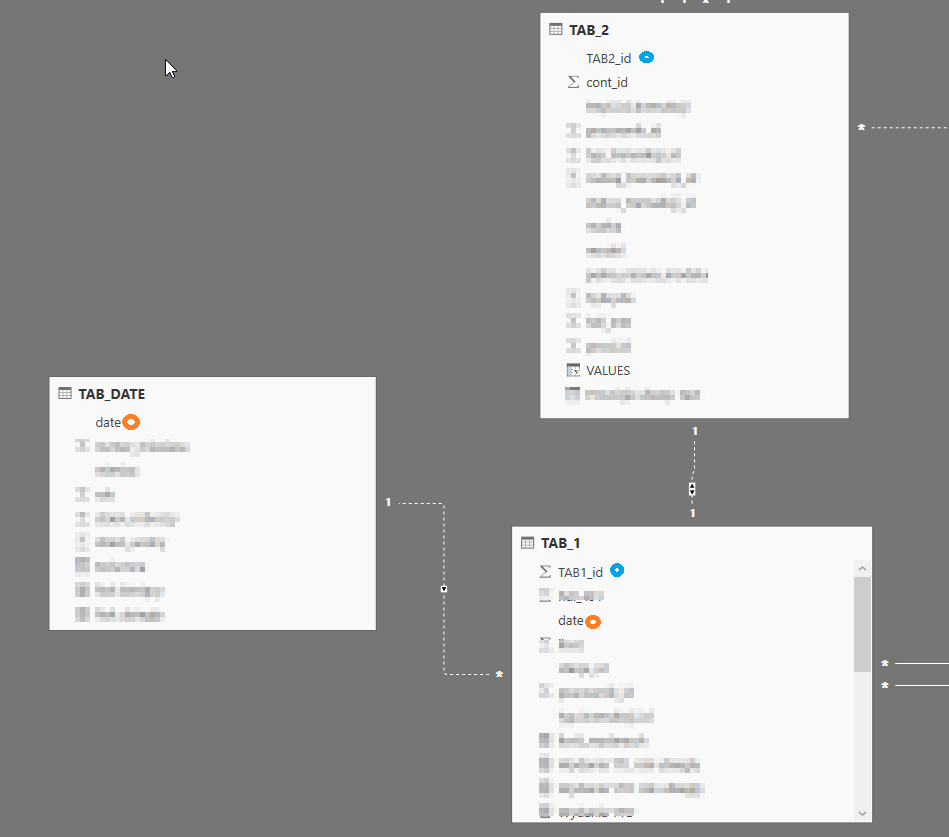
I want to create measure in the table "TAB_1", which sums up tle values "VALUES" from the table "TAB_2" only then if in the table "TAB_2" appears "cont_id" bigger than 0. I enclose screencast of my model. In my opinion, I have to activate inactive relationships. These relationships must be inactive in the model. I have now created something like this:
Values = CALCULATE(sum(TAB_2[VALUES]); USERELATIONSHIP(TAB_1[TAB1_id];TAB_2[TAB2_id]); TAB_2[cont_id]>0; USERELATIONSHIP(TAB_1[date];TAB_DATE[date]))
Unfortunately, this measure sums up everything from "VALUES" and it doesn't work on date filters.
Hi @nice_boy,
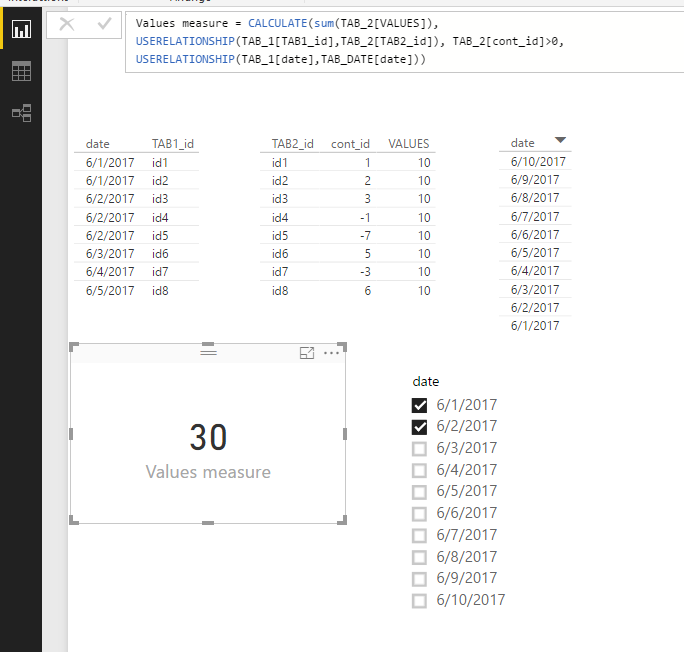
Based on my test, the above measure you provided works fine to generate the sum value. Below is the result in my test. I used a card visual to display the measure value.
In your scenario, what visualization did you use? Please show us the current output which does not meet your requirement.
Regards,
Yuliana Gu
Unfortunately still not working date filter
Change the link between the date table and Tab_1 to be Both directions.
I changed it but did not change
There must be something else at play here thats bigger than what is presented. It would be worth double checking your date slicers and making sure they come from one of those 3 tables.
To me it looks like you are overcompliating the measure itself. You already have the table relationships so just try this simple measure:
Values = CALCULATE( sum(TAB_2[VALUES]), TAB_2[cont_id] > 0 )
Check out the May 2026 Power BI update to learn about new features.
Sign up to receive a private message when registration opens and key events begin.
If you have recently started exploring Fabric, we'd love to hear how it's going. Your feedback can help with product improvements.
| User | Count |
|---|---|
| 31 | |
| 26 | |
| 23 | |
| 22 | |
| 13 |
| User | Count |
|---|---|
| 61 | |
| 47 | |
| 27 | |
| 23 | |
| 18 |