Get certified for free when you join Fabric Data Days 2026 and dive into Fabric, Power BI, SQL, AI, and other essential data skills.
Join nowTry your skills in the Power BI Dataviz World Championship! Round one ends June 26. Join now
HI
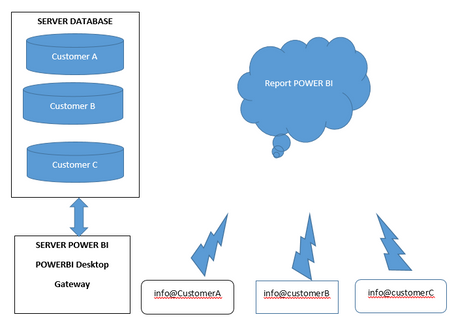
I have the following scenario. How do I configure the gateway to manage it?
Scenario
Thanks
Riccardo
Hi Jay
Yes, databases are in the same domanin.
Riccardo
Hi @RiccardoBefore ,
I didn't fully understand your scenario, but normally you could first load data from these databases through Power BI Desktop then publish dataset to Power BI Service and at last add these databases and credential under Manage Gateway.
https://docs.microsoft.com/en-us/power-bi/connect-data/service-gateway-data-sources
Best Regards,
Jay
HI. thnaks @Anonymous
This is the scenario.
CustomerA is a hotel with its SQL CustomerA database and will access PowerBI with the account [email protected]. CustomerB is a laundry with its SQL CustomerB database and will access PowerBI with the account [email protected] . CustomerC is a supermarket with its sql CustomerC database and will access PowerBI with the [email protected] account. You want to use a single gateway, configured by me. The three databases are installed on the same instance of sql. I am the administrator with my email [email protected]. I want to configure the gateway and data sources without [email protected], [email protected], and [email protected] being gateway administrators and not giving them the ability to manage it.
I hope that's clear. Thanky for your help.
Riccardo
@RiccardoBefore Are those 3 separate databases, one per customer?
Yes, one for customer
| User | Count |
|---|---|
| 24 | |
| 22 | |
| 21 | |
| 20 | |
| 12 |
| User | Count |
|---|---|
| 66 | |
| 56 | |
| 45 | |
| 44 | |
| 30 |