Get certified for free when you join Fabric Data Days 2026 and dive into Fabric, Power BI, SQL, AI, and other essential data skills.
Join nowJuly 7 - July 17 | Round 2 of the Power BI Dataviz World Championships. Don't miss your chance! Learn more
Hi,
I have a measure Delta as follow:
Solved! Go to Solution.
Hi @Anonymous,
You can use a measure to define the color like this:
Proud to be a Super User!
Hi @Anonymous,
You can use a measure to define the color like this:
Proud to be a Super User!
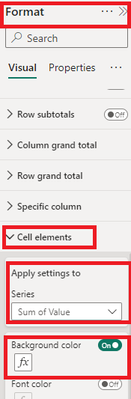
Go to Format Visual -> Cell Element -> Background Color -> Field[Format Style] -> Select the measure.
Hi,
Well, nothing happens.
I have
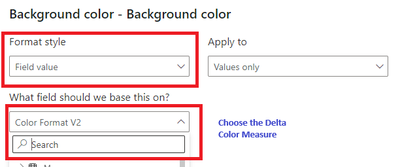
Format style: Field value
Apply To: Values only
What field: Delta
You need to choose What field: Delta Color (the new measure)
Proud to be a Super User!
Hi,
The formatting is working fine showing correct values either in red or green.
However, when I publish my report on the BI Server, all my values show as red (tables and cards)!
Any idea why? We have BI server Jan 2023.
Thx.
LD
| User | Count |
|---|---|
| 23 | |
| 22 | |
| 20 | |
| 20 | |
| 12 |
| User | Count |
|---|---|
| 63 | |
| 56 | |
| 47 | |
| 44 | |
| 37 |