Get certified for free when you join Fabric Data Days 2026 and dive into Fabric, Power BI, SQL, AI, and other essential data skills.
Join nowJuly 7 - July 17 | Round 2 of the Power BI Dataviz World Championships. Don't miss your chance! Learn more
Hi,
I have a measure Delta as follow:
Solved! Go to Solution.
Hi @Anonymous,
You can use a measure to define the color like this:
Proud to be a Super User!
Hi @Anonymous,
You can use a measure to define the color like this:
Proud to be a Super User!
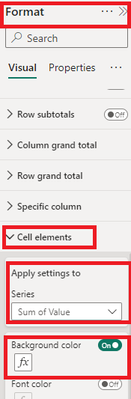
Go to Format Visual -> Cell Element -> Background Color -> Field[Format Style] -> Select the measure.
Hi,
Well, nothing happens.
I have
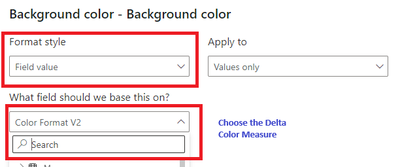
Format style: Field value
Apply To: Values only
What field: Delta
You need to choose What field: Delta Color (the new measure)
Proud to be a Super User!
Hi,
The formatting is working fine showing correct values either in red or green.
However, when I publish my report on the BI Server, all my values show as red (tables and cards)!
Any idea why? We have BI server Jan 2023.
Thx.
LD
Join us in Barcelona for FabCon and SQLCon, the Fabric, Power BI, SQL, and AI community event. Save €200 with code FABCMTY200.
Join Fabric Data Days 2026: 60 days of free live/on-demand sessions, challenges, study groups, and certification opportunities.
| User | Count |
|---|---|
| 22 | |
| 18 | |
| 18 | |
| 17 | |
| 13 |
| User | Count |
|---|---|
| 61 | |
| 53 | |
| 47 | |
| 40 | |
| 38 |