Share feedback directly with Fabric product managers, participate in targeted research studies and influence the Fabric roadmap.
Sign up nowGet Fabric certified for FREE! Don't miss your chance! Learn more
Dear experts,
this is the visual I have created in power BI
and P7W4 is a measure
| SSL | Rank | Target Utilization | Lower Limit | Upper Limit |
| ITTS | Senior | 75% | 65% | 85% |
Solved! Go to Solution.
Hi @vjnvinod
Create a measure to return the color value .
Measure = Switch( True() ,
[P7W4] =BLANK(),"Grey",
[P7W4] <= SELECTEDVALUE('Table'[Lower Limit]) , "red" ,
[P7W4] > SELECTEDVALUE('Table'[Lower Limit]) , "Green" )
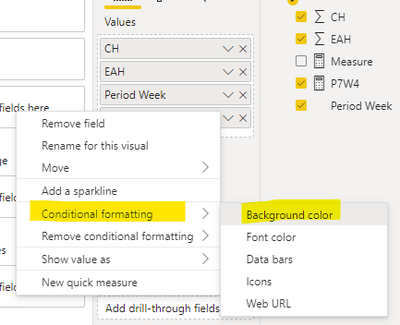
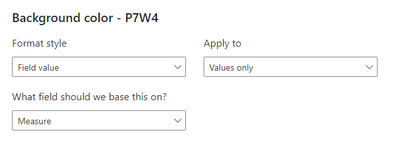
Then set conditional formatting for [P7W4] in table visual . Choose Field value for Format style , Measure for What field should we base this on .
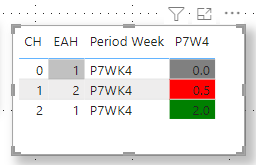
The final result is as shown :
I have attached my pbix file , you can refer to it .
Best Regard
Community Support Team _ Ailsa Tao
If this post helps, then please consider Accept it as the solution to help the other members find it more quickly.
Hi @vjnvinod
Create a measure to return the color value .
Measure = Switch( True() ,
[P7W4] =BLANK(),"Grey",
[P7W4] <= SELECTEDVALUE('Table'[Lower Limit]) , "red" ,
[P7W4] > SELECTEDVALUE('Table'[Lower Limit]) , "Green" )
Then set conditional formatting for [P7W4] in table visual . Choose Field value for Format style , Measure for What field should we base this on .
The final result is as shown :
I have attached my pbix file , you can refer to it .
Best Regard
Community Support Team _ Ailsa Tao
If this post helps, then please consider Accept it as the solution to help the other members find it more quickly.
color measure =
Switch( True() ,
[P7W4] < [Lower] , "red" ,
[P7W4] > [Upper] , "Green" ,
"Grey"
)
Did I answer your question? If so, please mark my post as a solution!
Proud to be a Super User!
@vjnvinod , That "n/a", might convert it to text
But you can create a measure like
Switch( True() ,
[P7W4] < [Lower] , "red" ,
[P7W4] > [Upper] , "Green" ,
"Yellow"
)
and you can use that in conditional formatting using field value option
If you love stickers, then you will definitely want to check out our Community Sticker Challenge!
Check out the January 2026 Power BI update to learn about new features.
| User | Count |
|---|---|
| 62 | |
| 61 | |
| 42 | |
| 20 | |
| 18 |
| User | Count |
|---|---|
| 122 | |
| 114 | |
| 36 | |
| 29 | |
| 29 |