cancel
Showing results for 
Search instead for 
Did you mean: 

The Power BI Data Visualization World Championships is back! Get ahead of the game and start preparing now! Learn more

Reply
vjnvinod
Impactful Individual

Conditional formatting question

Dear experts,


this is the visual I have created in power BI

vjnvinod_0-1644237137195.png

 and P7W4 is a measure 

P7W4 = CALCULATE( DIVIDE(SUM('WTD FY22'[CH]),SUM('WTD FY22'[EAH]),"n/a"),'WTD FY22'[Period Week]="P7WK4")
I need to conditionally put some background color based on the below table rule
 if with the combination of SSL, Rank, Lower and Upper limit
P7W4 <= Lower Limit, then Red background, if P7W4="n/a", then grey color background and if P7W4> Lower Limit, Green background
But I am not sure, how to achieve this on the Power BI desktop
SSLRankTarget UtilizationLower LimitUpper Limit
ITTSSenior75%65%85%
1 ACCEPTED SOLUTION
Anonymous
Not applicable

Hi @vjnvinod 

Create a measure to return the color value .

Measure = Switch( True() ,
[P7W4] =BLANK(),"Grey",
[P7W4] <= SELECTEDVALUE('Table'[Lower Limit]) , "red" ,
[P7W4] > SELECTEDVALUE('Table'[Lower Limit]) , "Green" )

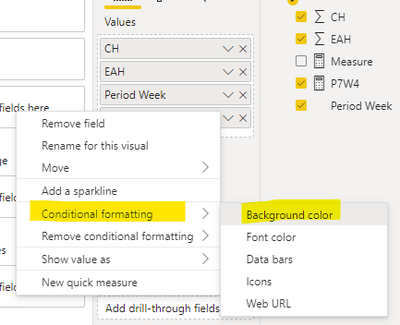
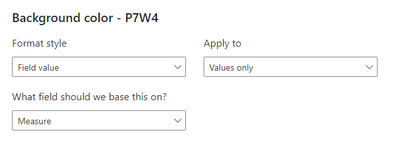
Then set conditional formatting for [P7W4] in table visual . Choose Field value for Format style , Measure for What field should we base this on .

Ailsamsft_0-1644480870990.png

 Ailsamsft_1-1644480870991.png

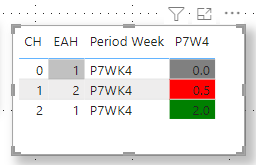
The final result is as shown :

Ailsamsft_2-1644480870992.png

I have attached my pbix file , you can refer to it .


Best Regard

Community Support Team _ Ailsa Tao

If this post helps, then please consider Accept it as the solution to help the other members find it more quickly.

View solution in original post

3 REPLIES 3
Anonymous
Not applicable

Hi @vjnvinod 

Create a measure to return the color value .

Measure = Switch( True() ,
[P7W4] =BLANK(),"Grey",
[P7W4] <= SELECTEDVALUE('Table'[Lower Limit]) , "red" ,
[P7W4] > SELECTEDVALUE('Table'[Lower Limit]) , "Green" )

Then set conditional formatting for [P7W4] in table visual . Choose Field value for Format style , Measure for What field should we base this on .

Ailsamsft_0-1644480870990.png

 Ailsamsft_1-1644480870991.png

The final result is as shown :

Ailsamsft_2-1644480870992.png

I have attached my pbix file , you can refer to it .


Best Regard

Community Support Team _ Ailsa Tao

If this post helps, then please consider Accept it as the solution to help the other members find it more quickly.

mh2587
Super User
Super User

color measure =

Switch( True() ,

[P7W4] < [Lower] , "red" ,

[P7W4] > [Upper] , "Green" ,

"Grey"

)


Did I answer your question? If so, please mark my post as a solution!


Proud to be a Super User!


LinkedIn Icon
Muhammad Hasnain


amitchandak
Super User
Super User

@vjnvinod , That "n/a", might convert it to text


But you can create a measure like

Switch( True() ,

[P7W4] < [Lower] , "red" ,

[P7W4] > [Upper] , "Green" ,

"Yellow"

)


and you can use that in conditional formatting using field value option


Share with Power BI Enthusiasts: Full Power BI Video (20 Hours) YouTube
Microsoft Fabric Series 60+ Videos YouTube
Microsoft Fabric Hindi End to End YouTube

Helpful resources

Announcements
Power BI DataViz World Championships

Power BI Dataviz World Championships

The Power BI Data Visualization World Championships is back! Get ahead of the game and start preparing now!

December 2025 Power BI Update Carousel

Power BI Monthly Update - December 2025

Check out the December 2025 Power BI Holiday Recap!

FabCon Atlanta 2026 carousel

FabCon Atlanta 2026

Join us at FabCon Atlanta, March 16-20, for the ultimate Fabric, Power BI, AI and SQL community-led event. Save $200 with code FABCOMM.