Join us at FabCon Atlanta from March 16 - 20, 2026, for the ultimate Fabric, Power BI, AI and SQL community-led event. Save $200 with code FABCOMM.
Register now!The Power BI Data Visualization World Championships is back! It's time to submit your entry. Live now!
Dear experts,
this is the visual I have created in power BI
and P7W4 is a measure
| SSL | Rank | Target Utilization | Lower Limit | Upper Limit |
| ITTS | Senior | 75% | 65% | 85% |
Solved! Go to Solution.
Hi @vjnvinod
Create a measure to return the color value .
Measure = Switch( True() ,
[P7W4] =BLANK(),"Grey",
[P7W4] <= SELECTEDVALUE('Table'[Lower Limit]) , "red" ,
[P7W4] > SELECTEDVALUE('Table'[Lower Limit]) , "Green" )
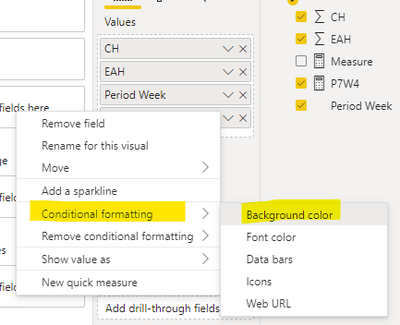
Then set conditional formatting for [P7W4] in table visual . Choose Field value for Format style , Measure for What field should we base this on .
The final result is as shown :
I have attached my pbix file , you can refer to it .
Best Regard
Community Support Team _ Ailsa Tao
If this post helps, then please consider Accept it as the solution to help the other members find it more quickly.
Hi @vjnvinod
Create a measure to return the color value .
Measure = Switch( True() ,
[P7W4] =BLANK(),"Grey",
[P7W4] <= SELECTEDVALUE('Table'[Lower Limit]) , "red" ,
[P7W4] > SELECTEDVALUE('Table'[Lower Limit]) , "Green" )
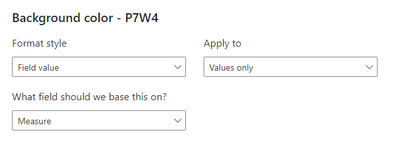
Then set conditional formatting for [P7W4] in table visual . Choose Field value for Format style , Measure for What field should we base this on .
The final result is as shown :
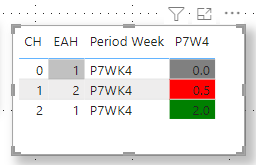
I have attached my pbix file , you can refer to it .
Best Regard
Community Support Team _ Ailsa Tao
If this post helps, then please consider Accept it as the solution to help the other members find it more quickly.
color measure =
Switch( True() ,
[P7W4] < [Lower] , "red" ,
[P7W4] > [Upper] , "Green" ,
"Grey"
)
Did I answer your question? If so, please mark my post as a solution!
Proud to be a Super User!
@vjnvinod , That "n/a", might convert it to text
But you can create a measure like
Switch( True() ,
[P7W4] < [Lower] , "red" ,
[P7W4] > [Upper] , "Green" ,
"Yellow"
)
and you can use that in conditional formatting using field value option
The Power BI Data Visualization World Championships is back! It's time to submit your entry.
| User | Count |
|---|---|
| 50 | |
| 43 | |
| 36 | |
| 33 | |
| 30 |
| User | Count |
|---|---|
| 139 | |
| 128 | |
| 60 | |
| 59 | |
| 57 |