Join us at FabCon Atlanta from March 16 - 20, 2026, for the ultimate Fabric, Power BI, AI and SQL community-led event. Save $200 with code FABCOMM.
Register now!Get Fabric Certified for FREE during Fabric Data Days. Don't miss your chance! Request now
Hello everyone -
I'd like to conditionally format the cells of a matrix to indicate whether or not sales are trending up or down, compared to the previous time period. I say time period, because I would like this to update as I "drill-down" from Year > Quarter > Month.
Additionally, I don't want a simple binary response - ie. "are sales greater or smaller than the previous time period". Ideally, I'd like a colour gradient that reflects the magnitude of the difference between time periods.
I feel as thought this is feasible using the conditional formatting optoins, but can't seem to get my head around how to construct the Field (assuming a Measure) I need.
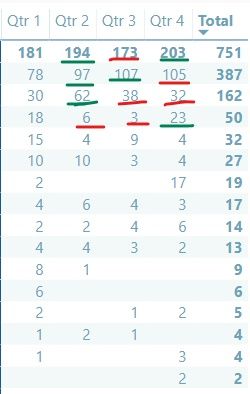
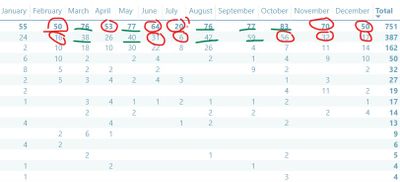
Will add some images of my data and some examples of how I'd like the colours (not a gradient), having issues right now.
Solved! Go to Solution.
hi, @Sweet-T
I continue to work on this requirement, and today I find a way may achieve your requirement.
Sorry about my carelessness.
Now, this is a new way for you refer to;
basic data
Step1:
Add a Year Quarter Number column
Year Quarter Number = YEAR ( Table1[Date] ) * 100 + INT ( FORMAT ( [Date], "q") )
Step2:
Add this measure
%change =
VAR previousDate =
CALCULATE (
MAX ( Table1[Date] ),
FILTER (
ALLSELECTED ( Table1 ),
Table1[Qty] > 0
&& Table1[Date] < MAX ( Table1[Date] )
)
)
VAR previousYQ =
CALCULATE (
MAX ( Table1[Year Quarter Number] ),
FILTER (
ALLSELECTED ( Table1 ),
Table1[Qty] > 0
&& Table1[Year Quarter Number] < MAX ( Table1[Year Quarter Number] )
)
)
VAR previousREG =
CALCULATE (
SUM ( Table1[Qty] ),
FILTER ( ALLSELECTED ( Table1 ), Table1[Date] = previousDate )
)
VAR previousYQTOTAL =
CALCULATE (
SUM ( Table1[Qty] ),
FILTER ( ALLSELECTED ( Table1 ), Table1[Year Quarter Number] = previousYQ )
)
VAR previousQty =
IF (
ISFILTERED ( Table1[Date].[Quarter] ),
previousYQTOTAL,
IF ( ISFILTERED ( Table1[Date].[Month] ), previousREG )
)
RETURN
DIVIDE ( SUM ( Table1[Qty] ) - previousQty, previousQty, 0 )Step3:
Add Conditional formatting for matrix
Result:
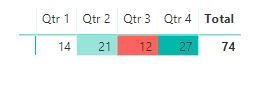
here is pbix, please try it.
https://www.dropbox.com/s/j3sraf440cbjs13/Conditional%20formatting%20for%20matrix.pbix?dl=0
Best Regards,
Lin
hi, @Sweet-T
I continue to work on this requirement, and today I find a way may achieve your requirement.
Sorry about my carelessness.
Now, this is a new way for you refer to;
basic data
Step1:
Add a Year Quarter Number column
Year Quarter Number = YEAR ( Table1[Date] ) * 100 + INT ( FORMAT ( [Date], "q") )
Step2:
Add this measure
%change =
VAR previousDate =
CALCULATE (
MAX ( Table1[Date] ),
FILTER (
ALLSELECTED ( Table1 ),
Table1[Qty] > 0
&& Table1[Date] < MAX ( Table1[Date] )
)
)
VAR previousYQ =
CALCULATE (
MAX ( Table1[Year Quarter Number] ),
FILTER (
ALLSELECTED ( Table1 ),
Table1[Qty] > 0
&& Table1[Year Quarter Number] < MAX ( Table1[Year Quarter Number] )
)
)
VAR previousREG =
CALCULATE (
SUM ( Table1[Qty] ),
FILTER ( ALLSELECTED ( Table1 ), Table1[Date] = previousDate )
)
VAR previousYQTOTAL =
CALCULATE (
SUM ( Table1[Qty] ),
FILTER ( ALLSELECTED ( Table1 ), Table1[Year Quarter Number] = previousYQ )
)
VAR previousQty =
IF (
ISFILTERED ( Table1[Date].[Quarter] ),
previousYQTOTAL,
IF ( ISFILTERED ( Table1[Date].[Month] ), previousREG )
)
RETURN
DIVIDE ( SUM ( Table1[Qty] ) - previousQty, previousQty, 0 )Step3:
Add Conditional formatting for matrix
Result:
here is pbix, please try it.
https://www.dropbox.com/s/j3sraf440cbjs13/Conditional%20formatting%20for%20matrix.pbix?dl=0
Best Regards,
Lin
Lin, THANK YOU!
This is really cool, I apprecaite you taking the time to figure this out. This is a great base; I simplified my model for the sake of explaining my need. I will take what you have given me and try it this weekend, then report back.
Thanks again,
T
hi, @Sweet-T
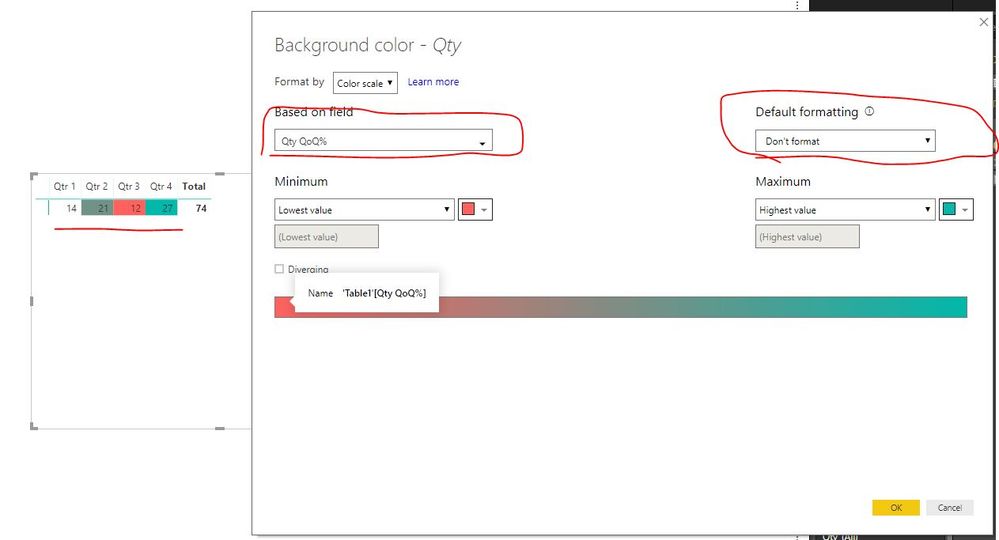
For your first requirement, it can be achieved by adding a measure like: PREVIOUSMONTH Function/PREVIOUSQUARTER Function/PREVIOUSYEAR Function then set Conditional formatting like it.
for example:
Qty QoQ% =
IF (
ISBLANK ( CALCULATE ( SUM ( Table1[Qty] ), PREVIOUSQUARTER ( 'Date'[Date] ) ) ),
BLANK (),
CALCULATE ( SUM ( Table1[Qty] ) )
- CALCULATE ( SUM ( Table1[Qty] ), PREVIOUSQUARTER ( 'Date'[Date] ) )
)
It works well.
Best Regards,
Lin
I'd first like the formatting to occur quarterly
And to update accordingly when I drill down to monthly
Check out the November 2025 Power BI update to learn about new features.
Advance your Data & AI career with 50 days of live learning, contests, hands-on challenges, study groups & certifications and more!