This is best Fabric, Power BI, SQL and AI community event. How do we know? The last event sold out! Save €200 with code FABCMTY200.
Register nowA new Data Days event is coming soon! This time we’re going bigger than ever. Fabric, Power BI, SQL, AI and more. Don't miss out.
Hello,
I am just starting to build dashboards in PowerBI. Can someone please review the DAX I have used and help me with modifying it for my needs please? I am trying to find a way to calculate variance between KPIs from past 12 months vs KPIs going back another 12 months. So essentially, it's something like this
Sum of KPI values for (Oct '18 to Oct '17) - Sum of KPI values for (Oct '17 to Oct '16) / Sum of KPI values for (Oct '17 to Oct '16)
I also need to display this variance in percentage.
This is the DAX I used
CALCULATE(
CALCULATE(
SUM(
Episodes[KPI_VALUE]
)
,FILTER(
Episodes,Episodes[REPORTING_PERIOD].[Year]=(year(TODAY())-1)
)
)
-
CALCULATE(
SUM(
Episodes[KPI_VALUE]
)
,FILTER(
Episodes,Episodes[REPORTING_PERIOD].[Year]=year(TODAY())
)
)
) * -1
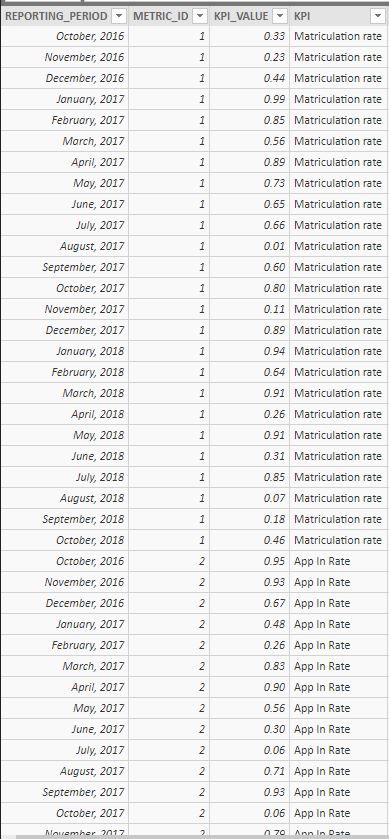
Here is a sample of the table that I have to use for this calculation. I have a separate column for each of the KPI (Matriculation Rate, App In Rate, etc) on my dashboard and I need to display the variance for each of the KPI.
Solved! Go to Solution.
hi, @pat1214
After my test, you could this formula as below:
Sum of KPI values for (Oct '18 to Oct '17)
Sum of KPI values for (Oct '18 to Oct '17) =
CALCULATE (
SUM ( Episodes[KPI_VALUE] ),
FILTER (
Episodes,
DATEDIFF ( Episodes[REPORTING_PERIOD], TODAY (), MONTH ) > 0
&& DATEDIFF ( Episodes[REPORTING_PERIOD], TODAY (), MONTH ) <= 13
)
)Sum of KPI values for (Oct '17 to Oct '16)
Sum of KPI values for (Oct '17 to Oct '16) =
CALCULATE (
SUM ( Episodes[KPI_VALUE] ),
FILTER (
Episodes,
DATEDIFF ( Episodes[REPORTING_PERIOD], TODAY (), MONTH ) > 13
&& DATEDIFF ( Episodes[REPORTING_PERIOD], TODAY (), MONTH ) <= 25
)
)this variance in percentage
this variance in percentage =
DIVIDE (
( [Sum of KPI values for (Oct '18 to Oct '17)]
- [Sum of KPI values for (Oct '17 to Oct '16)] ),
[Sum of KPI values for (Oct '17 to Oct '16)],
0
)Result:
for METRIC_ID is 1 by your sample data.

Best Regards,
Lin
hi, @pat1214
After my test, you could this formula as below:
Sum of KPI values for (Oct '18 to Oct '17)
Sum of KPI values for (Oct '18 to Oct '17) =
CALCULATE (
SUM ( Episodes[KPI_VALUE] ),
FILTER (
Episodes,
DATEDIFF ( Episodes[REPORTING_PERIOD], TODAY (), MONTH ) > 0
&& DATEDIFF ( Episodes[REPORTING_PERIOD], TODAY (), MONTH ) <= 13
)
)Sum of KPI values for (Oct '17 to Oct '16)
Sum of KPI values for (Oct '17 to Oct '16) =
CALCULATE (
SUM ( Episodes[KPI_VALUE] ),
FILTER (
Episodes,
DATEDIFF ( Episodes[REPORTING_PERIOD], TODAY (), MONTH ) > 13
&& DATEDIFF ( Episodes[REPORTING_PERIOD], TODAY (), MONTH ) <= 25
)
)this variance in percentage
this variance in percentage =
DIVIDE (
( [Sum of KPI values for (Oct '18 to Oct '17)]
- [Sum of KPI values for (Oct '17 to Oct '16)] ),
[Sum of KPI values for (Oct '17 to Oct '16)],
0
)Result:
for METRIC_ID is 1 by your sample data.
Best Regards,
Lin
Thank you so much! This worked for my needs. I appreciate your help a lot!
Check out the May 2026 Power BI update to learn about new features.
Sign up to receive a private message when registration opens and key events begin.
If you have recently started exploring Fabric, we'd love to hear how it's going. Your feedback can help with product improvements.
| User | Count |
|---|---|
| 29 | |
| 28 | |
| 25 | |
| 19 | |
| 14 |
| User | Count |
|---|---|
| 53 | |
| 47 | |
| 27 | |
| 20 | |
| 19 |